

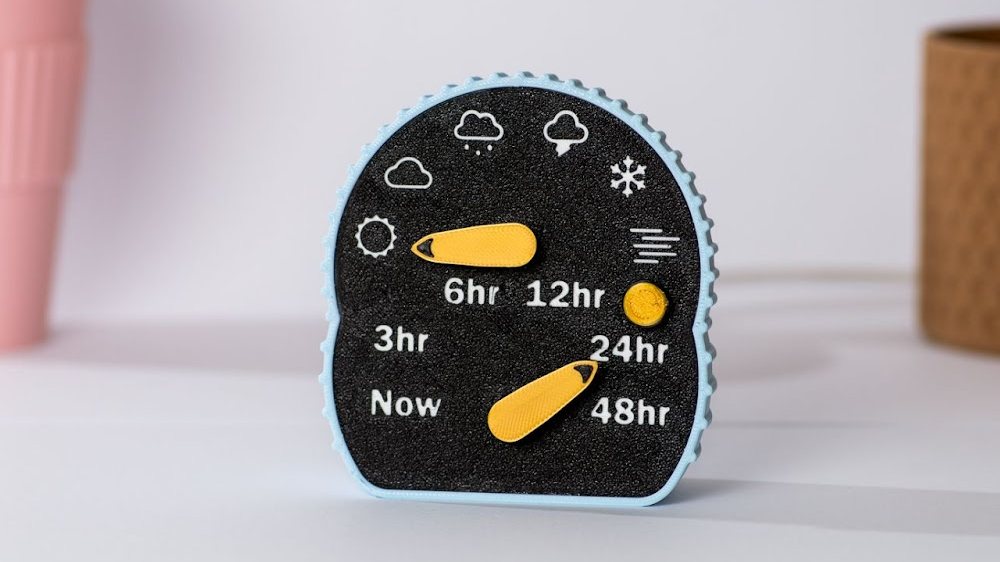
There are two kinds of people in the morning: the ones who gracefully greet the day, and the ones who open six apps before coffee and still walk outside dressed for the wrong season. If you belong to the second camp, welcome. There is a surprisingly elegant fix for weather chaos, and it does not involve turning your desk into NASA mission control.
A minimal desktop weather display can do something your phone often fails to do: give you the information you actually need, right when you need it, without dragging you into a doomscroll. One glance. Temperature. Conditions. Rain chance. Maybe sunrise, humidity, and a quick forecast. Done. No celebrity gossip, no ten-step swipe dance, no notification avalanche trying to sell you anxiety before breakfast.
That is why the idea of a small, calm weather screen for your desk is having a moment. Some people use a compact smart display. Others use a clean Windows widget, an old tablet in stand mode, or one of the newer E Ink-style weather displays that look like they belong in a Scandinavian design catalog next to a very expensive candle. The format varies, but the appeal is the same: weather information that feels useful instead of loud.
And honestly, that may be the most modern luxury of all. Not a bigger screen. Not another app. Just a better glance.
Why a Minimal Weather Display Makes So Much Sense
Weather is one of the few pieces of information that affects your day before your day even begins. It changes what you wear, how early you leave, whether the dog gets a long walk, whether the lawn gets watered, whether your bike commute is a heroic act or a deeply questionable one. But while weather is important, it is not complicated enough to deserve an entire ritual.
That is where a minimal desktop weather display shines. It turns forecasting into ambient information. Instead of demanding attention, it quietly offers direction. You do not “check the weather” in the dramatic, app-opening sense. You simply notice it, the same way you notice the time.
This small shift matters. Good design is not always about adding more features; sometimes it is about subtracting friction. A clean weather display removes the extra taps, the irrelevant headlines, and the visual clutter that can make even simple information feel noisy. It creates a tiny moment of clarity before your day gets busy.
That calm is a big part of the appeal. Full-size smart displays can be helpful, but they can also become digital billboards in your peripheral vision. A minimal weather display keeps the good partthe glanceable informationwhile leaving behind the stuff that makes you want to throw a throw pillow at the screen.
What the Best Desktop Weather Displays Actually Show
A useful setup is not just “pretty weather.” It gives you the right data in the right order.
Current Conditions First
The best weather displays start with the basics: the current temperature, weather conditions, and a clear icon. Sunny, cloudy, rainy, misty, brooding Victorian novelwhatever the sky is up to, you should be able to tell instantly. Bonus points for a “feels like” temperature, because 62 degrees with wind is not the same thing as 62 degrees with mercy.
Today’s Forecast, Not a Mystery Novel
Next comes the short forecast: high and low temperatures, precipitation chance, and the timing of changes. This is where minimal displays earn their desk space. A good forecast is not just “rain today.” It is “dry through lunch, showers after 3 p.m.” That is the difference between leaving with confidence and carrying an umbrella purely for emotional support.
Indoor Humidity and Temperature
This is the sleeper feature that turns a weather display from neat gadget to genuinely handy desk companion. Indoor humidity affects comfort, focus, static electricity, sleep quality, and even whether your skin feels like an overbaked cracker in winter. If your display shows indoor conditions alongside outdoor ones, it becomes useful all year longnot just on stormy days.
Sunrise, Sunset, and Air Details
Sunrise and sunset times sound quaint until you start using them. Suddenly they become practical: morning walks, kid pickups, evening runs, patio dinners, plant care, photography, and avoiding the deeply annoying experience of realizing darkness is arriving in seven minutes. Some setups also include UV data, wind, or air quality. Those features are especially useful for runners, gardeners, allergy sufferers, and anyone who has ever uttered the phrase, “Wait, why does the air feel spicy?”
Three Smart Ways to Build the Look
You do not need to buy the exact same device as everyone else online. There are several good routes to the same result.
1. A Dedicated E Ink or Digital Weather Display
This is the aesthetic champion. E Ink-style weather displays are attractive because they are easy on the eyes, readable in bright light, and visually calm. They do not scream for attention the way a glowing LCD can. Some of the newest products in this category combine real-time weather, multi-day forecasts, sunrise and sunset data, indoor temperature and humidity, calendar syncing, and even smart-home controls. In plain English: they look tidy, sip power, and can do more than you would expect from a “small weather thingy.”
If your goal is a desk that feels intentional instead of electronically over-caffeinated, this category is very hard to beat.
2. A Compact Smart Display or Smart Clock
If you want weather plus a few extras, a small smart display is the practical choice. Devices like compact smart clocks and partial smart displays can show time, weather, calendar details, and music information at a glance while still taking up very little desk space. The best versions feel like helpful assistants; the worst feel like tiny casino signage. Choose accordingly.
This route works well if you also want voice control, timers, reminders, or smart-home access. For people working from home, that can be genuinely useful. Ask for the weather, glance at the screen, set a timer, move on with your life. Civilization survives another day.
3. A Software-Based Desktop Widget
Sometimes the best hardware is the hardware you already own. Windows widgets, taskbar weather tools, and third-party weather widgets can give you a minimal setup without adding another device to your desk. This is ideal if you want a cleaner digital workflow and do not need your weather display to keep running when your computer is asleep.
The key here is restraint. A single weather widget can be elegant. Twelve widgets fighting for space on your desktop look like your PC lost a custody battle.
Why E Ink Feels Weirdly Perfect for Weather
There is something almost poetic about putting weather on a display that behaves more like paper than a glowing screen. E Ink and related reflective displays are often easier to read in daylight, use very little power, and feel visually softer in a room full of backlit devices. On a desk, that matters more than you might think.
Most of us already spend too much time staring into luminous rectangles. The appeal of a minimal weather display is partly informational, but it is also psychological. A calmer display changes the vibe of a workspace. It feels less like “one more device demanding engagement” and more like an object that quietly belongs there.
That is why these displays pair so naturally with weather. Weather is ambient. It should live in your awareness, not hijack it. A reflective display, a muted interface, and a glance-friendly layout all reinforce that idea beautifully.
But Let’s Be Honest: Not Every Weather Display Is Equally Useful
A stylish screen is not the same thing as a reliable tool. Before you fall in love with a cute dashboard, it helps to know what makes weather information actually helpful.
Forecasts and Observations Are Not the Same Thing
Your display might show forecast data, observed local conditions, or both. Forecast data tells you what is expected. A home weather station or sensor tells you what is happening at your location right now. The magic happens when those two work together. Forecast says rain by late afternoon; local pressure drops and humidity climbs; now you know to move the grill cover before the sky starts freelancing.
Hyperlocal Matters
If you live in a place where weather changes street by street, hyperlocal data matters. Coastal areas, mountain regions, storm-prone suburbs, and cities with dramatic summer thunderstorms all benefit from more than a generic forecast icon. A better display helps you understand not just the temperature, but the rhythm of the day.
Alerts Should Help, Not Panic You
The best weather setups do not turn every cloud into theater. They surface meaningful warnings clearly and keep routine updates calm. If your display can show alerts for severe weather without becoming a full-time anxiety machine, that is a win. Weather information is supposed to improve decisions, not turn lunch into a hostage situation.
How This Tiny Upgrade Can Improve Daily Life
The real charm of a minimal desktop weather display is that it earns its place in small, repeated ways.
For commuters, it helps answer the morning questions fast: jacket, no jacket, train, bike, drive, leave ten minutes earlier, bring boots, pack patience. For parents, it becomes part of the school-day routine. For remote workers, it creates a gentle connection to the outside world, which is surprisingly valuable when your office is three feet from your kitchen and your social circle includes a sourdough starter.
For gardeners, weather displays are tiny strategy boards. They help with watering, covering plants, timing fertilizer, and watching for overnight lows. For runners and walkers, they make wind, humidity, and precipitation easier to read at a glance. For allergy sufferers, anyone tracking indoor humidity, or anyone using a humidifier or purifier, they become useful in a quiet, practical way every single day.
And then there is the simplest benefit of all: fewer phone checks. That sounds minor until you remember that every phone check is an invitation to lose seven minutes to messages, headlines, ads, group chats, and a video of a raccoon stealing cat food with the confidence of a tax auditor. A desk display short-circuits that cycle. You get the weather and keep your brain where it was.
How to Make It Look Good on a Desk
A minimal weather display only works visually if you treat it like part of the space instead of a random appliance crash-landed next to your keyboard.
Place it slightly below eye level or off to the side of your main monitor so it remains glanceable without becoming a distraction. Keep the interface simpletime, temperature, conditions, short forecast. Use neutral frames, restrained colors, and avoid layouts that rotate endlessly through extra screens you never asked for. The point is clarity, not pyrotechnics.
If you are using a software widget, pin only what you truly use. Weather pairs well with calendar, traffic, and maybe a task list. That is it. Once you add stocks, sports, celebrity news, and seventeen other things “for convenience,” your minimal weather setup becomes a maximal cry for help.
Also, consider the room itself. If your desk sits near a bright window, reflective or matte displays are often easier to live with than glossy ones. If your desk already has two monitors, a subtle device is usually better than another vivid screen competing for attention.
What Living With One Actually Feels Like
Here is the part that product pages usually miss: a minimal desktop weather display does not change your life in one dramatic montage. It changes it through repetition. Tiny, useful repetitions.
You sit down with coffee, glance over, and instantly know the shape of the day. Cool morning, warmer afternoon, chance of rain by dinner. You make better decisions without feeling like you “did research.” That is the charm. The display becomes less like a gadget and more like a habit made visible.
After a while, you stop noticing the device itself and start noticing how often it helps. The wind icon nudges you to swap the light jacket for the real one. The humidity reading tells you why the room feels stuffy. The rain forecast saves the patio cushions. The sunset time quietly reminds you that your evening walk should happen before you accidentally negotiate with darkness.
It also makes your desk feel more grounded. Work can be strangely disembodied, especially if your day happens inside documents, tabs, meetings, and a heroic number of browser windows. A weather display adds a little context. It reminds you that there is, in fact, a sky involved in all of this. Clouds are moving. Temperatures are changing. Seasons are still doing their thing, even while you are answering emails with the emotional intensity of a Victorian clerk.
There is something satisfying about that. The display becomes a low-key bridge between indoor life and outdoor reality. Not poetic enough to write a sonnet about, perhaps, but definitely more helpful than checking your phone and somehow ending up reading about a celebrity breakup from six months ago.
In my experience, the best part is how it reduces decision fatigue. Not in a grand TED Talk way. In a real way. You stop asking the same questions every morning because the answers are simply there. It is 48 degrees. Windy. Dry now, wet later. Indoor humidity is low. Sunset is earlier than you think. Message received.
It also encourages better routines. You are more likely to crack a window when indoor conditions feel stale. More likely to step outside when the afternoon looks perfect. More likely to plan errands around rain instead of discovering the rain personally. That is not revolutionary technology. It is just thoughtful technology, which may be rarer.
And yes, there is an aesthetic pleasure to it too. A small, restrained weather display makes a desk feel edited. Intentional. Adult, even. Not “adult” in the boring sense, like owning beige napkins, but adult in the satisfying sense of knowing what belongs in your space and what does not. The device earns its spot because it is useful, calm, and surprisingly beautiful in its own modest way.
That is why this category works. It is not trying to be your entertainment center, your shopping portal, your social feed, or your digital hype man. It is there to point the way. Jacket or no jacket. Umbrella or no umbrella. Open the windows or start the humidifier. Go for a walk now or wait an hour. Tiny choices, made easier, every day.
And maybe that is what good tech should do more often: not overwhelm you with possibilities, but quietly sharpen your next decision.
Conclusion
A minimal desktop weather display is one of those rare tech upgrades that feels both modern and sensible. It does not ask you to reinvent your workflow or worship a shiny new ecosystem. It just gives you useful, glanceable information in a calmer format. Whether you choose an elegant E Ink weather display, a compact smart clock, or a simple desktop widget, the goal is the same: less friction, more clarity, and a desk that helps you move through the day with a little more confidence and a lot less digital nonsense.
In a world full of screens begging for attention, the best weather display may be the one that simply whispers, “You’ll want a jacket,” and lets you get on with it.