

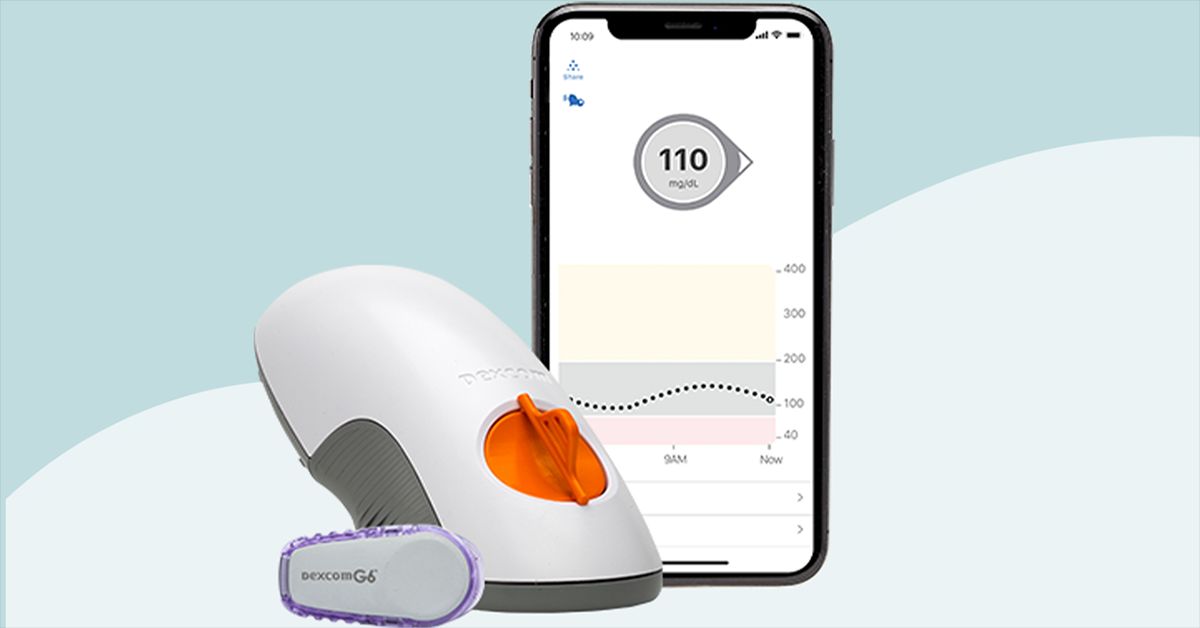
The Dexcom G6 is one of the most recognized names in continuous glucose monitoring, and for good reason: it turns glucose management from a guessing game into a live dashboard. Instead of relying only on fingerstick snapshots, the Dexcom G6 continuous glucose monitor checks glucose trends throughout the day and night, sending readings to a compatible smartphone, smartwatch, receiver, or connected diabetes device. For people managing type 1 diabetes, insulin-treated type 2 diabetes, or recurring lows, that constant stream of information can feel like switching from a paper map to GPS.
Of course, no diabetes device is magic. The Dexcom G6 is not invisible, not always cheap, and not immune to adhesive drama, signal loss, or the occasional “why now?” sensor error. But it remains a powerful real-time CGM system with customizable alerts, data sharing, pump compatibility, and a long track record in everyday diabetes care. This Dexcom G6 review covers how it works, what it does well, where it can annoy you, who it may be best for, and what the experience feels like beyond the glossy product photos.
What Is the Dexcom G6?
The Dexcom G6 is a real-time continuous glucose monitor, often shortened to CGM. It uses a small sensor placed just under the skin to measure glucose in interstitial fluid, which is the fluid around your cells. The system then sends glucose readings wirelessly to a display device about every five minutes. That adds up to roughly 288 readings per day, which is a lot more information than most people would ever get from traditional fingerstick testing.
The system has three main parts: a disposable sensor, a reusable transmitter, and a display device. The sensor is worn for up to 10 days. The transmitter snaps into the sensor and is used for about three months. The display device can be the Dexcom G6 app on a compatible phone, a Dexcom receiver, or in some cases an integrated insulin pump system. Think of the sensor as the reporter, the transmitter as the tiny newsroom satellite truck, and your phone as the anchor desk shouting, “Breaking news: your glucose is rising after pizza.”
How the Dexcom G6 Works
Sensor Placement and Setup
To start a Dexcom G6 session, the user inserts the sensor with an automatic applicator. The applicator places a thin sensor filament under the skin, while the adhesive patch keeps the device attached. Most users describe insertion as quick and manageable, though individual comfort varies. After insertion, the transmitter is attached, and the sensor code is entered into the app or receiver.
The Dexcom G6 has a warm-up period before readings begin. Once active, it displays a current glucose number, a trend arrow, and a graph showing where glucose has been. The trend arrow is one of the most useful parts of the system. A reading of 110 mg/dL can mean very different things depending on whether glucose is steady, climbing quickly, or dropping like it saw a spider.
No Routine Fingerstick Calibration
One major advantage of the Dexcom G6 is that it is factory-calibrated. That means most users do not need routine fingerstick calibrations when the sensor code is entered correctly. This does not mean fingersticks disappear forever. Dexcom advises using a blood glucose meter if symptoms do not match the reading, if readings seem unusual, or when a healthcare professional recommends confirmation. In other words, the G6 reduces fingersticks; it does not make common sense retire to Florida.
Key Features of the Dexcom G6
Real-Time Glucose Readings
The biggest reason people choose the Dexcom G6 CGM is real-time data. Instead of waiting until you feel shaky, tired, thirsty, foggy, or mysteriously cranky at a sandwich, you can see glucose movement earlier. This helps users adjust food choices, activity, insulin timing, and conversations with their care team. It can also reveal patterns that were previously hidden, such as overnight lows, post-meal spikes, dawn phenomenon, or exercise-related drops.
Customizable Alerts
The Dexcom G6 offers high and low glucose alerts. Users can set alert thresholds based on their care plan and personal needs. The system also includes an Urgent Low Soon alert, designed to warn users when glucose is predicted to reach a dangerously low level soon. For many users and caregivers, alerts are the feature that turns the device from “interesting gadget” into “sleep-preserving sidekick.”
That said, alerts can be both helpful and exhausting. Alert fatigue is real. If thresholds are set too tight, the phone may beep so often that it starts to feel like a tiny judgmental robot in your pocket. The best alert setup is usually personalized with guidance from a diabetes care team.
Dexcom Share and Follow
The Dexcom Share feature allows users to share glucose data with family members, caregivers, or trusted supporters through the Dexcom Follow app. This can be especially useful for parents of children with diabetes, adults caring for aging parents, partners who want overnight peace of mind, or anyone who wants backup when lows are possible.
For caregivers, this feature can be a huge relief. It can also require boundaries. A teenager may appreciate safety but not a running commentary every time glucose hits 181 after fries. Data sharing works best when everyone agrees on when to step in and when to let the person living with diabetes manage their own numbers.
Dexcom Clarity Reports
Dexcom Clarity is the reporting platform that organizes CGM data into trends, summaries, and patterns. It can show time in range, average glucose, estimated A1C-related metrics, highs, lows, and daily patterns. These reports can make doctor visits more productive because the conversation shifts from “I think mornings are weird” to “Here is a two-week graph proving mornings are indeed weird.”
Insulin Pump Integration
The Dexcom G6 is known for its compatibility with several diabetes technology systems, including certain insulin pumps and automated insulin delivery platforms. This is one reason many long-time users have stayed with the G6 even as newer sensors have arrived. For pump users, compatibility may matter more than sensor size or app design. Before choosing or switching CGM systems, users should confirm device compatibility with their pump, phone, insurance plan, and healthcare team.
Accuracy and Performance
Accuracy is one of the most important questions in any Dexcom G6 review. Clinical research on the G6 has supported its use as an accurate factory-calibrated real-time CGM across its approved wear period. The system was designed to support diabetes treatment decisions when readings and symptoms align. Its FDA classification as an integrated continuous glucose monitoring system also helped establish a pathway for CGMs that can work with compatible insulin delivery devices.
Still, CGM readings are not exactly the same as blood glucose meter readings. A CGM measures glucose in interstitial fluid, not directly in blood. During rapid changes, such as after eating fast carbohydrates, taking insulin, or exercising, interstitial glucose can lag behind blood glucose. This is not a Dexcom-only quirk; it is part of how CGM technology works. If your body is changing glucose levels quickly, the graph may trail the action like a friend walking behind you at the mall.
Pros of the Dexcom G6
It Reduces Guesswork
The best thing about the Dexcom G6 is visibility. Users can see not only the number, but also the direction and speed of change. This can support safer decisions around meals, exercise, insulin dosing, sleep, and driving. It can also reduce the mental burden of wondering what glucose is doing every hour of the day.
It Can Improve Diabetes Conversations
CGM data can make appointments more specific. Instead of relying on memory, users can review actual patterns. Maybe breakfast spikes are consistent. Maybe overnight lows happen after late workouts. Maybe stress meetings produce glucose graphs that look like a roller coaster designed by a caffeinated raccoon. The data gives patients and clinicians something concrete to work with.
It Offers Strong Caregiver Support
For children, older adults, people with hypoglycemia unawareness, or anyone who wants a safety net, Dexcom Follow can be a meaningful feature. The ability to share glucose trends remotely can help loved ones respond to lows and highs more quickly.
It Works With Many Diabetes Routines
The G6 can be useful for people using injections, pumps, low-carb eating plans, high-carb athletic fueling, shift work schedules, or school-day routines. Diabetes is not a one-size-fits-all condition, and the Dexcom G6 gives data that can be interpreted within different lifestyles.
Cons of the Dexcom G6
Cost Can Be a Barrier
Without insurance, CGM supplies can be expensive. Sensors, transmitters, and receivers may add up quickly. Pricing varies by pharmacy, insurance plan, coupon program, deductible, Medicare coverage, and supplier. Many users need prior authorization, documentation, or repeated insurance calls. Nothing says “modern healthcare” quite like a life-changing device and a 42-minute hold time.
Adhesive Issues Happen
The sensor is meant to last up to 10 days, but sweat, humidity, swimming, friction, skin oils, and activity can challenge the adhesive. Some users need overpatches, skin prep products, or careful site rotation. Others develop irritation or redness. Anyone with sensitive skin should discuss options with a clinician and watch for reactions.
Signal Loss and Sensor Errors Can Be Frustrating
The Dexcom G6 uses Bluetooth communication, so the transmitter and display device need to stay within range. Signal loss may happen if the phone is too far away, the body blocks the signal, the app is interrupted, or technology simply decides to have a dramatic moment. Sensor errors can also occur. Most are temporary, but failed sensors may need replacement.
It Is Not the Newest Dexcom Model
Dexcom has newer CGM options, including the G7 family. Many users are being encouraged to transition from G6 to newer systems depending on coverage, availability, and device compatibility. However, the G6 still matters because some people rely on it for pump integration, established routines, or insurance reasons. The “best” CGM is not always the newest one; it is the one that works reliably for your medical needs and daily life.
Dexcom G6 vs. Fingerstick Testing
Traditional blood glucose meters provide single-point readings. They are still useful, affordable, and sometimes necessary. The Dexcom G6 provides trend data, alerts, overnight visibility, and pattern recognition. The difference is like comparing a single photograph to a time-lapse video. Both can be accurate and useful, but they answer different questions.
A fingerstick says, “Here is your glucose right now.” A CGM says, “Here is your glucose, here is where it has been, and here is where it appears to be going.” For people who adjust insulin, worry about lows, exercise often, or want to understand food responses, that extra context can be extremely valuable.
Who Is the Dexcom G6 Best For?
The Dexcom G6 may be a strong option for people who need real-time glucose monitoring, especially those using insulin, experiencing hypoglycemia, managing type 1 diabetes, or working with a care team to improve time in range. It can also be useful for caregivers who need remote visibility into a loved one’s glucose trends.
It may be less ideal for someone who wants the smallest possible sensor, the newest Dexcom design, or a device with the simplest one-piece application. It may also be challenging for users without insurance coverage or those who struggle with adhesives. Before starting, it is smart to confirm prescription requirements, pharmacy or durable medical equipment coverage, phone compatibility, and whether the G6 or a newer CGM model fits best.
Safety Considerations
The Dexcom G6 is a medical device, not a wellness toy. Users should follow the official instructions, use a meter when readings do not match symptoms, and seek medical advice for severe highs, severe lows, or uncertain treatment decisions. The G6 should be removed before MRI, CT scan, or diathermy procedures because those environments may damage components or interfere with safe operation.
It is also important not to confuse FDA-authorized CGM systems with unapproved “glucose watches” or rings that claim to measure glucose without a sensor under the skin. Approved CGMs use minimally invasive sensors and have specific safety, accuracy, and labeling requirements. If a random online gadget promises perfect glucose readings with no sensor, no prescription, no science, and suspiciously shiny marketing photos, your skepticism should stretch like a fresh sensor overpatch.
Real-World Experience: What Living With the Dexcom G6 Can Feel Like
Using the Dexcom G6 for the first time can feel surprisingly emotional. Many people expect a gadget; what they get is a window into their body. The first day may involve checking the app constantly, watching the graph rise after coffee, dip after a walk, or behave beautifully until one innocent bowl of cereal enters the chat. It can be fascinating, empowering, and slightly addictive.
The most practical benefit is learning patterns. For example, someone may discover that a “healthy” smoothie sends glucose up faster than expected, while a balanced breakfast with protein and fiber produces a steadier curve. Another person may notice that a 20-minute walk after dinner smooths out a post-meal rise. A parent may finally see why a child wakes up tired after overnight lows. These are the kinds of insights that rarely appear from occasional fingersticks alone.
There is also a psychological side. Seeing glucose all the time can reduce anxiety for some users because the mystery is gone. For others, it can increase stress, especially at first. Every arrow can feel like a grade. Every spike can feel like a personal failure, even though glucose is affected by hormones, sleep, illness, stress, medication timing, digestion, hydration, and other factors. A good CGM mindset is not “perfect line forever.” It is “better information, better decisions.” Your glucose graph is data, not a moral report card.
Day-to-day wear is usually manageable, but not invisible. The sensor may catch on clothing, backpack straps, towels, or doorframes that apparently have personal grudges. Some users forget it is there; others remain very aware of it. Adhesive performance can vary depending on skin type, weather, workouts, and placement. People who sweat heavily or swim often may need extra adhesive support. Site rotation also matters because wearing sensors in the same favorite spot repeatedly can irritate the skin.
Sleep is where many users appreciate the Dexcom G6 most. Overnight alerts can catch lows that might otherwise go unnoticed. For caregivers, remote alerts can offer reassurance. But nighttime alarms can also be disruptive, especially if thresholds are too sensitive or compression lows occur. A compression low happens when pressure on the sensor, such as sleeping directly on it, may cause an inaccurate low reading. The fix may be as simple as changing position and confirming with a meter if the reading does not match how you feel.
Restaurants, travel, and exercise become easier with trend arrows. Before a workout, a steady 130 mg/dL may feel different from a fast-dropping 130 mg/dL. During travel, alerts can help users manage unusual meal timing, airport walking, stress, and time zone chaos. At restaurants, CGM data can teach which meals need earlier planning or different strategies. It does not remove the work of diabetes management, but it makes the work less blind.
The Dexcom G6 also changes conversations with healthcare providers. Instead of vague statements like “I go high sometimes,” users can bring reports showing exact timing and patterns. This can help adjust basal rates, meal boluses, correction factors, snack timing, or activity plans. The device becomes most powerful when the user and care team treat the data as a learning tool rather than a scoreboard.
Overall, the lived experience of the Dexcom G6 is a mix of freedom and responsibility. It can make diabetes management feel more visible, safer, and more responsive. It can also beep at awkward times, peel at the edges, and occasionally make you negotiate with Bluetooth like it is a stubborn houseplant. But for many users, the benefits outweigh the annoyances because the system provides something deeply valuable: timely information when decisions matter.
Final Verdict: Is the Dexcom G6 Worth It?
The Dexcom G6 remains a highly capable continuous glucose monitor with real-time readings, strong alerts, caregiver sharing, meaningful reports, and broad diabetes technology integration. Its biggest strengths are visibility, safety support, and practical day-to-day pattern tracking. Its biggest drawbacks are cost, adhesive challenges, occasional technical interruptions, and the fact that newer CGM models may now be available.
For people who need reliable glucose trend data, especially insulin users or those at risk for lows, the Dexcom G6 can be a life-changing tool. It will not manage diabetes by itself, and it will not stop pizza from being pizza. But it can show what is happening sooner, more clearly, and more often than fingersticks alone. That information can help users and healthcare teams make smarter choices, reduce surprises, and improve confidence in daily diabetes care.
Note: This article is for general educational purposes only and should not replace medical advice, diagnosis, or treatment. Always follow your healthcare professional’s guidance and the official Dexcom instructions for use.