

The internet loves a good “trade-off” story. Faster? Must be less secure. More convenient? Definitely sketchy. And suresometimes that’s true.
(Hello, “123456” and the password manager you swear you’ll set up “next weekend.”) But in modern biometrics, the best systems are built to
remove the trade-off by design: make the secure path the easiest path.
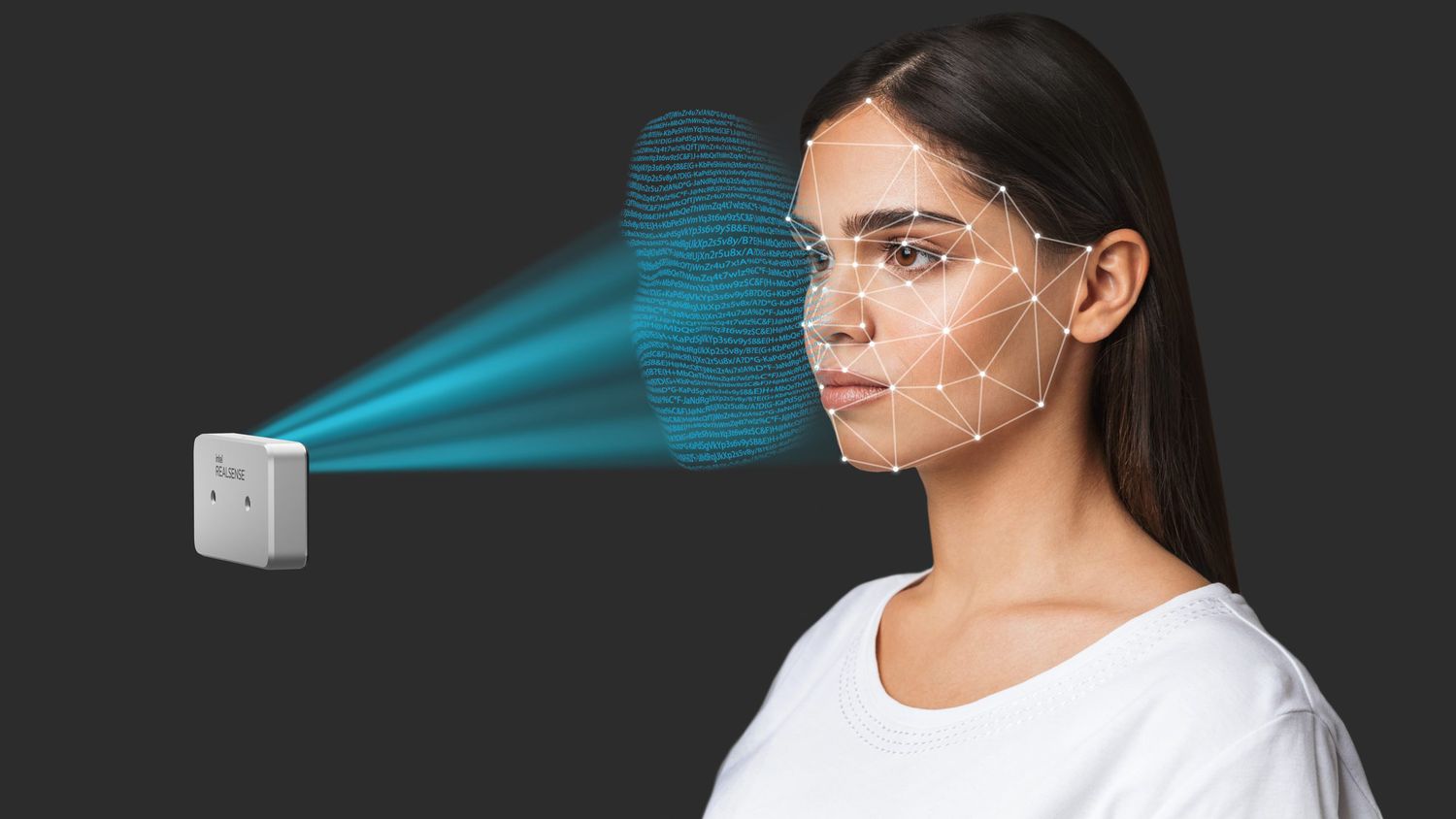
RealSense ID sits squarely in that camp. It aims to deliver the “walk up, glance, go” experience people wantwhile keeping the hard security parts
(anti-spoofing, encrypted storage, on-device processing, and explicit user intent) doing their job quietly in the background.
In other words: it’s not trying to be a magic trick. It’s trying to be a well-engineered door lock.
The Big Myth: “Convenience” Automatically Means “Less Secure”
Security gets blamed for inconvenience because it often shows up as friction: extra steps, extra seconds, extra mistakes. But that’s not a law of physics.
It’s usually a sign the system was bolted on late, or it depends on weak signals (like a 2D photo) and needs awkward workarounds to compensate.
RealSense ID’s bet is simple: if you start with stronger signals (3D depth + purpose-built hardware + a specialized neural network),
you can reduce user friction without lowering your defenses. Intel’s original introduction of RealSense ID framed it as an on-device solution
combining active depth, neural inference, and a dedicated system-on-chip with an embedded secure element for safe processing and encryptionbuilt to be
fast, accurate, and “user-aware.” That “user-aware” phrase matters more than it sounds.
What RealSense ID Actually Is (and What It Isn’t)
RealSense ID is designed for facial authentication, not mass surveillance, not “identify everyone in the crowd,” and not “tag strangers
at the mall.” Its product positioning centers on verifying registered users and unlocking specific thingssmart locks, access control points, kiosks,
point-of-sale terminals, and similar “permission gates.”
In practical terms, it’s a complete facial-authentication solution with two common form factors: a ready-to-integrate peripheral (F455) and a module (F450)
for tighter OEM integration. The idea is to give builders a reliable authentication subsystem they can embed into devices where passwords, PINs, or badges
are slow, shareable, or simply not hygienic (in the “everyone touches the keypad” sense).
Convenience, Engineered (Not Hoped For)
1) Fast sessions that feel instant
“Fast” in biometrics can’t just mean “the demo looked snappy.” It has to mean fast enough that users don’t invent shortcuts. RealSense ID has been marketed
as authenticating in under a second, and technical documentation around typical authentication flow time targets sub-second completion, plus wake-to-result
timings designed for responsive user experiences.
2) Designed to work in real lighting, with real faces
Real-world deployment is where convenience either becomes delightful… or becomes that one lobby everyone complains about. RealSense ID is described as working
in varied lighting conditions and supporting a wide range of heights and complexions. It’s also presented as adapting over time as users change (glasses,
facial hair, etc.). That “adapts over time” detail is convenience that’s actually security-friendly: fewer false rejects means fewer people begging for
“just put it in bypass mode.”
3) Standalone-friendly (because Wi-Fi is not a security strategy)
Some of the most painful security failures start with an innocent sentence: “It needs cloud access to work.” RealSense ID has been positioned as capable of
running without complicated network setupuseful for doors, kiosks, and terminals that should still authenticate when the network is flaky (or when the
building’s router decides to go on a spiritual retreat).
Security: The Part You Don’t Want Users to Notice
If the convenience story is “glance to unlock,” the security story is “what did we do to make sure a glance is a personnot a picture, a video,
or a Halloween mask that cost more than your rent?” RealSense ID leans on several layered ideas:
1) Active depth + IR is not the same as a selfie camera
2D face unlock methods can be tricked with 2D artifacts unless they add strong liveness checks. RealSense ID’s design emphasis on active depth sensing
changes the game: it’s harder to fake “shape” than it is to fake “appearance.” That’s why “depth-based” systems are often discussed in the same breath as
stronger presentation-attack resistance, especially when combined with dedicated anti-spoofing models.
2) Built-in anti-spoofing (photos, videos, masks)
Intel’s original RealSense ID introduction explicitly describes built-in anti-spoofing intended to protect against attempts using photographs, videos, or
masks. That matters because “liveness detection” isn’t a marketing checkboxit’s a threat category with standards, metrics, and testing methodologies.
3) “User-aware” activation (consent is a security control)
One of the easiest security wins is preventing unintended authentication in the first place. RealSense ID has been described as activating through
user awareness and not authenticating unless prompted by a pre-registered user. That’s a big deal in high-traffic environments:
it reduces accidental matches, reduces “drive-by scanning” concerns, and makes the system feel less creepy because it isn’t always “watching.”
4) On-device processing and encryption (privacy isn’t optional anymore)
A recurring theme across RealSense ID materials is that facial images are processed locally and user data is encrypted. The security story here isn’t only
“hackers are bad.” It’s also “data minimization is good engineering.” If your system can authenticate without shipping biometric data to a server, you’ve
reduced exposure, compliance burden, and the number of places something can go wrong.
Where Standards Fit: PAD, Testing, and “Prove It” Culture
In biometrics, the grown-up conversation starts when you ask: “What does ‘anti-spoofing’ mean in measurable terms?” The ISO/IEC 30107 family defines
presentation attacks (PAs) and provides test methodologies for Presentation Attack Detection (PAD). NIST also evaluates aspects of face technologies,
including PAD work that discusses attacks like impersonation and evasion.
Labs such as iBeta are known in the industry for conducting ISO/IEC 30107-3 PAD testing methodologies, and they also publish guidance on what their results
mean (and what they don’t). The practical takeaway for buyers and builders: don’t treat “anti-spoofing” as a vibe. Treat it as a requirement you can
specify, test, and monitor.
Why RealSense ID Can Be Both Convenient and Secure
Here’s the secret: convenience and security stop fighting when you align them around the same goaltrusted, low-friction verification.
RealSense ID’s architecture emphasizes:
- Strong sensing (depth + IR) so the system doesn’t need clunky “please blink twice and recite the alphabet” experiences.
- On-device inference so you’re not waiting on network round-trips (or leaking sensitive data in transit).
- Encrypted storage + secure element so biometric templates aren’t just sitting around like snacks at a conference table.
- User-aware activation so authentication happens intentionally, not passively.
Concrete Use Cases (Where the “No Trade-Off” Claim Gets Tested)
Access control doors in offices and multi-tenant buildings
Badges get lost, borrowed, and “accidentally left on the desk.” PINs get shared. RealSense ID-style facial authentication can reduce credential sharing
while keeping entry fast during peak traffic. The key is pairing it with good physical controls: anti-tailgating sensors, door position monitoring, and
clear fallback flows for guests.
Kiosks and self-service terminals
Kiosks have a special talent: they attract both legitimate users and creative troublemakers. A face-based “unlock” step can secure sensitive actions
(like accessing account features) without forcing users to type long passwords on grimy screens. Publications covering the original launch highlighted
kiosks, ATMs, and point-of-sale as target environmentsplaces where speed matters, but “oops, wrong user” is unacceptable.
Point-of-sale and staff authentication
Retail environments often need a quick “are you authorized to do this?” checkvoids, refunds, manager overrides. Face authentication can reduce shared
logins while keeping lines moving. And because RealSense ID is designed around registered-user authentication, it aligns with the “employees only” model
rather than open-ended identification.
Implementation Reality: A Checklist That Actually Helps
Here’s how teams keep “secure and convenient” from turning into “secure-ish and… complicated”:
1) Design for approach and positioning
Face authentication is physical UX. Mounting height, tilt, and user approach paths matter. Technical guidance emphasizes aligning the device to expected
user height ranges and approach distances. Do this well and users “just get it.” Do it poorly and you’ll witness the ancient ritual of people crouching
in front of a sensor like they’re trying to summon good Wi-Fi.
2) Add a smart trigger (don’t run hot 24/7)
Some hardware integration guidance suggests the host system use motion or proximity sensing to wake the device and start a sessionimproving power
efficiency and reducing unnecessary scanning. It also supports that “user-aware” principle: authenticate when the user intends to authenticate.
3) Treat fallback as part of security, not an afterthought
Every real system needs a fallback: PIN, badge, mobile credential, help desk flow, or supervised override. The security mistake is making fallback the
easiest path. The usability mistake is making fallback impossible. The right answer is “fallback works, but it’s auditable and appropriately gated.”
4) Tune your threat model: spoofing is not the only attack
Presentation attacks (photos/videos/masks) are one category. Tailgating is another. Insider misuse is another. Shoulder-surfing a PIN is another.
The best deployments combine strong face authentication with door hardware, logging, and policy (e.g., “high-risk actions require additional approval”).
The Fun Part: Explaining This to Humans Without Sounding Like a Robot
You can describe RealSense ID with a sentence that keeps both security and convenience intact:
“It unlocks quickly for the right faceonly when the user is present and intending to unlockand keeps the biometric data on-device and encrypted.”
That sentence works because it answers the questions people actually care about:
- Will it be fast? (Yes, designed for quick sessions.)
- Will it be fooled by a photo? (Designed with anti-spoofing and depth.)
- Is it watching me all day? (User-aware activation is meant to avoid that.)
- Where does my face data go? (On-device processing and encrypted data, by design.)
Conclusion: Convenience That Doesn’t Ask You to Lower Your Guard
RealSense ID’s whole point is to make secure authentication feel natural: walk up, glance, unlockwithout quietly swapping in weaker security behind the
scenes. Its emphasis on active depth sensing, anti-spoofing, encrypted on-device data handling, and user-aware activation is how it tries to keep the
promise: don’t trade security for convenienceengineer them together.
And that’s the real standard to judge any biometric system by. Not whether it looks futuristic in a demo, but whether it makes the secure path the
easiest path in the messy, fluorescent-lit world where humans actually exist.
Experiences From the Field (): What “Secure and Convenient” Looks Like in Real Deployments
When teams integrate RealSense ID-style facial authentication into real environments, the first surprise is how quickly users form an opinion. Not after a
weekafter the first three attempts. If the system is fast and consistent, users call it “easy.” If it’s slow or picky, they call it “broken,” even if
it’s technically working exactly as configured. So the best deployments obsess over the physical and behavioral details that don’t show up in a spec sheet.
One common pattern: the “front door rush.” Picture an office lobby at 8:55 a.m. People are holding coffee, juggling backpacks, and speed-walking like the
elevator is leaving without them (because it is). In that scenario, the most successful setups mount the device at a predictable height, add clear visual
cues (“Stand here, look here”), and use a sensible trigger so the device wakes as the person approaches. The result is a flow that feels like a badge tap,
except there’s nothing to forget at homejust a glance and a click.
Another pattern shows up at kiosks: users don’t read instructions. They just… do things. They lean in too close, or they stand too far back, or they angle
their faces like they’re taking a dramatic album cover photo. Teams that win here treat the kiosk like a mini stage: they constrain where people stand
(subtle floor decals), keep the camera line-of-sight clean (no reflections, no smudged cover glass), and use friendly UI prompts that guide without
nagging. The system feels “convenient” because the environment helps users succeed.
Security teams also learn quickly that anti-spoofing isn’t the end of the story. In access control, tailgating can defeat any authentication method if the
door policy is “one person authenticates, five people enter.” So practical deployments pair facial authentication with door sensors, turnstiles, or
operational norms (like staffed reception during busy hours). The biometric layer proves identity; the physical layer enforces entry.
On the privacy front, deployments that earn trust are transparent. They explain what’s happening in plain language: “This device checks that you’re an
enrolled user. It doesn’t upload your face to a cloud service. It only authenticates when you initiate it.” When users hear thatand then experience the
system activating intentionally rather than passivelythey’re more comfortable. That comfort is not a “soft” benefit; it reduces complaints, reduces
pressure to weaken security, and increases adoption.
Finally, the best teams build a fallback that doesn’t become a loophole. If face authentication fails (new haircut, harsh sunlight, temporary injury),
users can still get inbut the fallback is logged and policy-driven. Over time, those logs become operational gold: they show where the environment needs
tweaks, where users need better enrollment, and where threat patterns might be emerging. That’s what “won’t trade security for convenience” looks like in
practice: a system that’s fast for the honest majority, resilient against common attacks, respectful of user intent, and operationally measurable.