

Checking your Iqama status in Saudi Arabia is one of those life-admin tasks that feels smalluntil it suddenly becomes very, very important. One day you are buying groceries, booking a trip, applying for a bank service, renewing a SIM card, or trying to access a government platform, and suddenly the system asks for your valid Resident ID. That is when your Iqama stops being “that plastic card in my wallet” and becomes the main character of the day.
The Iqama, also called the Resident ID or residence permit, is the official identity document for many foreign residents living and working in Saudi Arabia. It confirms your legal residency, connects you to your employer or sponsor, and is commonly needed for banking, mobile services, travel procedures, healthcare access, government portals, traffic services, and employment matters. In short, it is not something you want to discover has expired while standing in a queue with seven people behind you and one very unimpressed customer-service agent in front of you.
The good news is that checking your Iqama status is now much easier than it used to be. Saudi Arabia has moved many residency and labor services online through platforms such as Absher, Absher Business, Muqeem, HRSD, and Qiwa. For most residents, the fastest way to check Iqama validity or the Iqama expiry date is through Absher. For employer-related issues, work permits, transfers, and business-side residency management, HRSD, Qiwa, and Muqeem may also be involved.
This guide explains how to check your Iqama status in seven practical steps, what the results mean, what to do if something looks wrong, and how to avoid the classic “I thought it expired next month” panic attack. Let’s make your residency status less mysterious than a hotel Wi-Fi password.
What Does “Iqama Status” Actually Mean?
Before you start clicking buttons, it helps to know what you are checking. Many people use the phrase “Iqama status” to mean different things. Sometimes they mean the Iqama expiry date. Sometimes they mean whether the Resident ID is valid or expired. Others are asking about employment status, sponsor status, transfer status, work permit validity, or whether there is a legal or administrative issue connected to the Iqama.
For everyday purposes, the most important Iqama status details are:
- Iqama validity: whether your Resident ID is currently valid.
- Iqama expiry date: the date your residency must be renewed by.
- Personal information: your name, Iqama number, nationality, and identity details.
- Employment or sponsor connection: your relationship with your employer or sponsor.
- Work-related status: transfer requests, work permit validity, or employer-side updates.
The key point is simple: Absher is usually the best place to check Resident ID validity and expiry, while Qiwa, HRSD, and Muqeem are useful for labor, employer, and business-related checks. Think of Absher as your main personal government-services dashboard, and Qiwa/Muqeem as the more corporate, “HR department has entered the chat” side of the story.
How to Check Your Iqama Status: 7 Steps
Step 1: Prepare the Information You Need
Before opening any portal, gather the basic details you may need. At minimum, you should have your Iqama number. Depending on the service, you may also need your date of birth, registered mobile number, Absher username or ID number, password, and access to the phone that receives your one-time password.
This sounds obvious, but it saves time. Many failed attempts happen because the user has an old mobile number linked to Absher, enters a date in the wrong calendar format, or types the Iqama number incorrectly. The Iqama number is usually a 10-digit number, so check it carefully. A single wrong digit can turn your simple status check into a detective movie.
Also make sure your internet connection is stable. Government portals are secure platforms, and sessions can expire if you take too long. If your tea break becomes a lunch break, you may have to log in again.
Step 2: Use an Official Platform First
The safest way to check your Iqama status is through an official Saudi government platform. For personal Resident ID validity and expiry, use Absher or the Absher app. Absher is the official electronic services platform connected with the Ministry of Interior and is widely used by citizens, residents, and visitors for many government services.
You may find many third-party websites claiming they can check your Iqama status. Some are informational and harmless, but others may be outdated, inaccurate, or risky. Avoid entering your personal information, password, OTP, or Iqama details into random websites. Your Iqama is not a pizza coupon code; do not paste it everywhere.
For employer-side or business-related checks, official options may include Absher Business, Muqeem, Qiwa, or HRSD services. If you are an employee checking your own residency expiry, start with Absher. If you are an employer or HR officer managing multiple employees, Muqeem and Absher Business may be more relevant.
Step 3: Log In to Absher
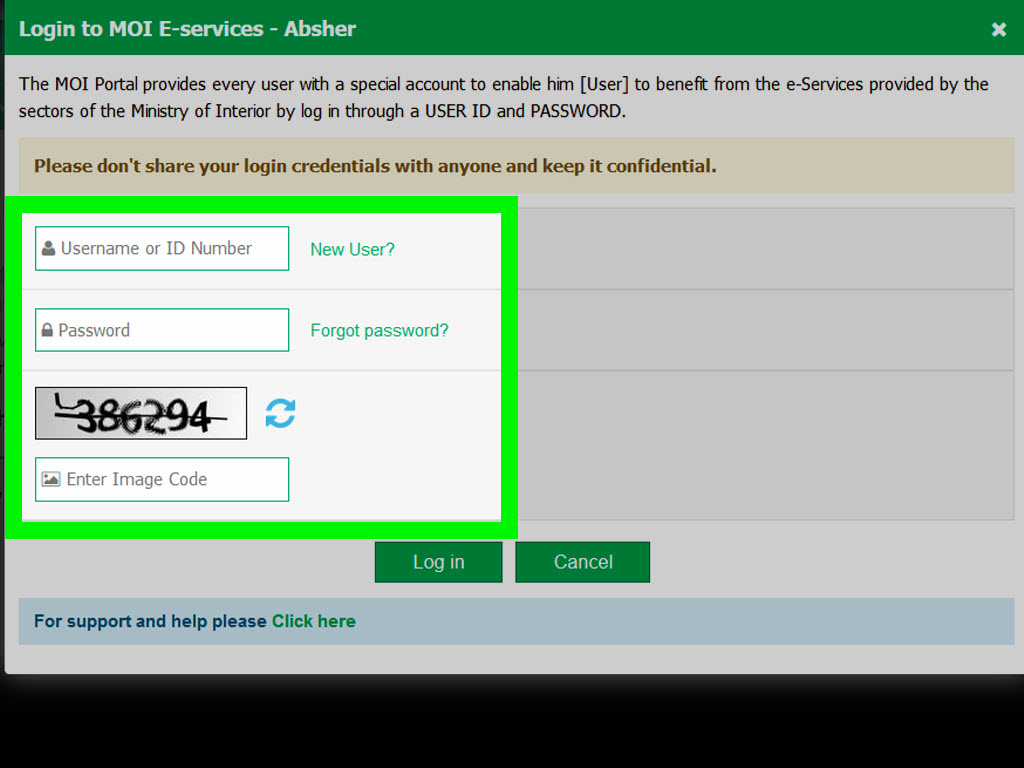
Open the Absher platform or the Absher mobile app. Select the individual services option if you are checking your personal Iqama. Log in using your username or ID number and password. After that, you will usually receive a one-time password on your registered mobile number.
Enter the OTP only inside the official Absher platform or official app. Never share it with anyone by phone, WhatsApp, email, or social media. No legitimate support agent needs your OTP. If someone asks for it, imagine a giant red warning sign flashing above their head.
If you cannot log in because your mobile number has changed, you may need to update your registered number through official Absher channels or approved self-service options. If you forgot your password, use the official password recovery feature. Do not create duplicate accounts unless the official process tells you to do so.
Step 4: Find the Resident ID or Iqama Expiry Service
After logging in, look for services related to your Resident ID, passport services, inquiries, or Iqama expiry. The exact menu names may change slightly over time, especially as platforms update their layouts, but the service is generally connected to Resident ID validity or Iqama expiry inquiry.
In many cases, you can navigate through a path similar to: My Services > Inquiries > Passport Services > Query Iqama Expiry. On some versions, you may see wording such as Resident ID Expiry, Public Query Resident ID Expiry, or Iqama Validity. If the menu looks different, use the search function inside the platform and type “Iqama,” “Resident ID,” or “expiry.”
If you are using the mobile app, the layout may be more compact, but the idea is the same. Find the service that checks your residency validity or expiry date. Government apps love menus almost as much as humans love snacks, so be patient and look under inquiries or passport-related services.
Step 5: Enter Your Iqama Details and Verification Code
Once you open the Iqama status or Resident ID expiry service, enter the requested information. This usually includes your Iqama number and a visual verification code. Some services may request additional information depending on whether you are logged in, using a public inquiry, or checking another eligible dependent or worker under your account.
Type the numbers carefully. If the captcha is difficult to read, refresh it rather than guessing. Captchas seem designed to remind us all that robots are not the only ones who struggle with distorted letters.
After entering the required information, click the button to view, check, inquire, or submit. The system should display the relevant status information, typically including whether the Iqama is valid and the expiry date.
Step 6: Read the Result Carefully
When the result appears, do not just glance at it and close the tab. Read it carefully. Confirm that the Iqama number is correct, the expiry date matches your expectations, and the status appears valid. If your Iqama is close to expiry, inform your employer, sponsor, or HR department immediately, depending on your residency arrangement.
Saudi residency rules are time-sensitive. Residence permits should be renewed before expiration, and official guidance has historically emphasized renewing before the expiry date, including a three-day-before-expiry rule in Ministry of Interior information. Penalties can apply for late renewal, and repeated violations can become much more serious. In other words, do not treat your Iqama expiry date like a soft deadline for cleaning your closet.
If your Iqama has already expired, act quickly. Contact your employer or sponsor, check whether renewal fees or penalties are pending, and avoid unnecessary travel or official transactions until the matter is resolved. If you are a dependent, speak with the head of household or sponsor responsible for renewal.
Step 7: Save the Result and Follow Up
After checking your Iqama status, save the result for your records. You can write down the expiry date, take a screenshot for personal reference, or add a reminder to your calendar at least 30 to 60 days before the expiry date. If your employer handles renewal, ask for confirmation early instead of waiting until the last week.
If something looks wrong, do not ignore it. Examples include an unexpected expiry date, a mismatch in personal details, missing renewal, a work permit issue, or a transfer request that has not moved forward. For employment transfer or work-related status, check Qiwa or ask your HR department to verify the relevant business-side process. HRSD services can also be relevant for labor-related inquiries, while Muqeem is commonly used by establishments for resident employee data and passport-related procedures.
Finally, keep your digital identity tools updated. Absher offers digital ID-related services, and residents may be able to display digital identity information electronically. A digital ID can be convenient, but it does not mean you should ignore the validity of your underlying Resident ID. Digital convenience is wonderful; expired residency is not.
Alternative Ways to Check Iqama-Related Information
Using the Absher App
The Absher app is often the easiest option because it keeps services in one place and supports Arabic and English. Once you log in, you can view personal services, digital ID options, and inquiry services. If you use your phone for most life-admin tasks, the app may feel smoother than the browser version.
Using Muqeem
Muqeem is especially useful for establishments and business users who manage resident employees. Companies can use it to access resident employee data and complete certain passport-related procedures electronically. If you are an individual employee, your HR department may use Muqeem behind the scenes even if you never log in yourself.
Using Qiwa
Qiwa is important for labor-market services, work permits, employee transfers, and employment-contract processes. If your question is not simply “When does my Iqama expire?” but rather “What is happening with my transfer?” or “Is my employer-side process complete?” Qiwa may be part of the answer.
Using HRSD Services
The Ministry of Human Resources and Social Development is connected to labor services, employment status, work rules, and expatriate worker processes. HRSD and Qiwa services may be relevant when checking employment-related details tied to your Iqama.
Common Problems When Checking Iqama Status
You Cannot Log In to Absher
If you cannot log in, check whether your username, password, and registered mobile number are correct. Use the official recovery options if needed. If your mobile number changed, update it through approved channels. Do not hand your account to a stranger at a typing center unless you fully understand what they are doing.
The OTP Does Not Arrive
OTP delays may happen because of network issues, an old phone number, SIM problems, or temporary service delays. Wait briefly, request a new code if allowed, and confirm that the registered number is active. Avoid repeated failed attempts that may temporarily lock the process.
The Iqama Shows Expired
If your Iqama shows expired, contact your sponsor or employer immediately. Renewal may require payment of fees, clearance of penalties, valid insurance, a valid passport, or completion of employer-side requirements. Do not assume renewal is automatic. In Saudi residency matters, “I thought someone else handled it” is not a strong strategy.
The Expiry Date Looks Wrong
If the expiry date seems incorrect, compare the information across official channels and ask your HR department or sponsor to verify. Sometimes confusion happens because people mix up Gregorian and Hijri dates. A date that looks far away in one calendar may not be as far away as your optimistic brain wants it to be.
Your Work Transfer Is Pending
An Iqama can be valid while a work transfer or employment process is still pending. In that case, Absher may show residency validity, but Qiwa or employer-side systems may show the transfer status. Ask the new or current employer to confirm the status through official business channels.
Practical Tips to Stay Ahead of Iqama Issues
The best way to handle Iqama status is to check it before you urgently need it. Add the expiry date to your phone calendar. Set reminders 90 days, 60 days, and 30 days before expiration. If your employer is responsible for renewal, politely follow up early. A calm message two months ahead is better than a dramatic message two days after expiry.
Keep your passport valid as well. Iqama renewal can be affected by passport validity, insurance status, employer compliance, work permit status, and other administrative requirements. Your Iqama does not live alone; it has a whole paperwork family.
Also, keep your Absher account active and updated. Make sure your registered phone number is yours, not an old company SIM or a number you no longer use. Store your login details securely, but do not share them. If you use public computers, log out properly and avoid saving passwords.
Experience-Based Advice: What Checking Iqama Status Feels Like in Real Life
For many expatriates in Saudi Arabia, checking Iqama status becomes a regular routine after one memorable scare. The first time is often confusing. You hear from a friend that you should check your Iqama expiry. Then another friend says to use Absher. Someone else mentions Muqeem. A fourth person confidently gives instructions from 2018. Suddenly, what should be a two-minute task feels like assembling furniture without the manual.
The practical experience is usually much simpler. Once your Absher account is active and your mobile number is correct, checking the expiry date is quick. The biggest challenge is not the technology; it is knowing which platform answers which question. Absher tells you about your Resident ID validity. Qiwa may tell you about labor-transfer matters. Muqeem may be used by companies. HRSD connects to labor-related services. Once that mental map is clear, the process becomes far less stressful.
A common experience among workers is discovering that the expiry date is closer than expected. This often happens because people remember the month but not the exact day, or they confuse the Hijri and Gregorian calendar. For example, someone may say, “My Iqama expires in July,” but the actual date is early July, not late July. That difference matters. Government systems do not accept “approximately valid” as a status, no matter how charming you are.
Another real-life lesson is that HR communication matters. Some employees assume the company will renew everything automatically. Many companies do handle renewals professionally, but employees should still monitor their own status. A polite follow-up to HR before expiry is not rude; it is responsible. You can say, “I checked Absher and my Resident ID expires on this date. Could you please confirm the renewal timeline?” That message is clear, respectful, and much better than discovering the issue during travel planning.
Families also learn to check dependent Iqamas early. A spouse or child’s Resident ID may be needed for school registration, healthcare, travel, bank documentation, or government services. If one dependent’s information is outdated, it can delay the whole family’s plan. Anyone who has tried to fix paperwork right before a flight knows that airport stress has a special flavor, somewhere between burnt coffee and regret.
Travel is another area where Iqama status becomes important. Before booking an international trip, residents should check Iqama validity, passport validity, exit/re-entry visa status, and any employer-related travel requirements. Having a valid Iqama does not automatically mean every travel document is ready. Treat travel paperwork like a team sport: Iqama, passport, visa, and tickets all need to show up and play their positions.
One useful habit is to create a simple “Saudi documents” note on your phone. Include your Iqama expiry date, passport expiry date, driving license expiry date if applicable, vehicle registration reminders if applicable, and insurance dates. Do not store passwords or OTPs there, but do store harmless reminder dates. This small habit can save hours of future stress.
The best experience-based advice is this: check early, use official platforms, save the result, and ask questions before the deadline. Most Iqama problems are easier to solve before expiry than after expiry. A five-minute check today can prevent a five-day headache later. That is a pretty good return on investment, even by finance-bro standards.
Conclusion
Checking your Iqama status is not complicated once you know where to go and what to look for. Start with Absher for Resident ID validity and expiry. Use your correct Iqama number, log in securely, verify the OTP, and read the result carefully. If your question involves employment transfer, work permits, or employer-side processes, Qiwa, HRSD, Absher Business, or Muqeem may also be relevant.
The smartest approach is to treat your Iqama like an essential life document, not an afterthought. Check it regularly, set reminders before expiry, keep your Absher mobile number updated, and communicate early with your sponsor or HR team. In Saudi Arabia, your Iqama is connected to many parts of daily life, from banking to travel to employment. Keep it valid, and your future self will thank youpossibly with coffee.
Note: Online menus and service names can change as Saudi digital platforms are updated. Always rely on official government platforms for final verification, and never share your Absher password, OTP, or personal identity details with untrusted websites or individuals.