

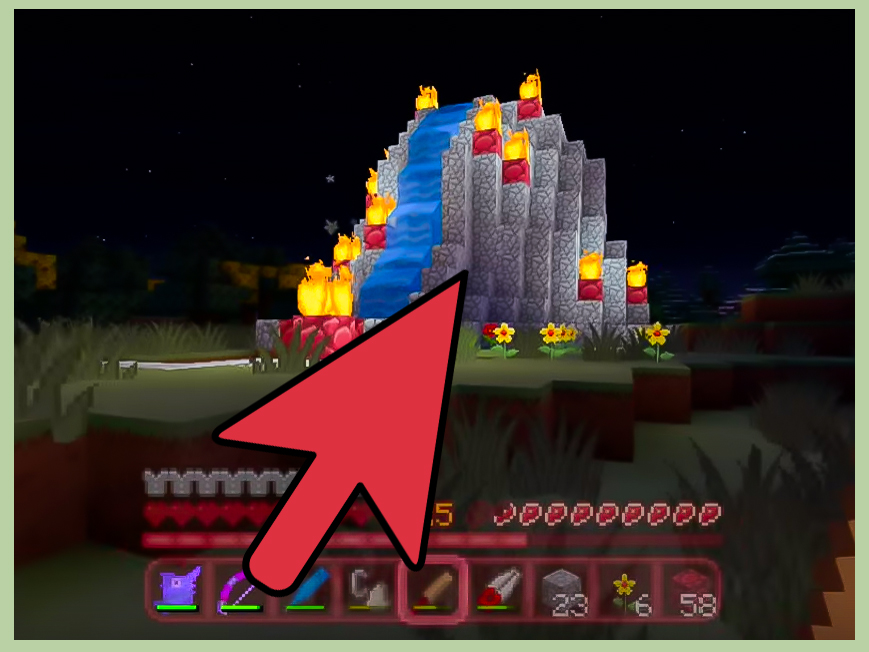
If your Minecraft world feels a little too peaceful, a volcano is the perfect way to add drama, height, and just enough “should I really pour lava there?” energy to keep things interesting. It is one of those builds that looks wildly impressive from far away, gives you room for clever interior design, and somehow makes every surrounding hill feel like it needs to try harder.
The good news is that building a volcano in Minecraft is not reserved for redstone wizards, mega-build streamers, or the kind of player who casually says things like “I just terraformed half the continent before breakfast.” With a smart plan, the right block palette, and a little patience, you can create a volcano that looks natural, dangerous, and downright cinematic in both Creative and Survival.
This guide breaks the process into 13 clear steps, from choosing the best location to shaping the cone, carving the crater, adding lava flows, and finishing the surrounding landscape. You will also find practical tips for block choices, lighting, realism, and an extended experience section at the end to help you avoid the most common mistakes builders make on their first volcano project.
Why a Minecraft volcano is such a great build
A volcano works beautifully in Minecraft because it combines several things the game already does well: dramatic vertical shapes, bold contrasts, natural-looking terrain, and satisfying use of lava, stone, and lighting. It can be a stand-alone landmark, a secret base, a mob-proof mountain fortress, or the centerpiece of an island, badlands, or fantasy biome project.
Better yet, a volcano gives you flexibility. You can build a realistic dormant mountain with dark stone and a cracked crater, or go full movie-trailer mode with glowing lava rivers, smoke effects, obsidian details, and a hidden throne room inside. Minecraft is very generous that way. One minute you are making a mountain. The next minute you are accidentally building the headquarters of a lava-loving supervillain.
What you should gather before you start
You do not need every block in the game, but having a solid material list saves time and prevents the classic builder problem of standing on top of a half-finished peak whispering, “Why did I only bring 14 cobblestone?”
- Stone, cobblestone, and andesite for rough terrain
- Deepslate, cobbled deepslate, blackstone, or basalt for darker volcanic texture
- Gravel or tuff for visual variation
- Lava buckets for the crater and exterior flows
- Water buckets for shaping terrain safely and controlling mistakes
- Magma blocks for glow and heat effects
- Campfires or soul campfires for smoke-style decoration
- Torches, lanterns, or hidden lighting blocks to control mob spawns
- Scaffolding, dirt, or temporary blocks for easier climbing
- TNT only if you want controlled destruction for crater shaping
If you are in Creative mode, the job is much faster because you can fly and place unlimited blocks. In Survival, the same build is still absolutely possible, but it helps to build hollow sections, collect materials in bulk first, and light your work area well so your volcano does not become a free apartment complex for hostile mobs.
How to Create a Volcano in Minecraft: 13 Steps
Step 1: Pick the right location
The best volcano locations are places where a giant cone will feel natural instead of awkward. Mountain ranges, jagged cliffs, rocky coastlines, crater valleys, and islands all work especially well. If you want maximum drama, build near water so the lava glow reflects at night. If you want a more realistic volcanic look, choose a stony or uneven area instead of a perfectly flat plain.
That said, a flat area is not wrong. It just means you will need to terraform more aggressively to make the volcano look like it belongs there. If you are starting a new world specifically for this project, seeds with peaks, cliffs, or crater-like terrain can save you a huge amount of time.
Step 2: Decide on the size before placing blocks
Many volcano builds fail for one simple reason: the builder starts with no scale in mind. Then the base ends up too small, the cone looks like a lumpy hat, and the crater resembles a cereal bowl. Decide early whether you want a small scenic volcano, a medium landmark, or a giant megabuild with interior rooms.
A good rule is to start wider than you think you need. Volcanoes look better with a broad base that narrows gradually toward the top. Mark the footprint with temporary blocks in a rough circle or oval. If it looks too neat, good. Nature will mess it up later.
Step 3: Build the rough cone shape first
Start stacking your main stone blocks upward in layers, making each level slightly smaller than the one below it. Do not worry about details yet. Right now, your job is to create a clear mountain silhouette. Think big shapes first, tiny drama later.
A helpful trick is to avoid long straight lines. Organic terrain looks better when the sides shift a little as they rise. Step back often and look at the volcano from multiple angles. Minecraft builds can look amazing from the front and suspiciously potato-like from the back, so keep rotating around the structure as you work.
Step 4: Hollow out the inside
This step is optional, but it is highly recommended. A hollow volcano takes fewer blocks, is easier to modify, and gives you room for hidden interiors. You can turn the inside into a base, storage hall, enchantment chamber, forge, portal room, or dramatic staircase leading to the crater.
Leave enough wall thickness so the mountain still feels solid from the outside. You do not want one misplaced pickaxe swing exposing your secret lava bunker to the world. Unless that is the vibe, in which case, carry on.
Step 5: Carve the crater at the top
The crater is what sells the volcano. Flatten the summit slightly, then cut a jagged opening into the center. Make the rim uneven so it feels broken and worn rather than perfectly circular. A crater with a few raised sections and deeper pockets looks much more believable than a smooth ring.
For a dormant volcano, keep the crater dark and rocky with only a little lava or magma at the bottom. For an active volcano, make the opening deeper and brighter. You can even create layers inside the crater so the lava appears to sit below a cracked inner rim.
Step 6: Upgrade the block palette
Once the overall shape is done, swap out some of the basic stone with darker and more varied blocks. This is where the volcano starts looking intentional instead of accidental. Mix in deepslate, cobbled deepslate, blackstone, basalt, gravel, and patches of andesite or tuff.
The key is controlled randomness. Too much variation and your volcano starts looking like a geological sample platter. Too little and it feels flat. Keep darker blocks near the crater, lava channels, and steeper faces. Let lighter stone appear lower on the mountain or in eroded sections.
Step 7: Add lava inside the crater
Now for the fun part: the spicy orange center. Pour lava into the crater carefully, preferably starting from the lowest inner points. If you want a calm molten pool, use fewer sources and contain them with hidden blocks. If you want chaos, add more openings and let the lava spill over edges later.
Be patient here. Lava spreads slowly, which is Minecraft’s way of saying, “You really should have thought this through.” Watch how it settles before adding more. It is much easier to grow a lava pool than to clean up one that has wandered halfway down the mountain like it pays rent there.
Step 8: Create lava flows on the outside
Choose two to five paths where lava can run down the sides of the volcano. Fewer flows often look better than covering every face. Start near the crater and guide the lava down natural-looking channels. You can carve these channels slightly into the mountain first so the lava feels embedded in the terrain.
Surround each flow with darker blocks to suggest heat damage. A little obsidian, blackstone, basalt, or magma block near the source can add extra visual punch. Some builders also like to stop the lava partway down, as if the flow cooled before reaching the base. That looks more realistic than turning the whole mountain into a bright orange waterfall convention.
Step 9: Shape the base and surrounding terrain
A volcano should not rise from the ground like a giant traffic cone. Blend it into the landscape. Add foothills, cracked rock, ash-like patches, scattered boulders, and small ledges around the base. If the volcano sits near water, form black rocky shores or a hardened lava delta. If it is inland, use rough stone fields and sparse vegetation.
This is also the perfect time to add secondary features: a ruined bridge, a mining outpost, a lava cave entrance, a scorched forest edge, or a tiny village that probably should have chosen a less dramatic ZIP code.
Step 10: Add smoke, heat, and eruption effects
If you want the volcano to feel active, add decorative effects. Campfires placed under trapdoors, slabs, or custom vents can create smoke rising from the crater or side fissures. Magma blocks hidden beneath grates or tucked into cracks can add glow without making every inch look molten.
You can also use pointed dripstone, black glass, or dark block spires around the crater to suggest sharp volcanic rock. For a more explosive style, place blocks and slabs around the rim at uneven angles, as if the top has fractured from repeated eruptions.
Step 11: Build an interior that matches the theme
This is where your volcano becomes unforgettable. Inside, build something worthy of the exterior: a forge, throne room, hidden laboratory, wizard chamber, lava observatory, or a fully functional Survival base with farms, storage, and a Nether portal. A spiral staircase hugging the inner wall works especially well, and a central shaft overlooking the crater adds instant drama.
Use darker blocks, warm lighting, chains, polished stone, iron details, and lava windows behind glass if you want a cinematic feel. If you prefer realism, keep the interior rougher, with carved tunnels, support beams, and naturally shaped caverns.
Step 12: Light everything and make it practical
A stunning volcano loses some of its charm when a creeper strolls out of the crater like it owns the place. Light the inside thoroughly and hide lighting on the outside where you can. Shroomlights, lanterns, glowstone, or concealed torches can all work depending on your style.
In Survival mode, create safe routes up and down the mountain. A rear staircase, a bubble elevator, a hidden ladder shaft, or a carved path on one side will make the build easier to use. Beautiful is great. Beautiful and not constantly fatal is even better.
Step 13: Review the silhouette and make final corrections
Before calling the build finished, walk far away and look at it from different times of day. Sunrise, sunset, and nighttime all reveal different strengths and problems. You might notice that one side is too flat, the crater rim is too even, or the lava is brighter than the rest of the composition can support.
This last editing pass is what separates a decent build from a memorable one. Trim awkward bumps, add missing shadows with darker blocks, widen a lava path, or break up repeating textures. Your volcano should feel massive, dangerous, and natural enough that someone seeing it for the first time thinks, “Okay, yes, that definitely looks like a place where poor decisions happen.”
Extra tips for making your volcano look realistic
- Use wider lower slopes and steeper upper slopes for a stronger natural cone shape.
- Keep the crater asymmetrical so it looks formed by pressure and erosion.
- Do not overuse lava. A few strong flows are usually more effective than a glowing orange blanket.
- Mix your block palette in zones instead of sprinkling every block everywhere.
- Add contrast around lava with darker materials to make the glow stand out.
- Build the surrounding terrain with the same care as the mountain itself.
Conclusion
Building a volcano in Minecraft is one of the best ways to combine terraforming, architecture, and pure visual drama in a single project. It can be simple enough for a weekend build or ambitious enough to anchor an entire world. The trick is to think in layers: location, shape, crater, texture, lava, detail, and atmosphere.
If you follow these 13 steps, you will end up with more than a pile of dark blocks and liquid danger. You will have a landmark. A destination. A giant reminder that Minecraft rewards bold ideas, especially when those ideas include molten rock and a suspiciously dramatic staircase.
So grab your blocks, clear some inventory space, and build the kind of volcano that makes the rest of your world feel like it needs a sequel.
Experience: What Building a Volcano in Minecraft Actually Feels Like
The first time I built a volcano in Minecraft, I made the same mistake a lot of players make: I focused so hard on the top that I forgot the mountain needed a convincing bottom. The crater looked great. The lava looked great. The silhouette from one angle looked heroic. Then I walked to the side and realized I had basically created a giant rocky funnel cake. That is the moment I learned that volcano builds are won or lost at the base.
What makes this project so satisfying is that it teaches you how to think like a terrain builder instead of just a block placer. You stop asking, “Which block looks cool?” and start asking, “Why would this slope exist? Where would the lava naturally flow? Which side would look weathered? Where would someone build a secret entrance?” It becomes less like stacking materials and more like directing a tiny geological movie.
Another thing you notice quickly is how important restraint is. When players first discover how good lava looks against deepslate and blackstone, there is a strong temptation to pour it everywhere. Resist that urge. A volcano with one or two brilliant lava streams feels powerful. A volcano covered in lava from head to toe looks like it slipped in nacho cheese. The contrast is what makes the glow exciting.
I also found that hollowing the volcano changed the entire experience. Instead of building a decoration, I was building a location. Suddenly I had room for a storage chamber, a nether portal hall, and a staircase curling around the inner wall with a view up into the crater. That interior perspective was easily my favorite part. Looking up from inside and seeing the orange light spill down through the opening makes the whole structure feel alive.
One of the most underrated parts of the project is the surrounding land. The moment I added scorched rock, a small ruined path, and a little outpost near the base, the volcano stopped feeling like an isolated build and started feeling like part of a world. That is when it clicked: the best Minecraft volcano is not just the mountain. It is the story around it. Who lives there? Who avoids it? Why is there a bridge on the side? Why does a suspiciously wealthy blacksmith work nearby? Minecraft is at its best when your builds suggest answers without spelling everything out.
There is also a strange joy in the trial and error. Lava goes where you do not want it. Temporary scaffolding gets ugly. You will probably reshape the crater more than once. But that process is part of the fun. Volcanoes are supposed to feel unstable, dramatic, and a little unruly. If the build fights you a bit, congratulations, you are accidentally collaborating with the theme.
By the time the project is finished, you usually end up with more confidence as a builder than you started with. You learn scale, texture, lighting, and landscape composition all in one build. And perhaps most importantly, you learn the timeless Minecraft lesson that every ridiculous idea becomes a lot less ridiculous once you add enough deepslate and commit to the bit.