

If you have ever tried to build a castle, a bridge, a fantasy wizard tower, or a suspiciously over-designed chicken coop in Minecraft, you already know one painful truth: stone blocks disappear fast. Stairs, slabs, walls, chiseled blocks, polished blocksyour inventory becomes a rocky soup before you can say, “Why did I make 64 stairs when I only needed seven?” That is exactly where the Minecraft stonecutter earns its spot as one of the most useful early-game utility blocks.
A stonecutter is a compact crafting station used to turn stone-related blocks into slabs, stairs, walls, bricks, polished variants, chiseled variants, and other decorative shapes with less waste and fewer crafting-table headaches. It also works as a job site block for Mason villagers, which makes it useful for both builders and players who enjoy villager trading halls. In other words, it is small, cheap, and weirdly powerfulbasically the pocketknife of Minecraft architecture.
In this guide, you will learn how to make a stonecutter in Minecraft in 7 easy steps, what materials you need, how to use it, why it is better than a crafting table for many building recipes, and how to avoid common beginner mistakes. Grab a pickaxe. We are about to become responsible adults who cut stone instead of panic-crafting stairs at 2 a.m.
What Is a Stonecutter in Minecraft?
The stonecutter is a utility block that lets players craft many stone and stone-like block variants from a simple menu. Instead of arranging blocks in specific crafting patterns, you place one compatible block into the stonecutter interface, choose the result you want, and collect the output. It is faster, cleaner, and in several cases more efficient than using a crafting table.
The main keyword here is efficiency. When you craft stone stairs at a crafting table, you usually need six full blocks to make four stairs. With a stonecutter, one full block can become one stair. That difference matters when you are working with valuable materials such as quartz, deepslate, blackstone, sandstone, prismarine, or copper-related decorative blocks. Nobody wants to mine extra quartz in the Nether just because they got ambitious with a staircase.
The stonecutter is also connected to villagers. Place one near an unemployed villager, and that villager may become a Mason. Mason villagers can offer useful trades involving clay, bricks, quartz, terracotta, stone variants, and other building materials depending on their level and edition. For survival builders, that makes the stonecutter more than a crafting stationit becomes part of your building supply chain.
Materials Needed to Craft a Stonecutter
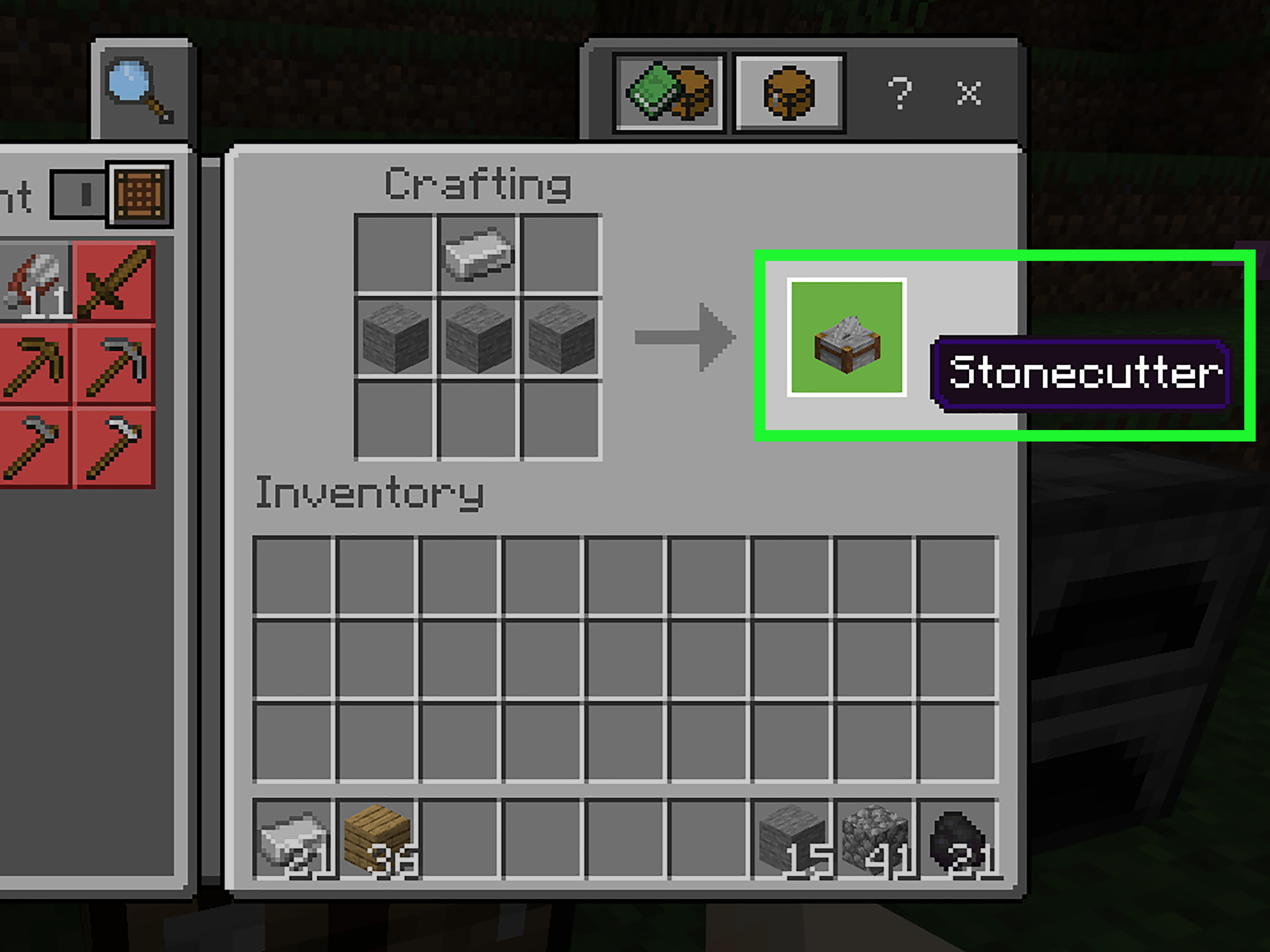
To craft a stonecutter in Minecraft, you need only two types of materials:
- 1 iron ingot
- 3 stone blocks
That is the basic stonecutter recipe. The important detail is that the recipe requires regular stone blocks, not cobblestone. This is where many new players trip over their own boots. Cobblestone is what you usually get when mining stone without Silk Touch. Regular stone is obtained by smelting cobblestone in a furnace. So yes, before you cut stone like a professional builder, Minecraft makes you cook rocks. Perfectly normal behavior.
How to Get an Iron Ingot
You can get an iron ingot by mining iron ore or deepslate iron ore, collecting raw iron, and smelting that raw iron in a furnace or blast furnace. You will need fuel such as coal, charcoal, wood, or another burnable item. Once the smelting is done, you receive an iron ingot.
If you are in early survival mode, look for iron in caves, exposed mountain areas, ravines, or underground tunnels. Iron is common enough that you usually do not need a full mining expedition for one ingot. Still, bring a pickaxe, food, and a healthy respect for skeletons, because Minecraft caves have a way of turning a simple shopping trip into a dramatic survival documentary.
How to Get Stone Blocks
To get regular stone blocks, mine stone to collect cobblestone, then place the cobblestone in a furnace with fuel. Each cobblestone smelts into one stone block. Since you need three stone blocks, smelt three cobblestone. Easy math, no redstone calculator required.
If you have a Silk Touch pickaxe, you can mine regular stone directly, but most players who are making their first stonecutter will not have Silk Touch yet. The furnace method is the simplest and most reliable option for beginners.
How to Make a Stonecutter in Minecraft: 7 Easy Steps
Now let us walk through the full process from empty hands to shiny rotating blade. The steps below work for standard Minecraft survival gameplay and are beginner-friendly for both Java Edition and Bedrock Edition players.
Step 1: Gather Cobblestone
Start by mining at least three blocks of stone with a pickaxe. Unless your pickaxe has Silk Touch, the stone will drop as cobblestone. That is fine. Cobblestone is the first stage of the process.
You can find stone almost everywhere underground, on cliffs, in caves, and beneath dirt layers. If you have just spawned into a new world, punch a tree, craft wooden tools, make a wooden pickaxe, mine some stone, then upgrade to a stone pickaxe. The usual Minecraft opening routine: tree violence, rock collecting, and pretending you will build a small starter house before accidentally designing a mansion.
Step 2: Smelt Cobblestone Into Stone
Next, open your furnace. Place cobblestone in the top input slot and fuel in the bottom slot. After a short wait, the furnace will produce regular stone. You need three stone blocks for the stonecutter recipe.
This step is essential because cobblestone will not work for the standard stonecutter crafting recipe. Players often open the crafting table with cobblestone and an iron ingot, then stare at the empty output slot like the game personally betrayed them. The fix is simple: smelt the cobblestone first.
Step 3: Find or Smelt One Iron Ingot
Mine iron ore with a stone pickaxe or better. Smelt the raw iron in a furnace using fuel, and collect one iron ingot. You only need a single ingot, which makes the stonecutter affordable very early in the game.
If you already have iron from village chests, shipwreck loot, mineshafts, or ruined portals, you can use that instead. Minecraft rewards exploration, especially if your definition of exploration includes “borrowing” from village chests while villagers stare silently into your soul.
Step 4: Open a Crafting Table
A stonecutter requires a 3×3 crafting grid, so you need a crafting table. Open the crafting table interface and make sure you have your one iron ingot and three stone blocks ready in your inventory.
You cannot craft a stonecutter directly from the small 2×2 player inventory grid. The recipe needs the full crafting table layout. If you do not have a crafting table yet, place four wooden planks in your inventory crafting grid to make one.
Step 5: Place the Iron Ingot in the Top Middle Slot
In the 3×3 crafting grid, place the iron ingot in the top middle slot. This represents the metal blade of the stonecutter. It is the sharp part, the business part, the “please do not stand on this barefoot” part.
The stonecutter recipe is shaped, so placement matters. If the iron ingot is in the wrong spot, the output may not appear. Keep it centered above the row of stone blocks.
Step 6: Place Three Stone Blocks in the Middle Row
Now place the three stone blocks in a horizontal row directly under the iron ingot. In many recipe diagrams, the iron ingot goes in the top center, and the three stone blocks fill the middle row. Some guides describe the stone as being placed in the row below the iron, which is the important relationship to remember.
The layout looks like this:
Once the ingredients are arranged correctly, the stonecutter appears in the output slot.
Step 7: Move the Stonecutter to Your Inventory
Click or tap the stonecutter in the output slot and move it into your inventory. Congratulationsyou now own one of the most convenient building tools in Minecraft. Place it wherever you like: beside your crafting table, near your furnace setup, in your storage room, or in the middle of your base so it can silently judge your uneven roofline.
How to Use a Stonecutter
Using a stonecutter is simple. Place the block on the ground, then interact with it. On desktop, right-click it. On console or mobile, use the normal interact control. The stonecutter interface opens with an input slot and a list of available output options.
Place a compatible block into the input slot. Depending on the material, the menu may show slabs, stairs, walls, bricks, polished versions, chiseled versions, cut variants, or other decorative forms. Select the output you want, then take the finished block from the result slot.
The stonecutter is especially useful because it shows possible recipes automatically. Instead of memorizing every pattern for stone bricks, mossy stone brick slabs, polished andesite stairs, sandstone walls, or cut copper blocks, you can let the interface do the thinking. Your brain is free to focus on more important questions, like “Does this tower need a balcony?” The answer is yes. It always needs a balcony.
Why the Stonecutter Is Better Than a Crafting Table for Builders
The crafting table is still essential, but for stone-based building, the stonecutter often wins. Its biggest advantage is precision. If you need one stair, craft one stair. If you need three walls, make three walls. You do not have to craft in bulk batches that leave awkward leftovers in your inventory.
This is particularly useful in survival mode, where materials cost time. A stonecutter can help reduce waste when making stairs from full blocks. It also lets you skip intermediate crafting steps. For example, certain decorative stone blocks can be produced more directly through the stonecutter than through a crafting table chain.
Another advantage is speed. Large builds require hundreds or thousands of shaped blocks. Clicking through crafting-table recipes repeatedly can become tedious. With a stonecutter, you insert a stack of material, choose the desired result, and produce what you need quickly. It turns “crafting session” into “actual building time,” which is exactly where the fun lives.
Best Blocks to Use With a Stonecutter
The stonecutter works with many stone-related and similar building blocks. The exact list can vary by Minecraft version, but common compatible materials include stone, cobblestone-related variants where supported, stone bricks, sandstone, red sandstone, granite, diorite, andesite, deepslate, blackstone, basalt, quartz blocks, prismarine, bricks, end stone bricks, purpur blocks, and copper-related blocks.
For everyday builders, the most useful materials are stone, stone bricks, deepslate, sandstone, blackstone, and quartz. These blocks appear in many popular building styles. Stone bricks are great for castles and medieval bases. Sandstone works beautifully in desert towns and temples. Blackstone fits dark fantasy builds, Nether bases, and dramatic villain lairs. Quartz is perfect for modern houses, laboratories, and any build where you want to say, “Yes, I mined the Nether and survived.”
Can You Find a Stonecutter Instead of Crafting One?
Yes, you can find stonecutters naturally in some generated structures. They commonly appear in Mason houses in villages. Depending on the version and world generation, they may also appear in certain ruins or structure-related locations. If you find one, you can mine it with a pickaxe and take it with you.
However, crafting one is usually faster. The recipe is so cheap that stealing one from a village is more of a convenience than a necessity. Still, if you are role-playing as a wandering builder with questionable property ethics, a village stonecutter is technically portable.
How the Stonecutter Works With Villagers
The stonecutter is the job site block for the Mason profession. When an unemployed villager claims a nearby stonecutter, it can become a Mason. This villager may trade items related to stone, clay, bricks, quartz, terracotta, and other decorative materials as it levels up.
This is extremely helpful for players who build often. Instead of collecting every decorative block manually, you can use villager trades to supplement your supply. A Mason villager can fit nicely into a trading hall, especially if your base uses lots of stone bricks, polished stone, quartz, or terracotta colors.
To assign the profession, place the stonecutter near an unemployed villager during working hours. Make sure the villager is not already linked to another job site block. If the villager does not switch jobs, break nearby job blocks, give the villager access to the stonecutter, and wait a little. Villagers are useful, but their pathfinding sometimes has the confidence of a potato in a maze.
Common Stonecutter Mistakes to Avoid
Using Cobblestone Instead of Stone
The most common mistake is trying to craft a stonecutter with cobblestone. Remember: smelt cobblestone into stone first. The recipe needs three stone blocks and one iron ingot.
Forgetting the Crafting Table
The stonecutter recipe needs a 3×3 crafting grid. Use a crafting table, not the small inventory grid.
Crafting Too Many Blocks at Once
The stonecutter is designed for precision. Do not turn an entire stack into stairs unless you are sure you need them. Make a few, test your design, then craft more.
Ignoring Villager Uses
If you only use the stonecutter for crafting, you are missing half its value. Try using one to create a Mason villager and unlock useful trades for future builds.
Stonecutter Tips for Survival Builders
Keep your stonecutter near your main storage system. It pairs naturally with a furnace array, blast furnace, crafting table, anvil, grindstone, and loom. If you have a dedicated building room, place the stonecutter beside chests full of stone, deepslate, sandstone, and wood. That way, you can design and craft in one place without running laps through your base like a confused villager.
Use the stonecutter when experimenting with roofs, arches, paths, bridges, and walls. Stairs and slabs are the secret sauce of good Minecraft building because they soften blocky shapes and add depth. The stonecutter makes it less painful to test different shapes.
For large projects, process materials in batches. Keep some blocks uncut, turn some into stairs, and make a smaller number of slabs and walls. This gives you flexibility while building. A smart builder keeps options open; a chaotic builder turns everything into slabs and then wonders why the tower has no walls.
Experience: What I Learned From Using a Stonecutter in Real Minecraft Builds
The first time many players discover the stonecutter, it feels like finding a secret shortcut that should have been obvious all along. In one survival world, I built a small medieval starter house with stone brick trim, cobblestone paths, and a roofline that started as “cozy cottage” and somehow became “tiny castle with opinions.” Before using a stonecutter, I kept crafting stairs at the crafting table in batches. That meant I always had too many of one shape and not enough of another. My chests filled with leftover stairs, random slabs, and enough stone brick walls to defend a kingdom of three chickens.
After adding a stonecutter beside my crafting table, the entire building rhythm changed. Instead of guessing how many stairs I needed, I could make them one by one while shaping the roof. If a doorway needed two extra stone brick stairs, I made exactly two. If a garden path looked better with a few slabs, I made a few slabs. It sounds simple, but that precision saves both materials and patience. Minecraft building is often about small adjustments, and the stonecutter makes those adjustments easy.
The biggest improvement showed up during a deepslate basement project. Deepslate looks fantastic, but mining and shaping it can feel slow, especially early in survival mode. Using a stonecutter helped stretch every block. I could turn deepslate into tiles, bricks, stairs, slabs, and walls without memorizing recipes or wasting blocks. The basement went from “gray rectangle where mobs probably hold meetings” to “dramatic underground workshop.” The stonecutter did not make me a master architect, but it definitely stopped me from rage-crafting too many stairs.
Another practical lesson is to keep the stonecutter close to your build site. For small projects, one stonecutter in your base is fine. For large builds, carry one with you. It only takes one inventory slot, and the recipe is cheap enough that making extras is no big deal. When building a bridge far from home, having a stonecutter on-site prevents constant trips back to storage. Place it near a temporary chest, dump your stone blocks inside, and craft shapes as the design develops.
The villager side is also worth exploring. A Mason villager can become a long-term partner for builders, especially when you need decorative blocks in bulk. Once you start trading, the stonecutter becomes part of a bigger system: mine materials, trade for supplies, cut blocks precisely, build better structures, repeat until your “starter base” is larger than the village you borrowed from.
My best advice is this: do not treat the stonecutter as an optional decoration. Treat it as a core tool. Put one near your storage room, one near major build sites, and one in any villager trading area where you want a Mason. The stonecutter is cheap, efficient, and beginner-friendly, but it remains useful even in late-game worlds. Whether you are building a simple stone path or a massive mountain fortress, this tiny blade block quietly saves time, saves materials, and saves you from the ancient Minecraft curse of having 37 leftover stairs and no plan.
Conclusion
Learning how to make a stonecutter in Minecraft is one of the easiest upgrades you can give your survival world. With just one iron ingot and three stone blocks, you unlock a cleaner way to craft stone slabs, stairs, walls, bricks, polished blocks, chiseled designs, and other decorative variants. The recipe is simple, the materials are easy to find, and the payoff is huge for anyone who enjoys building.
The key steps are simple: mine cobblestone, smelt it into stone, smelt raw iron into an iron ingot, open a crafting table, place the iron ingot above three stone blocks, craft the stonecutter, and start cutting. Once you use it, the crafting table will still be importantbut for stonework, the stonecutter will probably become your favorite little workshop buddy.
Note: This article is based on current, widely used Minecraft Java and Bedrock Edition crafting mechanics and practical gameplay knowledge. Recipe availability and supported stonecutter inputs can vary slightly by version, snapshots, previews, and experimental features.