

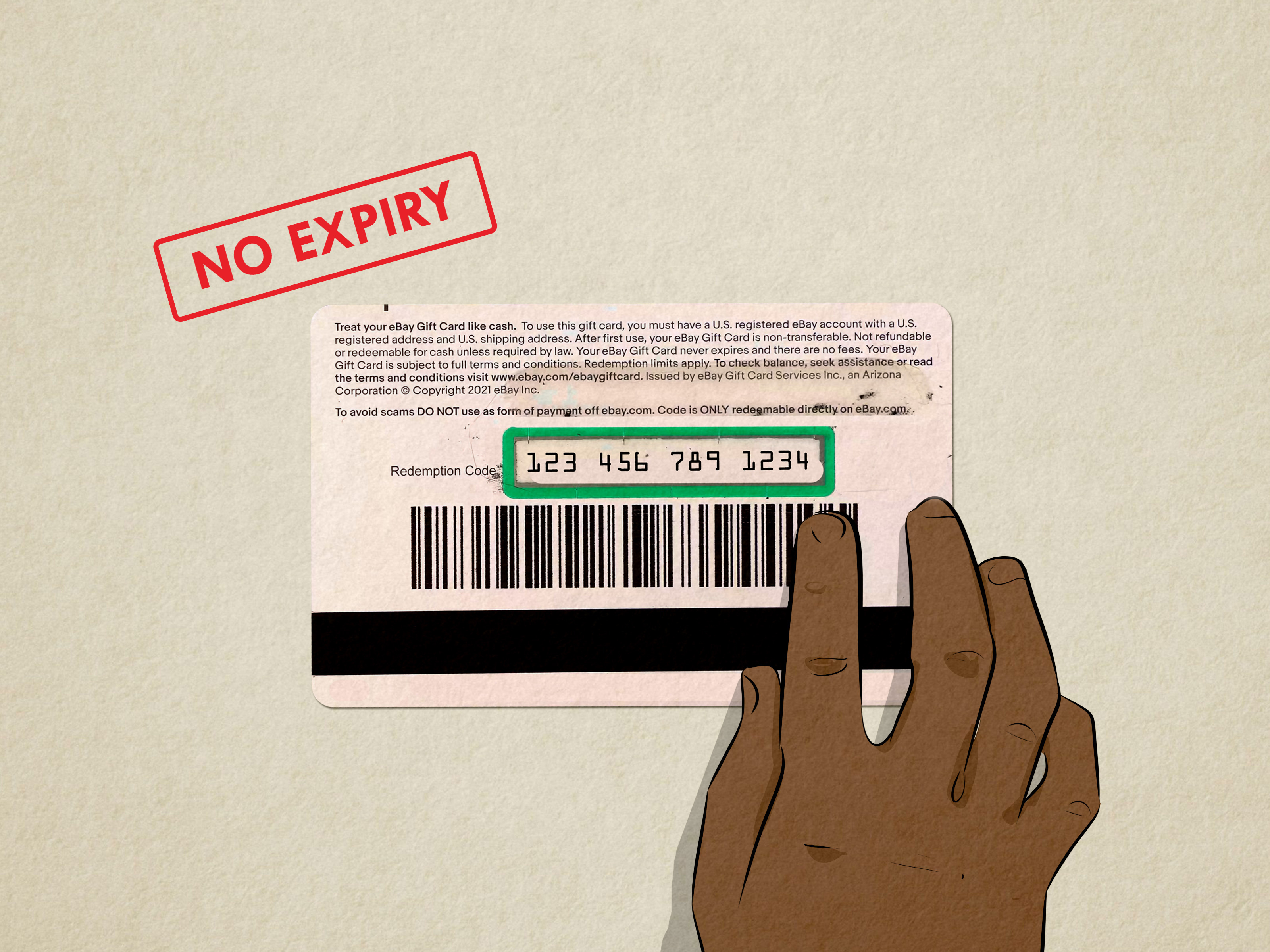
An eBay gift card is a little rectangle of shopping power. It can become vintage sneakers, a refurbished laptop, collectible trading cards, replacement car parts, a kitchen gadget you definitely “needed,” or that oddly specific item you could not find anywhere else. The trick is knowing how to redeem and spend an eBay gift card online the right waywithout typing the code into the wrong place, losing track of the balance, or accidentally trying to buy something the card cannot cover.
The good news: using an eBay gift card is simple once you understand the checkout flow. The even better news: you do not need to be a payment wizard, coupon archaeologist, or online shopping detective. You only need your eBay account, your gift card redemption code, a qualifying item, and a few minutes to review the order before clicking that glorious “Confirm and pay” button.
This guide explains how eBay gift cards work, where to enter the code, what you can and cannot buy, how to check your balance, how refunds work, and how to avoid the gift card scams that make the internet feel like a parking lot full of suspicious vans.
What Is an eBay Gift Card?
An eBay gift card is a prepaid card that can be used toward eligible purchases on eBay. It may be digital, delivered by email, or physical, purchased from a retailer and activated at the register. Both versions work in a similar way: each card has a redemption code that you enter during checkout.
Unlike a general-purpose prepaid debit card, an eBay gift card is designed for eBay purchases. That makes it useful for people who love flexible shopping but still want the recipient to spend the money in one marketplace. Instead of guessing a shoe size, phone model, or favorite hobby, the giver says, “Here, go find your treasure.” eBay, being eBay, usually has plenty of treasureand a few things that look like they were discovered in someone’s garage in 1997.
Digital vs. Physical eBay Gift Cards
A digital eBay gift card usually arrives by email. The redemption code is inside the message, often behind a “Redeem Now” button or similar prompt. A physical eBay gift card has the redemption code on the back, hidden under a scratch-off security coating. Scratch gently. This is not the time to unleash your inner raccoon.
Whether digital or physical, treat the redemption code like cash. Anyone with the code may be able to attempt to use the card, so do not text it to strangers, post it online, or send a photo of it to someone claiming they need “verification.” That is not verification. That is your money packing a tiny suitcase.
Before You Redeem: What You Need
Before using your eBay gift card online, make sure you have the basics ready. You need an eBay account, a U.S. shipping address for eligible U.S. gift card redemption, and the gift card redemption code. You should also confirm that the item you want can be purchased with an eBay gift card.
Do You Need a PayPal Account?
No. eBay no longer requires a PayPal account to use an eBay gift card for purchases. If your gift card does not cover the full order total, you may be able to pay the remaining amount with another accepted payment method, such as a credit card, debit card, Apple Pay, Google Pay, or PayPal, depending on what is available at checkout.
Can You Use an eBay Gift Card Without an eBay Account?
No. You need an eBay account to redeem and spend an eBay gift card online. This is important because once an eBay gift card is used, it becomes linked to that account. If there is a remaining balance, you must use the same account for future purchases with that card.
How to Redeem an eBay Gift Card Online
Redeeming an eBay gift card happens during checkout. You do not need to “load” the card into a separate wallet first, though eBay may allow you to add or link the gift card to your account. The standard process is to shop, go to checkout, enter the code, apply it, and confirm payment.
Step 1: Sign In to Your eBay Account
Start by signing in to your eBay account. If you have multiple eBay accounts, choose carefully. Once you use a gift card, it is linked to the first account where it was redeemed. That is convenient for security, but inconvenient if you accidentally use your old account from college with the username “SneakerWizard2009.”
Step 2: Find an Eligible Item
Search for the item you want and review the listing. Look at the price, shipping cost, delivery estimate, seller rating, return policy, item condition, and any taxes or fees that may appear at checkout. An eBay gift card can help pay the order total, but it does not magically make a poor listing a good idea.
For example, if you are buying a refurbished tablet, compare several listings. Check whether the charger is included, whether the device is locked to a carrier, and whether the seller accepts returns. A gift card is still real money, so spend it with the same attention you would give your credit card.
Step 3: Go to Checkout
When you are ready, select “Buy It Now” or proceed from your cart. Enter or confirm your shipping address and review your payment details. Do not rush this step. The checkout page is where tiny errors like an outdated address can become big headaches.
Step 4: Enter the Redemption Code
At the bottom of the checkout page, look for the field labeled “Gift cards and coupons” or similar wording. Enter the eBay gift card redemption code exactly as shown. If you are using a digital card, copy and paste carefully. If you are using a physical card, type the code slowly and check for look-alike characters.
After entering the code, select “Apply.” eBay should update the order total to show the gift card amount applied. If the card covers the full amount, your remaining balance due may become zero. If the order costs more than the card balance, choose another payment method for the difference.
Step 5: Review and Confirm Payment
Before selecting “Confirm and pay,” review everything one more time: item, seller, shipping address, delivery estimate, gift card amount, remaining payment method, taxes, and total. Once the details look correct, confirm the order. Congratulationsyou have successfully turned a gift card into a real purchase, which is basically modern alchemy.
How to Spend an eBay Gift Card Wisely
Spending an eBay gift card is not just about using the code. It is about stretching the value, choosing the right listings, and avoiding surprises. eBay has millions of items, so a little strategy goes a long way.
Use It for Practical Purchases
One smart way to spend an eBay gift card is on items you already planned to buy. Think phone accessories, replacement parts, printer ink, household tools, hobby supplies, used books, or certified refurbished electronics. This turns the gift card into real budget relief instead of an excuse to buy a life-size cardboard cutout of a celebrity. Unless that was already in the budget. No judgment.
Compare New, Used, Open-Box, and Refurbished Items
eBay is famous for variety. The same product may appear as new, used, open-box, or refurbished. Read the condition notes carefully. A used camera lens from a trusted seller may be an excellent deal, while a suspiciously cheap “new” product from a low-feedback seller may deserve a second look.
Check Shipping Costs Before You Celebrate
A low item price can lose its sparkle when shipping is expensive. Always compare the total cost, not just the listing price. A $22 item with free shipping may beat a $15 item with $12 shipping. Your gift card does not care which line item gets the money; your wallet does.
Watch for Coupons and Promotions
Sometimes eBay offers coupons or discount promotions. If you have a valid coupon, you may be able to enter it in the same general checkout area used for gift cards and coupons. Always read the coupon terms because some offers apply only to certain categories, sellers, dates, minimum purchase amounts, or payment methods.
What Can You Buy With an eBay Gift Card?
In general, eBay gift cards can be used for eligible products sold on eBay. Popular choices include electronics, fashion, collectibles, auto parts, home goods, toys, sporting goods, watches, and accessories. If the listing is eligible and the checkout page accepts the gift card, you can apply the balance toward the order.
Examples of common eBay gift card purchases include a replacement laptop charger, a set of vintage baseball cards, a refurbished smartwatch, a rare book, a pair of sneakers, a car mirror, a kitchen mixer attachment, or a camera tripod. In other words, the card can fund both the practical and the delightfully specific.
What Can’t You Buy With an eBay Gift Card?
eBay gift cards have restrictions. They cannot be used to buy other eBay gift cards, third-party gift cards, gift certificates, coupons, coins, paper money, virtual currency, or bullion such as precious metal bars or coins. They also cannot be used to pay eBay selling fees.
If your cart contains a restricted item, the gift card may not apply at checkout. The easiest fix is to remove the restricted item and try again with an eligible purchase. If you are trying to buy something unusual, check the listing and checkout details before assuming the gift card will work.
How to Check Your eBay Gift Card Balance
You can view eBay gift card balances during checkout in the “Gift cards and coupons” section after applying the code. eBay may also show linked gift card balances in the Payments section of My eBay. If you used the gift card previously, remember that the remaining balance is tied to the same eBay account.
If you recently bought or received a gift card, note that activation may not be instant. In some cases, a newly purchased eBay gift card may take up to several hours before it is ready to redeem. If the card does not work immediately after purchase, keep the receipt and try again later before assuming disaster has arrived wearing a tiny hat.
What Happens If Your Order Costs More Than the Gift Card?
If your order total is higher than your eBay gift card balance, you can usually pay the remaining amount with another accepted payment method. For example, if your cart total is $68 and your gift card balance is $50, you can apply the gift card and pay the remaining $18 plus any applicable taxes or shipping difference with another payment option available at checkout.
This split-payment flexibility is useful because you do not have to find an item that matches the card balance perfectly. A $100 gift card can go toward a $124 pair of headphones, a $47 tool set, or several smaller items in one cart, as long as the purchase qualifies and checkout allows the payment combination.
What Happens If Your Order Costs Less Than the Gift Card?
If your order total is lower than the gift card balance, the remaining balance stays available for future eligible purchases. Once the card has been used, the remaining balance is linked to the eBay account where it was first redeemed. To spend the rest, sign in with that same account and use the gift card again at checkout.
For example, if you use a $75 gift card to buy a $32 item, the remaining balance can be used later. Do not throw away the physical card or delete the digital email until you are sure the balance is fully spent and any return period has passed.
Do eBay Gift Cards Expire?
eBay gift cards do not expire and do not charge fees. That is helpful, but it does not mean you should ignore the card forever. Prices change, listings disappear, accounts get forgotten, and physical cards can be misplaced. The smartest move is to use the card when you have a purchase you actually want, then keep the code and receipt until the balance is gone.
How Refunds Work With eBay Gift Cards
If you return an item purchased with an eBay gift card, the gift card portion of the refund is credited back to the gift card. You can use the redemption code again, but you must use the same eBay account that made the original purchase.
Here is a simple example: you buy a $60 item using a $40 gift card and $20 from a credit card. If the order is refunded, the $40 gift card amount typically goes back to the gift card, while the $20 goes back to the other payment method, subject to eBay’s refund process and the seller’s return policy. Keep the card code and proof of purchase until the entire transaction is settled.
Why Your eBay Gift Card Might Not Work
If your eBay gift card is not working, do not panic. Most issues fall into a few common categories. The card may not be activated yet, the code may have been entered incorrectly, the item may be restricted, the card may already be linked to another eBay account, or your account may not meet the requirements for redemption.
Common Troubleshooting Tips
First, recheck the redemption code. Look for mistaken letters or numbers. Second, confirm you are signed in to the correct eBay account, especially if the card has been used before. Third, remove restricted items from your cart. Fourth, confirm your shipping address is eligible. Fifth, check whether the card has a remaining balance.
If the card was just purchased, wait a few hours and try again. If it still does not work, contact eBay customer support and keep your receipt, card number, and any error messages handy. Screenshots can help too, as long as you do not share the full redemption code in unsafe places.
eBay Gift Card Limits to Know
eBay gift cards may be subject to redemption limits. Current eBay terms state that no more than $1,000 in gift cards may be redeemed per day and no more than $1,500 may be redeemed per calendar month. eBay may review accounts linked to a user when calculating these limits.
Most everyday shoppers will never bump into these limits. However, if you are planning a large purchase, such as a high-end refurbished laptop or camera gear, it is smart to review the latest gift card terms before checkout.
How to Avoid eBay Gift Card Scams
This part matters. An eBay gift card should only be redeemed at eBay checkout. If someone asks you to buy an eBay gift card and send them the code by text, email, phone, social media, marketplace message, or photo, it is almost certainly a scam.
Scammers love gift cards because codes can be used quickly and are difficult to recover once stolen. They may pretend to be a government agency, tech support company, romantic partner, employer, seller, buyer, utility company, or family member in an emergency. The story changes, but the ending is the same: they want the code.
Red Flags That Mean “Stop”
Stop immediately if someone says payment must be made with an eBay gift card outside eBay checkout. Stop if they create urgency, threaten arrest, claim your account is in danger, promise a prize, overpay by check and ask for the difference in gift cards, or tell you not to talk to anyone. Real businesses and government agencies do not demand gift card codes as payment.
Safe Gift Card Habits
Buy gift cards from trusted retailers. Inspect physical cards for tampering before purchase. Keep the receipt. Do not use random balance-check websites. Type the official eBay address directly into your browser instead of clicking suspicious links. Never share your redemption code outside checkout. A gift card code is not a password, but you should guard it like one.
Best Ways to Maximize an eBay Gift Card
To get the most value from an eBay gift card, shop with a plan. Start with items you already need, compare total prices, read seller feedback, review return policies, and check whether coupons are available. If the item is expensive, compare sold prices for similar listings so you know whether the deal is actually good.
For collectibles, condition matters. For electronics, warranty and return options matter. For auto parts, compatibility matters. For fashion, sizing and authenticity matter. Your eBay gift card can be a great tool, but it does not replace common sense. Think of it as a shopping assistant, not a magic wand.
Specific Examples of Spending an eBay Gift Card
Example 1: Buying a Refurbished Phone
Suppose you have a $100 eBay gift card and want a refurbished phone listed for $179. You confirm the seller has strong feedback, the phone is unlocked, the condition is clearly described, and returns are accepted. At checkout, you enter the gift card code, apply $100, and pay the remaining balance with a credit card. This is a practical use because the gift card lowers the out-of-pocket cost of a planned purchase.
Example 2: Buying Several Small Items
Maybe you have a $50 eBay gift card and need a phone case, charging cable, and replacement vacuum filter. Add eligible items to your cart, compare shipping costs, and apply the gift card at checkout. If the total is $43, the leftover balance remains linked to your account for later.
Example 3: A Purchase That Will Not Work
You try to use an eBay gift card to buy another gift card or coins. The code does not apply because those categories are restricted. The solution is not to argue with the checkout pagecheckout pages are famously stubbornbut to choose an eligible item instead.
Experience Notes: What It Feels Like to Redeem and Spend an eBay Gift Card Online
Redeeming an eBay gift card online is usually smooth, but the experience is better when you slow down. The first moment that trips people up is finding the code. Digital cards are easy if the email is still available, but physical cards require careful scratching. Scratch too lightly and you cannot read the code. Scratch like you are mining for gold and you may damage the numbers. A coin and a gentle hand are the dream team.
The second experience lesson is that checkout deserves attention. Many shoppers get excited when the gift card applies and immediately click confirm. That is understandable; discounts make people move faster than coffee. But it is worth pausing to check the shipping address, especially if you have moved recently or shipped a birthday gift to someone last year. A gift card can pay for the item, but it cannot convince a package to leave your old apartment building.
The third lesson is to think in terms of total value, not just “free money.” A $75 gift card can feel like permission to buy anything under $75, but the best purchases are often things you already wanted or needed. For example, using the card toward a reliable refurbished monitor, a replacement appliance part, or a hobby tool can feel more satisfying than spending it on random impulse items. Fun purchases are fine too; just make sure the fun survives past the delivery notification.
Another practical experience: keep the original email, physical card, and receipt until the balance is fully used and you are sure you will not return the item. This sounds boring, like advice from someone who alphabetizes batteries, but it matters. If a refund goes back to the gift card, you may need the same redemption code again. Deleting the email too soon can turn a simple refund into a scavenger hunt through your inbox.
It also helps to use the gift card sooner rather than later. eBay gift cards do not expire, but listings do. The perfect used camera, rare book, or discounted tool set may not wait patiently while you “think about it” for four months. If you see a strong listing from a reputable seller at a fair total price, using the card can be a smart move.
Finally, the most important real-world lesson is this: the redemption code belongs only at eBay checkout. Not in a text message. Not in a screenshot. Not in a “verification form.” Not in a conversation with someone who says they are from customer support but somehow types like a panicked raccoon. If anyone asks for the code outside eBay, stop. A legitimate eBay gift card purchase happens on eBay, through checkout, after you choose an eligible item.
Conclusion
Learning how to redeem and spend an eBay gift card online is simple once you understand the process. Sign in to your eBay account, choose an eligible item, go to checkout, enter the redemption code in the gift cards and coupons field, apply it, review the new total, and confirm payment. If the gift card does not cover everything, use another accepted payment method for the remaining balance.
The smartest shoppers also check restrictions, protect the redemption code, keep proof of purchase, compare listings, and avoid anyone who asks for gift card payment outside eBay. Used well, an eBay gift card is flexible, practical, and fun. It can help you save money on something useful or finally buy that oddly specific collectible you have been stalking like a polite online detective.