

Editorial note: This article is based on current TikTok Help Center, TikTok Safety Center, TikTok Newsroom, creator policy, and platform safety information available as of May 2026. TikTok features may vary by region, app version, account type, and rollout status.
Trying to find your TikTok reports count can feel a little like searching for a secret room in a house that keeps rearranging itself. One day a setting is under “Safety Center,” the next day it appears inside “TikTok Studio,” and somewhere in the middle you start wondering whether the app is testing your patience as a new engagement feature.
Here is the honest answer: TikTok does not show users an exact public counter of how many times their account, video, comment, LIVE, or profile has been reported by other people. There is no simple “Reports Against Me: 7” dashboard. However, TikTok does provide several tools that help you check related information, including your Account Status, possible Community Guidelines violations, removed content, appeal options, account restrictions, and the status of reports you have submitted against other content or accounts.
So, while you may not be able to see a clean report count, you can still figure out whether reports have led to enforcement actions, whether your account is in good standing, and what steps to take if something looks wrong. This guide explains the easiest ways to check your TikTok report-related information without falling into the swamp of rumors, fake “report count checker” apps, or suspicious websites that ask for your login. Spoiler: please do not give your password to a website with twelve pop-ups and a dancing robot.
Can You See Your Exact Reports Count on TikTok?
No, TikTok does not currently give regular users a direct count showing how many reports other people have filed against their account or content. If someone reports your video, TikTok may review it, but you typically will not receive a notification simply saying, “This video was reported three times.”
What you can see instead are outcomes. For example, TikTok may notify you if your post is removed, your account receives a warning, your LIVE access is restricted, your comments are limited, your content becomes ineligible for the For You feed, or your account is at risk because of repeated violations. In other words, TikTok usually shows the decision, not the raw number of reports behind that decision.
Why TikTok Does Not Show a Public Reports Counter
A visible report count could create several problems. It might encourage harassment, mass-reporting campaigns, revenge reporting, or attempts to game the moderation system. TikTok’s review process also does not rely only on user reports. The platform uses automated systems, human moderators, Community Guidelines, appeal reviews, and account history to evaluate whether content actually breaks the rules.
This matters because one report does not automatically equal one violation. A video can be reported many times and still stay up if it does not violate TikTok’s policies. Likewise, a video may be removed even before anyone reports it if TikTok’s systems detect a clear violation. Reports are signals, not final verdicts.
Quick Answer: Where to Check Report-Related Information
If you are trying to see your TikTok reports count, use these areas instead:
- Account Status: Shows whether your account is in good standing and may list violations.
- Account Check: Available to some creators and can review recent posts and account health.
- Inbox notifications: TikTok sends notices when content is removed or restrictions are applied.
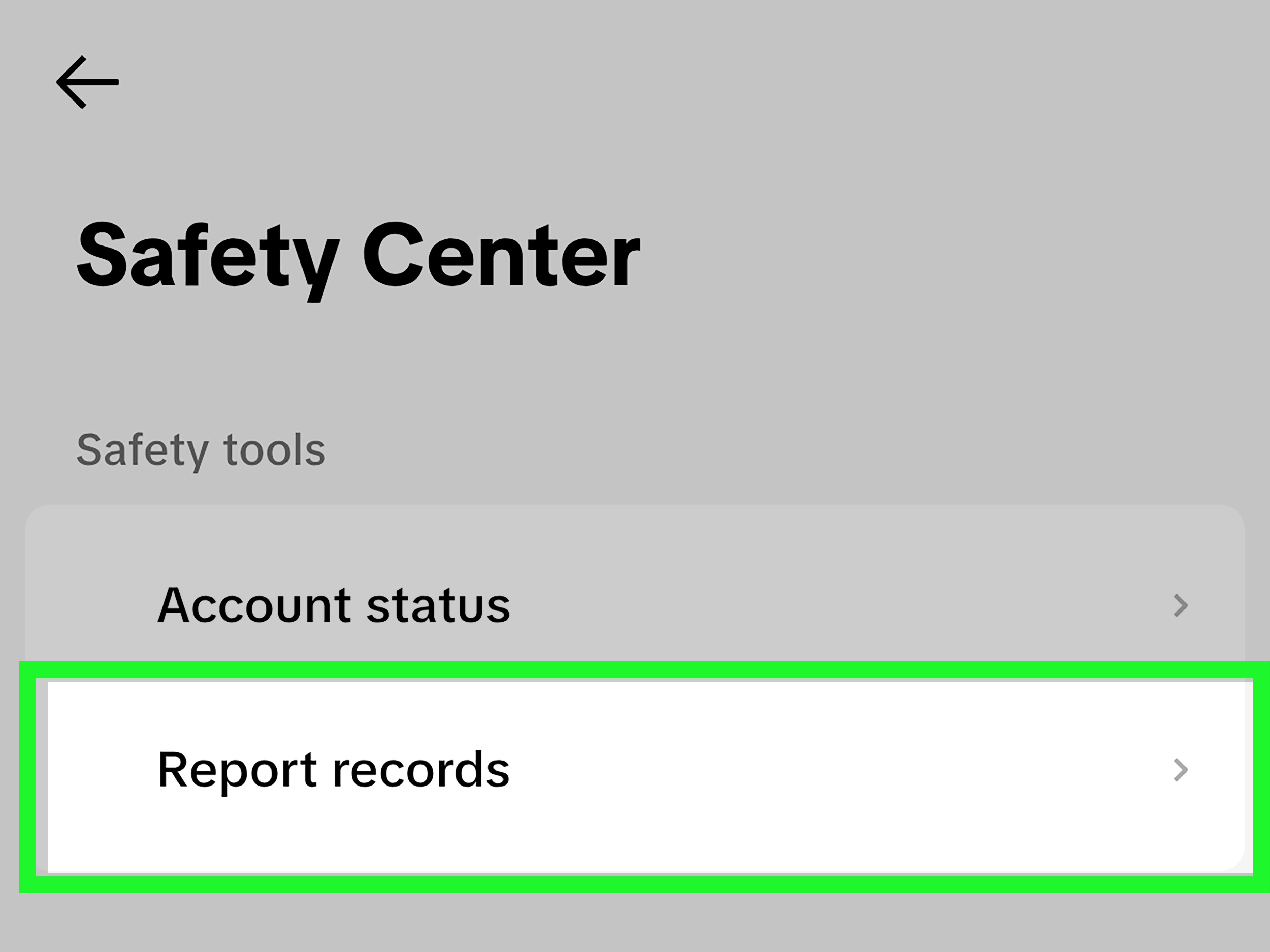
- Report Records: Shows the status of reports you made on other content or accounts, not reports made against you.
- TikTok Studio: May show creator account health, analytics, and content performance information.
The key is understanding the difference between reports against you and reports you submitted. Many users confuse the two, which is why this topic gets messier than a comment section under a controversial hot take.
How to Check Your TikTok Account Status
Your TikTok Account Status is the best place to start if you want to know whether your account has been affected by reports, moderation decisions, or Community Guidelines violations.
Easy Steps to Check Account Status
- Open the TikTok app.
- Tap Profile at the bottom right.
- Tap the Menu icon, usually shown as three lines in the top right corner.
- Select Settings and privacy.
- Look for Support or Safety Center.
- Tap Account Status.
- Review any warnings, violations, restrictions, or account standing notices.
If your account is in good standing, TikTok may show that there are no current issues. If there is a problem, you may see information about removed videos, feature restrictions, strikes, or appeal options. This is the closest practical substitute for seeing a “reports count,” because it tells you whether reports or moderation activity have actually affected your account.
What Account Status May Show
Depending on your app version and account type, Account Status may include:
- Video violations
- Account warnings
- Strike-related information
- Feature restrictions
- Content removed for breaking rules
- Appeal options
- Notices that your account is at risk
If you see nothing unusual, that is usually a good sign. It does not prove nobody has ever reported you, but it suggests TikTok has not recently taken major action against your account.
How to Use Account Check on TikTok
TikTok has also introduced Account Check for some creators. This feature is designed to help users quickly audit their account health and recent posts. It may show whether your account is in good standing, whether recent posts have violations, and whether certain features have been restricted.
Steps to Find Account Check
- Open TikTok and go to your Profile.
- Tap the Menu icon.
- Open TikTok Studio, Creator tools, or Settings and privacy.
- Look for Account Check, Account Status, or Safety Center.
- Review the account health summary and recent post status.
If you do not see Account Check, do not panic. TikTok often rolls out features gradually. Your region, account type, app version, or eligibility may affect whether the feature appears. Update the app and check again later, but do not download random third-party apps claiming they can unlock hidden TikTok reports. That is how accounts get compromised, and nobody wants to lose their profile over curiosity and a shady button labeled “Reveal Secret Reports.”
How to See Reports You Have Made on TikTok
This is where the wording gets important. TikTok’s Report Records page is not a list of people who reported you. Instead, it is designed to show the status of reports you submitted on other videos, comments, accounts, LIVE content, or other TikTok features.
Steps to Check Your Report Records
- Open the TikTok app.
- Go to your Profile.
- Tap the Menu icon.
- Open Settings and privacy.
- Go to Support or Safety Center.
- Look for Report Records.
- Review the status of reports you have submitted.
This section may show whether TikTok reviewed a report you filed and what decision was made. For example, if you reported a video for harassment, the report record may show that TikTok reviewed it and either removed the content or found no violation.
Again, this does not reveal who reported you or how many reports your content received. It only tracks your own reporting activity.
Check Your TikTok Inbox for Violation Notices
TikTok often sends important account and content notices through the Inbox. If a video was removed, a feature was restricted, or an account warning was issued, you may find details there.
Steps to Check Your Inbox
- Open TikTok.
- Tap Inbox.
- Look for notifications from TikTok.
- Open any notice about removed content, restrictions, warnings, or appeals.
- Read the explanation carefully before taking action.
If TikTok removed a video, the notice may explain which rule was involved. It may also include a button or link to submit an appeal. If you believe TikTok made a mistake, use the official appeal process instead of deleting the post immediately. In some cases, deleting content under review may make it harder for TikTok to restore it or remove the violation from your record.
How to Appeal a TikTok Violation
If TikTok removes your content or restricts your account, you may be able to appeal. Appeals are useful when your video was misunderstood, taken out of context, flagged incorrectly, or affected by an automated review that missed the joke, the education angle, or the fact that your dog was clearly the villain of the story.
Steps to Appeal Removed Content
- Open the notification about the removed content.
- Tap Submit an appeal if the option is available.
- Follow the instructions on the screen.
- Explain clearly why you believe the content does not violate TikTok’s rules.
- Wait for TikTok to review the appeal.
You may also be able to appeal from the removed post itself by tapping the violation notice or “See details” option. Keep your explanation short, calm, and specific. “TikTok hates me” is emotionally understandable, but “This video discusses harassment prevention and does not target a private person” is more useful.
Can You See Who Reported You on TikTok?
No, TikTok does not show you who reported your video, account, comment, or LIVE. Reports are generally private. This helps protect users from retaliation and encourages people to report harmful content when needed.
If you suspect someone is repeatedly reporting your content unfairly, focus on what you can control:
- Check your Account Status.
- Review any violation notices.
- Appeal incorrect decisions.
- Keep screenshots of important notices.
- Block or limit interactions with users who are harassing you.
- Use comment filters and privacy settings.
Mass reporting can be frustrating, but TikTok still reviews content against its policies. A pile of false reports should not automatically remove content if the content does not break the rules. That said, moderation systems are not perfect, so appeals matter.
How TikTok Reports and Violations Work
When a user reports something on TikTok, that report becomes a signal for review. TikTok may review the reported content using automated systems, human moderation, or both. If the content violates Community Guidelines, TikTok may remove it, restrict it, limit distribution, issue a warning, apply a strike, or restrict certain features.
TikTok’s enforcement system also considers repeated violations. Under its strike-based approach, accounts that repeatedly violate policies may face stronger penalties. Some severe violations can result in immediate bans, while lower-level violations may lead to warnings, restrictions, or strikes that expire after a period of good standing.
Reports Are Not the Same as Violations
This is the golden rule: a report is not a punishment. A report is simply a request for TikTok to review something. A violation happens only if TikTok determines that the content or behavior breaks its rules.
For example, if someone reports your cooking video because they do not like cilantro, that is not a Community Guidelines violation. It may be a culinary disagreement, possibly a dramatic one, but TikTok is unlikely to ban you for guacamole confidence. On the other hand, if a video contains harassment, threats, dangerous behavior, hate speech, scams, or explicit policy violations, TikTok may take action even if only one person reports it.
Common Reasons TikTok Content Gets Reported
Users may report content for many reasons, including:
- Harassment or bullying
- Hate speech
- Violence or threats
- Dangerous acts or challenges
- Scams or misleading content
- Impersonation
- Sexual content or nudity
- Minor safety concerns
- Spam or fake engagement
- Copyright or trademark issues
Some reports are valid. Some are misunderstandings. Some are made by users who are upset, confused, or simply allergic to nuance. That is why the review process matters more than the report count.
What to Do If You Think Your TikTok Is Being Mass Reported
If you believe people are mass reporting your content, do not respond by posting angry callout videos. That can make the situation worse and may create new policy risks. Instead, take a clean and organized approach.
Step 1: Check Account Status
Look for current warnings, strikes, removals, or restrictions. If your account is still in good standing, the reports may not have resulted in action.
Step 2: Review the Specific Content
Ask yourself whether the content could be misunderstood. Did it include sarcasm, sensitive topics, copyrighted audio, heated language, dangerous-looking behavior, or claims that need context? If yes, consider editing future content to be clearer.
Step 3: Appeal Incorrect Decisions
If TikTok removed content unfairly, appeal through the official app. Be specific and polite. The goal is to help a reviewer understand the context quickly.
Step 4: Tighten Your Privacy Settings
You can limit comments, filter keywords, block users, restrict direct messages, and control who can duet, stitch, or mention you. These tools can reduce harassment and lower the odds of coordinated drama spreading through your account.
Step 5: Keep Records
Take screenshots of removal notices, appeal results, harassment, threats, or repeated false claims. If you need to contact TikTok support, organized evidence is much more helpful than a paragraph typed at midnight in all caps.
Do Third-Party TikTok Report Count Checkers Work?
Be extremely careful with third-party websites or apps that claim they can show your hidden TikTok report count. Most regular users cannot access private moderation data, and TikTok does not provide a public tool for outsiders to reveal who reported you or how many times you were reported.
Do not enter your TikTok username and password into unofficial tools. Do not install suspicious browser extensions. Do not pay for “report removal” services. Many of these tools are designed to collect logins, push malware, sell fake services, or scare creators into paying for information they cannot actually provide.
If a tool promises secret TikTok moderation data, treat it like a gas station sushi coupon: technically possible, but spiritually unsafe.
How to Keep Your TikTok Account in Good Standing
The best way to worry less about reports is to make your account harder to flag successfully. That does not mean making boring content. It means creating with enough awareness that your jokes, opinions, tutorials, reactions, and trends do not accidentally wander into policy trouble.
Read the Community Guidelines Before Posting Risky Content
If you post about sensitive topics, news, health, politics, crime, conflict, body image, pranks, financial advice, or dangerous stunts, review TikTok’s rules first. A little prevention beats a lot of appeal paperwork.
Add Context When Needed
Educational and documentary content can be misunderstood without context. Use captions, on-screen text, and descriptions to explain your purpose. For example, “Explaining how to report scams” is clearer than a video that appears to demonstrate a scam with no framing.
Avoid Harassment Spirals
Do not encourage followers to attack someone, mass comment on another account, or “go report this person.” Even if you feel wronged, mobilizing an audience can create policy issues.
Use Original or Licensed Material
Copyright claims are separate from regular Community Guidelines reports, but they can still affect content. Use TikTok’s licensed sounds, original footage, or material you have permission to use whenever possible.
Monitor Repeat Issues
If TikTok repeatedly flags a certain type of content, take the hint. Maybe your comedy format needs clearer context. Maybe your product claims need evidence. Maybe your prank series has gone from “funny” to “why is everyone running?” Adjust before the account health meter starts coughing.
Troubleshooting: Why You Cannot Find Account Status or Report Records
If you cannot find Account Status, Account Check, or Report Records, try these fixes:
- Update TikTok from the App Store or Google Play.
- Close and reopen the app.
- Check under Settings and privacy, Safety Center, Support, Creator tools, and TikTok Studio.
- Switch from Wi-Fi to mobile data or vice versa.
- Log out and log back in if needed.
- Check whether you are using a personal, business, or creator account.
- Wait if the feature is still rolling out in your region.
Feature names can change, so use TikTok’s in-app search if available. Searching terms like “Account Status,” “Safety Center,” “Report Records,” or “Account Check” may help you find the right page faster.
Examples: What Different TikTok Notices May Mean
Example 1: Your Video Was Removed
This means TikTok decided the video violated a rule. It may or may not have started with a user report. Open the notice, read the policy reason, and appeal if you believe the decision was wrong.
Example 2: Your Account Is in Good Standing
This means TikTok is not currently showing major account health problems. It does not mean nobody ever reported you. It means no visible enforcement issue is currently affecting your account.
Example 3: Your Content Is Not Eligible for the For You Feed
This may happen when content does not break the rules badly enough to be removed but is considered unsuitable for broad recommendation. You may be able to review details and appeal, depending on the notice.
Example 4: Your Report Was Reviewed
This appears in Report Records when you reported someone else’s content. It tells you the result of your report, not whether someone reported you.
Real-World Experience: What Checking TikTok Reports Actually Feels Like
For many creators, the first time they search for a TikTok reports count happens after something weird: views suddenly drop, a video disappears, comments turn spicy, or a stranger announces, “I reported you,” with the confidence of someone who believes they personally manage the internet. The natural reaction is to look for a counter. You want proof. You want numbers. You want TikTok to hand you a neat little receipt.
In practice, the process is less dramatic and more detective-like. The best habit is to check your account health before assuming the worst. Open Account Status, review your Inbox, and look for actual notices. If there are no violations, no restrictions, and no removed videos, your account may be fine even if people are loudly claiming they reported you. Online threats often sound bigger than their real impact.
Creators who post opinion content, comedy, reaction videos, or educational clips about sensitive subjects tend to experience this more often. A joke can be clipped out of context. A news explainer can be mistaken for endorsement. A self-defense tip can look like dangerous behavior if the caption is vague. That is why experienced TikTok users often add clear on-screen text, avoid aggressive calls to action, and keep explanations simple. Context is not glamorous, but it can save you from moderation confusion.
Another common experience is discovering that TikTok’s report-related tools answer a slightly different question than the one you asked. You may ask, “How many reports did I get?” TikTok answers, “Here is whether your account has violations.” Annoying? A little. Useful? Actually, yes. The report count itself matters less than whether TikTok acted on those reports. A video with ten bad-faith reports and no violation is usually less concerning than one confirmed policy violation that creates a strike.
Many creators also learn the hard way that emotional responses can create more trouble than the original report. Posting “Everyone go report this person back” can look like harassment or coordinated behavior. Replying angrily to every critic can turn a small issue into a large one. A calmer strategy works better: document the issue, appeal if needed, block abusive users, filter keywords, and keep creating.
One practical routine is to check Account Status once a week if your account is growing quickly or if you post in a niche that attracts debate. You do not need to obsess over it daily. Think of it like checking your car dashboard. You do not stare at the oil light every three seconds, but you also do not ignore it when it turns on.
The biggest lesson is this: TikTok reports are not always personal, and they are not always powerful. Some reports are valid safety signals. Some are misunderstandings. Some are just digital side-eye. Your job is to understand the tools TikTok gives you, keep your content within the rules, and appeal decisions that seem wrong. No secret report counter required.
Conclusion
So, can you see your reports count on TikTok? Not exactly. TikTok does not show a direct number of reports filed against your account or content, and it does not reveal who reported you. What you can see are the important things: your Account Status, Account Check details if available, violation notices, removed content, restrictions, appeals, and Report Records for reports you submitted.
The smartest approach is to stop chasing a hidden number and start checking the areas that actually affect your account. If your Account Status is clean, your Inbox has no warnings, and your content remains active, there may be nothing to worry about. If TikTok has taken action, read the reason carefully, appeal when appropriate, and adjust future posts to reduce confusion.
TikTok may be fast, chaotic, funny, dramatic, and occasionally confusing enough to deserve its own weather forecast, but account safety is manageable when you know where to look. Use the official tools, avoid shady report-checker apps, and remember: reports are signals, not sentences.