

Note: This guide reflects Roblox trading features and subscription rules available in July 2026. Roblox may change menu names, eligibility requirements, regional availability, or transaction rules, so review the confirmation screen before completing any trade.
Trading on Roblox can feel like entering a tiny stock market where everyone wears enormous hats. One player wants your collectible face accessory, another offers three smaller items, and somebody in the corner insists that a suspiciously ordinary-looking fedora is “about to explode in value.” Welcome to the Roblox trading economy.
The official Roblox trading system lets eligible users exchange certain Limited and Limited U avatar items. Robux may also be added to an offer, subject to platform fees and limits. However, you cannot trade every shirt, accessory, game pass, pet, weapon, or random object sitting in your inventory. Items from experiences such as Adopt Me!, Blox Fruits, or other Roblox games use their own trading systems, when the developers provide one.
This guide explains how to trade items on Roblox in 11 practical steps, from checking your subscription to evaluating an incoming offer. It also covers item values, Recent Average Price, transaction fees, common scams, and several lessons beginners usually learn after making at least one trade that seemed brilliant for approximately seven minutes.
What You Need Before Trading on Roblox
Both participants generally need an active Roblox Plus or qualifying Roblox Premium subscription. Roblox Plus became the platform’s primary purchasable membership in 2026, although some users may still have an active Premium subscription. Trading and inventory permissions must also be configured under the account’s privacy and content restriction settings.
- An active Roblox Plus or eligible Premium subscription
- At least one trade-eligible Limited or Limited U item
- Trading enabled in your account settings
- A second eligible user whose settings allow the trade
- Access to the Roblox website, preferably through a desktop browser
- A secure account with a verified email and two-step verification
Regional rules can affect access. The Trade Items option may also be missing when the other user is not eligible, has disabled trading, or does not own items that can be exchanged.
How to Trade Items on Roblox in 11 Steps
Step 1: Confirm That Your Subscription Includes Trading
Sign in to the Roblox account containing the items you want to trade. Open Settings, select Subscriptions, and confirm that your Roblox Plus or Premium membership is active.
A canceled subscription may remain active until the paid period expires. However, once the membership ends, trading access can disappear. Subscriptions are tied to the account that purchased them, so double-check your username before buying one. Paying for a membership on the wrong account is an impressively efficient way to disappoint yourself.
Step 2: Enable Trading and Review Inventory Privacy
Open Settings and go to Privacy & content restrictions. Select Trading & inventory, then check who is allowed to trade with you and who can view your inventory.
Choose the narrowest audience that still lets you trade comfortably. Allowing only friends or selected connections can reduce random offers, although it will also limit who can approach you. For the smoothest transaction, both users should verify their settings before searching through menus and blaming the Wi-Fi.
Step 3: Identify Which Items Are Actually Tradeable
Open your Roblox inventory and inspect the items you own. Tradeable collectibles are normally identified by a Limited or Limited U label on the item details page. Ordinary accessories, clothing, bundles, animations, and game-specific assets are not automatically eligible.
Item eligibility can vary, especially with creator-made collectibles and regional restrictions. The safest test is simple: open the official trade window. If an item appears as selectable, Roblox currently recognizes it as eligible for that transaction.
Newly purchased Limited items may enter a holding period before certain resale actions become available. Roblox states that this period can last up to 30 days. Item pages may also show reseller listings, price charts, and historical average prices.
Step 4: Research the Item’s Price, Value, and Demand
Never evaluate a collectible by its appearance alone. An accessory that resembles a mildly dented saucepan may be far more valuable than an elaborate crown with particle effects and enough gold to alarm an airport security scanner.
Start with the item’s Roblox details page. Review its lowest resale price, available copies, reseller list, and price chart. Then compare three separate measurements:
- Recent Average Price: Commonly called RAP, this reflects recent resale activity.
- Community value: An unofficial estimate based on demand, rarity, ownership, and trading history.
- Demand: How easily the item can be traded again without offering a large discount.
Third-party analytics platforms can help compare RAP and community estimates, but they are not operated or endorsed by Roblox. Treat their numbers as research tools rather than divine messages carved into a digital tablet.
Step 5: Find the Player You Want to Trade With
Use Roblox search to locate the other player’s profile. Confirm the spelling carefully because impersonators often use similar display names, swapped characters, or nearly identical avatars.
Check the account’s username rather than relying only on its display name. You may also inspect the visible inventory, account age, mutual connections, and collectible ownership. None of those details guarantees honesty, but they can help you notice inconsistencies before opening a trade.
If someone contacted you through Discord, social media, a video comment, or another website, navigate to the player’s Roblox profile manually. Do not use an unfamiliar link they provide.
Step 6: Open the Official Trade Window
On the player’s profile, click the three-dot More button near the upper-right area of the profile box. Select Trade Items from the menu.
The official trading interface should display both inventories. One side contains the items you can offer, while the other contains the items you can request. If the Trade Items option does not appear, check the following:
- One of the subscriptions may be inactive.
- One user may have trading disabled.
- The privacy settings may not permit interaction between the accounts.
- The account or region may have feature restrictions.
- The user may not own an eligible collectible.
- You may be using an interface where the full browser trading menu is unavailable.
Step 7: Select the Items You Are Offering
Under Your Offer, select the Limited items you are willing to give away. Do not add an item merely because the other trader says it is required “temporarily.” Once the trade is completed, ownership changes permanently.
Consider both the total value and the quality of your offer. Trading one popular item for four unpopular items with the same combined RAP may leave you with a technically balanced deal that is painfully difficult to move later.
A practical beginner rule is to favor items with stable demand over collections of random low-demand accessories. Four objects are not automatically better than one, just as four lukewarm sodas are not necessarily better than one cold soda.
Step 8: Select the Items You Want to Receive
Under Your Request, choose the collectible or collectibles you expect from the other player. Verify each item’s name, thumbnail, category, and value. Similar-looking accessories can have dramatically different prices.
Pay special attention to items experiencing unusual short-term price increases. A collectible may show an inflated Recent Average Price after a small number of suspiciously expensive sales. Traders often call these projected items. Their displayed RAP can fall quickly once ordinary transactions resume.
Also consider whether the requested items are easy to trade again. A slightly lower-value item with strong demand can sometimes be more useful than a higher-RAP collectible nobody appears to want.
Step 9: Add Robux Only When the Math Makes Sense
Robux can be included to balance an official trade, but Roblox removes a 30% transaction fee from the Robux portion after acceptance. For example, adding 1,000 Robux does not give the receiving player the full 1,000; only 700 remains after the fee.
Roblox also limits how much Robux can be added in relation to the current value of the items being offered. The permitted amount cannot exceed 50% of the offered item value after accounting for the fee.
Because of the deduction, Robux should not be evaluated at a one-to-one rate inside a trade. Calculate the net amount before deciding whether the deal is balanced. Otherwise, the transaction fee will arrive like an uninvited guest who somehow ate 30% of the pizza.
Step 10: Review Every Detail and Click Make Offer
Pause before submitting. Compare the offer one final time and ask:
- Are the correct items on both sides?
- Did an item disappear while the offer was being edited?
- Did I calculate the Robux fee?
- Am I accepting inflated RAP as real value?
- Would I still want this deal without pressure from the other person?
- Can I trade the requested items again without taking a major loss?
When satisfied, click Make Offer and confirm the submission. The other player can then accept, decline, or counter your proposal.
Roblox warns that completed trades cannot be undone. There is no “I changed my mind after lunch” button. Review the confirmation window as though the items matterbecause once valuable collectibles are involved, they do.
Step 11: Monitor, Accept, Decline, or Counter the Trade
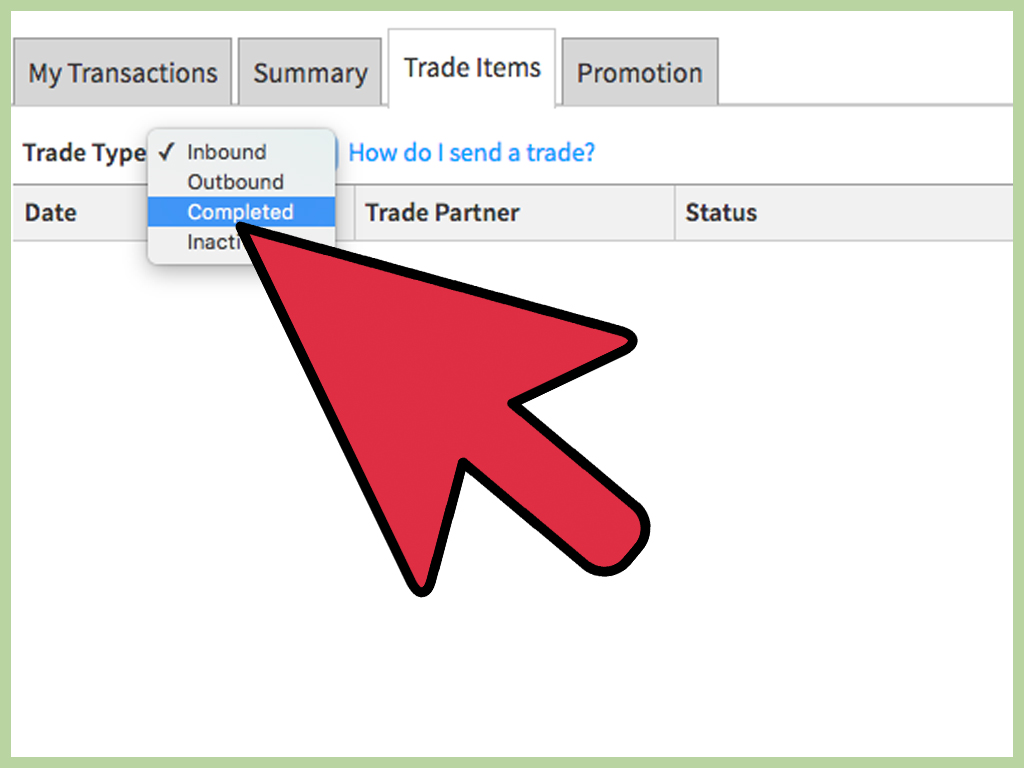
Open the Trade section from the Roblox website. Use the trade-type menu to view your activity:
- Inbound: Offers other users have sent to you
- Outbound: Offers you have submitted
- Completed: Successfully accepted trades
- Inactive: Declined or expired offers
When reviewing an inbound offer, you can accept it, decline it, or create a counteroffer. Countering is often better than immediately rejecting an almost-fair deal. Remove a weak item, request a more liquid collectible, or adjust the balance without restarting the conversation.
Do not accept simply because a message says the offer will disappear in 30 seconds. Genuine opportunities survive long enough for basic arithmetic.
How to Avoid Roblox Trading Scams
Use only Roblox’s official Trade and Selling features. Roblox does not enforce private promises or off-platform deals, including arrangements involving cash, gift cards, cryptocurrency, account sales, “borrowed” items, or trades where one participant must go first.
Never Lend a Limited Item
A stranger promising to borrow your item for a screenshot, video, outfit check, or value test is asking you to surrender control of it. The word “borrow” does not create a magical return button.
Do Not Use a Middleman
A supposed middleman may be the scammer’s friend, alternate account, or the same person using another identity. The official trade window already exists to exchange eligible items directly.
Avoid External Login Pages
Fake Roblox pages can copy logos, profiles, inventories, and item listings. Their goal is often to steal passwords, cookies, authentication codes, or account sessions. Type the Roblox address yourself or use a trusted bookmark rather than clicking links from traders.
Never Share Codes or Session Information
No legitimate trader needs your password, email code, authenticator code, backup code, browser cookie, QR login approval, or passkey prompt. Anyone requesting those details is not helping you complete a trade.
Secure Valuable Accounts
Use a unique password, verify your recovery email, activate two-step verification, and consider a passkey or Roblox Enhanced Protection where available. Phishing-resistant login methods provide stronger protection than relying on a password alone.
Understanding Common Roblox Trading Terms
- RAP
- Recent Average Price, a measurement derived from recent resale transactions.
- Value
- An unofficial community estimate of what an item commonly receives in trades.
- Demand
- How frequently traders want an item and how easily it can be exchanged.
- Upgrade
- Trading several smaller collectibles for one larger or more desirable item.
- Downgrade
- Trading one larger item for multiple smaller items, often with an overpay.
- Overpay
- Offering more total value to obtain an item with stronger demand, rarity, or upgrade potential.
- Projected
- An item whose RAP may be temporarily inflated by unusually high resale transactions.
- Lowball
- An offer significantly below the reasonable market value of the requested item.
Frequently Asked Questions
Can You Trade Items on Roblox Without a Membership?
No. Both participants generally need an active Roblox Plus or eligible Premium subscription to use the official avatar-item trading system.
Can You Trade Every Item in Your Roblox Inventory?
No. The official system is intended for eligible Limited and Limited U collectibles. Regular avatar items and assets from individual Roblox experiences are not automatically tradeable.
Can You Trade Robux Without an Item?
The traditional trade interface uses eligible items as the foundation of an offer. Robux may be added within Roblox’s fee and value limits. Roblox Plus also has a separate Robux transfer feature with its own age, verification, parental approval, and regional requirements.
Can a Completed Roblox Trade Be Reversed?
Normally, no. Roblox instructs users to review offers carefully because completed trades are not reversible simply because one participant regrets the decision.
Why Is the Trade Items Button Missing?
Possible causes include an inactive subscription, privacy restrictions, regional limitations, an ineligible account, unavailable collectible inventory, or use of an interface that does not show the complete browser trading controls.
Is RAP the Same as an Item’s True Value?
No. RAP reflects recent resale activity, while trading value also depends on demand, rarity, ownership concentration, price stability, and what other users are currently willing to offer.
Experience-Based Lessons From Learning to Trade on Roblox
A typical beginner enters Roblox trading with a simple plan: exchange one item for a more expensive item and repeat until the inventory resembles a museum gift shop owned by a billionaire. The first surprise is that equal RAP does not necessarily mean an equal trade.
Imagine a new trader owns a popular collectible with a RAP of about 5,000. Another player offers four items with a combined RAP of 5,400. On paper, the beginner appears to gain 400. The offer even has more thumbnails, which makes it look generous. After accepting, however, the beginner discovers that all four requested items have weak demand. Nobody wants them unless they receive another discount. The original 5,000-RAP item could have been traded quickly, while the new collection sits in the inventory like four guests who refuse to leave after the party.
The practical lesson is to research liquidity, not just totals. Before accepting a downgrade, search for recent trade activity and see whether the smaller items appear in desirable offers. A trader giving up one strong item should often request additional value because managing and retrading several weaker collectibles requires more time.
Another common experience involves projected RAP. Suppose an accessory normally sells near 2,000 Robux but suddenly displays a RAP above 7,000 after a few unusual sales. A beginner may believe they are receiving an enormous win. Experienced traders instead examine the price chart, recent sales, demand, and community estimates. When the abnormal sales leave the calculation, the RAP can fall rapidly, turning the “huge win” into a collectible worth much less than the item surrendered.
Pressure is another warning sign. A trader may say the offer must be accepted immediately because another buyer is waiting. That claim might be true, but it changes nothing about the value of the items. Taking two minutes to verify a deal is cheaper than spending two months trying to recover from it. Good traders become comfortable declining offers without writing a courtroom closing argument. “No thanks” is a complete trading strategy.
Beginners also learn that sentimental value and market value are different. You may love an old accessory because it was your first Limited item. Another trader will not automatically pay extra for the story. At the same time, you do not have to sell an item simply because a calculator labels the offer profitable. A collection is supposed to be enjoyable. Trading every favorite item for mathematically efficient inventory can turn a hobby into spreadsheet maintenance with hats.
The strongest long-term habit is recording completed trades. Note the items given, items received, estimated value, RAP, and reason for accepting. Review the results later. You may notice that your best trades involved popular, stable collectibles, while your worst trades began with excitement, urgency, or the phrase “trust me.”
Finally, account security is part of trading skill. A valuable inventory attracts more phishing attempts, fake links, copied profiles, and offers involving external websites. Protecting the account with a unique password, verified recovery information, passkeys, and two-step verification is not optional housekeeping. It is the digital equivalent of locking the vault after filling it with expensive virtual antlers.
Final Thoughts
Learning how to trade items on Roblox is less about clicking the Make Offer button and more about understanding what belongs inside the offer. Confirm your membership, enable the correct privacy settings, identify eligible Limited items, research demand, calculate Robux after fees, and review every transaction before submitting it.
Start with modest trades while learning how RAP, community value, demand, upgrades, downgrades, and projected prices behave. Most importantly, keep every transaction inside Roblox’s official systems. A patient trader may miss an occasional deal, but an impatient trader can lose an entire inventory before finishing the sentence, “This link looks slightly weird.”