

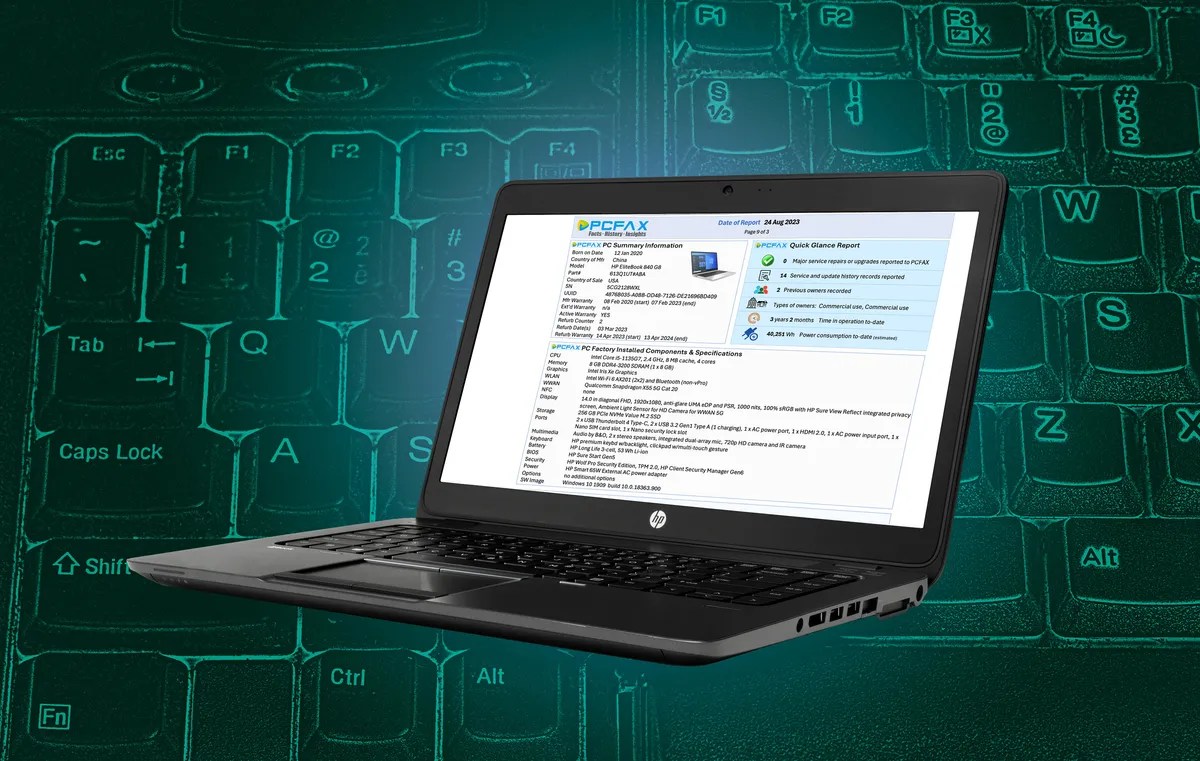
Buying a used laptop can feel a little like adopting a mystery pet from the internet. The photos look great, the seller says it was “barely used,” and yet somewhere deep inside the machine there may be a tired battery, a cooked SSD, a fan that has inhaled more dust than a vacuum cleaner, and a keyboard that has survived three coffee incidents and one emotional spreadsheet.
That is why the idea behind HP’s proposed “Carfax system for PCs” is so interesting. HP has publicly discussed a concept called PCFax, a device-history system designed to help organizations and future buyers understand the real condition of a used computer. Instead of relying only on cosmetic grading, vague seller descriptions, or the classic “trust me, bro” warranty, PCFax would provide a more transparent report about a PC’s usage, maintenance, health, and service history.
So, will HP create a Carfax system for PCs? The most accurate answer is: yes, HP appears to be moving in that direction, but it will likely begin as an enterprise-focused system rather than a universal public database for every laptop on Facebook Marketplace. And if it works, it could change how businesses manage devices, how refurbished PCs are sold, and how buyers judge whether an older laptop is a bargain or a tiny aluminum money pit.
What Would a “Carfax for PCs” Actually Mean?
Carfax became famous because used cars are complicated, expensive, and full of hidden history. A vehicle may look shiny on the outside while quietly carrying a past life of accidents, flood damage, odometer weirdness, or heroic levels of neglect. A vehicle-history report gives buyers more context before they hand over their money.
PCs have a similar problem. A used laptop may look clean, boot quickly, and still have major hidden wear. The battery may have hundreds of charge cycles. The SSD may be approaching the end of its write life. The cooling system may have spent years fighting heat inside a dusty office. The device may have required several support calls, a motherboard replacement, or repeated thermal shutdowns. None of that is obvious from a product photo taken at a flattering angle next to a houseplant.
A PCFax-style report would attempt to turn that hidden history into useful information. Instead of asking, “Does it turn on?” buyers and IT managers could ask smarter questions: How hot did it usually run? How heavily was the storage used? Was the battery replaced? Did the device require major repairs? Was it used gently by a spreadsheet warrior or punished daily by design software, video rendering, and 72 browser tabs named “final_final_v3”?
How HP’s PCFax Concept Could Work
HP’s idea is based on data that many modern business PCs already collect. Business laptops include sensors and firmware-level systems that can monitor hardware health, power behavior, thermal performance, storage condition, fan activity, and other device signals. In the PCFax concept, that information could be stored securely and later turned into a readable history report.
1. Firmware-Level Data Collection
The most important part is that the record would not depend entirely on Windows, user-installed apps, or a reseller’s spreadsheet. HP has described using firmware-level capabilities and hardware security features to collect and protect key lifecycle information. That matters because a useful secondhand PC history report must be difficult to fake. If a seller can erase all bad news with two clicks and a cheerful reboot, the report becomes less “Carfax” and more “marketing brochure wearing a lab coat.”
2. Hardware Health Signals
A PCFax report could include details such as SSD wear, battery condition, system temperatures, power consumption, fan behavior, performance counters, factory-installed components, and hardware update records. These are the PC equivalent of mileage, oil changes, accident reports, and service records.
For example, two identical HP EliteBook laptops may have the same processor, RAM, and screen size. One spent three years in an accounting department opening PDFs. The other spent three years in a hot warehouse running heavy software near a dusty loading dock. On a resale listing, both may be called “Grade A.” In real life, one may be ready for another productive owner, while the other may be one Zoom call away from sounding like a leaf blower.
3. Service and Support History
The value of a PCFax system would grow if it could include service records, warranty events, repairs, part replacements, and verified maintenance. A laptop that received a new battery, cleaned cooling system, updated firmware, and tested SSD is far more attractive than a laptop with an unknown past and a suspiciously enthusiastic seller.
This is especially useful for businesses. Large organizations often replace computers on a schedule, such as every three or four years, even when many devices still have useful life left. With better condition data, IT teams could identify which machines should be reused internally, refurbished for resale, donated, recycled, or retired. That is better than treating every laptop like a carton of milk with the same expiration date.
Why HP Would Want to Build This
HP’s motivation is not mysterious. The PC industry is under pressure from several directions: sustainability goals, corporate budget tightening, right-to-repair expectations, and demand for better lifecycle management. Businesses want devices that are secure, manageable, and cost-effective. At the same time, they are being asked to reduce electronic waste and report progress toward environmental targets.
A credible PC history system fits neatly into that world. It could help HP strengthen its commercial PC ecosystem, support refurbished sales, and make its device lifecycle services more valuable. HP already offers services focused on device life extension, certified refurbished PCs, IT asset disposition, and responsible reuse or recycling. PCFax would not appear out of nowhere; it would be a logical extension of HP’s broader circular-computing strategy.
Reducing E-Waste
The e-waste argument is powerful. The world generates tens of millions of tonnes of electronic waste each year, and recycling systems do not keep up with the pace of disposal. Extending the usable life of laptops can reduce waste, conserve materials, and lower the need to manufacture replacement devices prematurely.
For businesses, the environmental math can be surprisingly practical. If a company can safely extend the life of 2,000 laptops by one extra year, it may reduce procurement costs, lower disposal volume, and improve sustainability metrics. For consumers, a trustworthy refurbished laptop could offer better value than buying the cheapest new machine with the personality of a wet napkin.
Improving Trust in Refurbished PCs
The refurbished PC market has one big problem: trust. Some sellers are excellent. Others use words like “premium refurbished” in the same way gas stations use “gourmet” for a hot dog that has seen things.
A standardized device-history report could help serious refurbishers stand out. It could show that a laptop was inspected, cleaned, repaired with approved parts, securely wiped, tested, and graded using consistent criteria. Buyers could compare machines based on condition rather than guessing from vague listings.
Who Would Benefit Most?
Enterprise IT Teams
Enterprise IT departments would likely be the first major audience. They manage thousands of devices, track support tickets, schedule refreshes, handle security policies, and deal with end-of-life decisions. A PCFax-style dashboard could help them see which laptops are healthy enough for redeployment, which should receive maintenance, and which are ready for retirement.
Imagine an IT manager preparing devices for a new group of employees. Instead of assigning laptops randomly, the manager could prioritize machines with strong battery health, low SSD wear, stable thermals, and clean service histories. Older but healthy devices could go to light-duty users, while power users could receive newer hardware. That is smarter than the traditional method: open a storage closet, pick a laptop, whisper “please work,” and hope for the best.
Refurbishers and Resellers
Professional refurbishers could use PCFax reports as proof of quality. A verified report could support pricing, warranty decisions, and buyer confidence. It could also reduce returns, because customers would better understand what they are buying.
For example, a reseller might list two refurbished business laptops at different prices. One has a fresh battery, low storage wear, and a clean service record. The other has higher thermal history and an older battery but remains functional for basic use. Both can be sold honestly to the right buyer. Transparency makes the market healthier.
Everyday Buyers
Consumers would love this too, especially students, freelancers, small businesses, and families trying to stretch a budget. A reliable used business laptop can be a fantastic purchase. Many commercial machines are better built than ultra-cheap new laptops. But without trustworthy history, buyers take a risk.
A PCFax report would not make used laptops perfect, but it could reduce the guessing. It would be especially helpful for buyers who are not comfortable interpreting BIOS logs, battery reports, SSD SMART data, or the emotional meaning of a fan that screams during YouTube playback.
The Big Challenges HP Must Solve
Privacy and Consent
Any system that records device history must be careful about privacy. Buyers need hardware health information, not a diary of the previous user’s life. A good PCFax system should focus on device condition, service events, component changes, and diagnostic signals. It should avoid personal files, browsing history, keystrokes, location history, or anything that turns a sustainability tool into a surveillance goblin.
HP will need clear rules about what is collected, who can see it, when it can be exported, and how personal data is excluded. For business use, administrators may accept fleet telemetry as part of device management. For consumer resale, expectations are different. Transparency and opt-in controls will matter.
Data Accuracy
A history report is only useful if the data is accurate and complete. If third-party repairs are not recorded, if parts are swapped outside authorized channels, or if a device is damaged after the last report, buyers still need caution. A clean PCFax report should be treated like a strong signal, not a magic blessing from the laptop gods.
That means physical inspection will still matter. Buyers should check the screen, keyboard, ports, hinges, webcam, Wi-Fi, battery performance, charger, and return policy. A PCFax report can reduce risk, but it should not replace common sense.
Industry Standardization
The biggest question is whether PCFax remains an HP-only feature or becomes part of a broader industry standard. A used PC market works best when reports are understandable across brands, repair shops, refurbishers, and enterprise fleets. If every manufacturer creates its own private format, buyers may face a confusing alphabet soup of reports.
For PCFax to become truly powerful, other manufacturers, component makers, operating system vendors, refurbishers, and standards groups may need to align on common definitions. What counts as high SSD wear? How should battery health be measured? How should repairs be verified? How should a secure wipe be documented? These details sound boring, but boring details are where trust is built.
Could PCFax Affect Used Laptop Prices?
Yes, and that may be one of its biggest market effects. A verified report could create price separation between “unknown condition” and “verified healthy” devices. Refurbished laptops with strong PCFax reports might command higher prices. Devices with heavy wear may sell for less but still find buyers who understand the tradeoff.
This is not a bad thing. In fact, it could make pricing fairer. Today, many used laptops are priced mostly by model name, processor, RAM, storage, and cosmetic grade. But condition matters. A three-year-old laptop with excellent battery health and low thermal stress is not the same as one with a tired battery and a fan that sounds like it is training for a marathon.
Will HP’s System Be for All PCs?
Probably not at first. The early focus appears to be commercial and enterprise devices, where HP already has stronger management tools, security hardware, service programs, and customer demand. Consumer laptops may come later, but business PCs are the natural starting point.
That makes sense. Enterprises generate large batches of similar devices with known purchase dates, support contracts, and service records. Those fleets are easier to track than random individual laptops sold one at a time. Once the system proves itself in business environments, it could expand into certified refurbished channels and eventually influence consumer resale.
What PC Buyers Should Do Now
Even before PCFax becomes widely available, buyers can use the same mindset. Ask for battery health reports, SSD health data, warranty status, service records, and proof of secure data wiping. Buy from sellers who offer returns and clear grading. Prefer business-class laptops when possible, because they are often easier to service and built for longer use.
If you manage a business fleet, start treating device history as an asset. Keep records of repairs, battery replacements, firmware updates, cleaning, redeployment, and disposal. Even without PCFax, better documentation can improve resale value and reduce risk.
Experience Notes: What a PCFax-Style Report Would Change in Real Life
The real-world value of a PCFax system becomes obvious the moment someone has to buy, sell, or manage used laptops at scale. Anyone who has handled secondhand computers knows the problem: two machines can look identical on a desk but live completely different lives under the hood.
Consider a small business buying ten refurbished laptops for a new team. Without a reliable device-history report, the buyer usually compares processor generation, RAM, storage size, screen condition, and price. That is helpful, but it misses the hidden story. One laptop may have spent its life docked on a clean office desk, rarely moved, running basic productivity apps. Another may have been carried through airports every week, dropped twice, thermally stressed, and charged from 3% to 100% every day like a tiny battery roller coaster. Both may be advertised as “excellent condition.” Only one deserves the premium price.
A PCFax-style report would make that buying experience more rational. Instead of relying on cosmetic grading alone, the buyer could see battery health, storage wear, service events, and signs of thermal stress. That does not eliminate risk, but it changes the conversation. The buyer can say, “This unit has low wear and a replaced battery, so it is worth more,” or “This one is fine for light use, but the battery is near replacement, so the price should reflect that.” Suddenly, used laptops become less mysterious and more like assets with measurable condition.
The same idea helps sellers. A refurbisher with high-quality processes could prove its work. If it cleaned the cooling system, replaced the battery, installed approved parts, updated firmware, securely wiped the drive, and passed diagnostics, a report could show that. Good sellers would no longer be forced to compete only on price with mystery-box sellers. The market could reward transparency.
For IT departments, the experience may be even more valuable. Many companies replace laptops because the calendar says it is time, not because each laptop is truly finished. With better history data, IT teams could make more flexible choices. A healthy three-year-old laptop could move to a lighter-duty role. A device with warning signs could be serviced before it fails. A machine with major wear could be retired responsibly. That is the difference between fleet management and fleet guessing.
There is also a human benefit. Employees hate unreliable computers. Nobody enjoys joining a meeting while a laptop fan screams like a tiny jet engine. Nobody wants a battery that drops from 41% to “goodbye” during a client call. If PCFax helps organizations assign healthier devices and fix problems earlier, it could improve everyday work in a surprisingly direct way.
For ordinary buyers, the experience would feel like confidence. A student buying a refurbished laptop for school could compare reports instead of gambling. A freelancer could choose a used business notebook with enough verified life left for client work. A parent buying a laptop for a teenager could avoid the cheapest suspicious listing and pick a machine with a documented history. In other words, PCFax would not make used laptops glamorous, but it could make them less scary. In the used PC world, “less scary” is a very underrated feature.
Final Verdict: Will HP Create a Carfax System for PCs?
HP is already moving toward that idea with PCFax. The company has described a system that would collect and protect device-history data, help IT teams make smarter lifecycle decisions, and give future buyers more confidence in second-life PCs. The early version will likely focus on business laptops and enterprise fleets, not every old laptop in the wild.
Still, the direction is important. If HP can balance transparency, privacy, accuracy, and standardization, PCFax could become a major step toward a healthier refurbished PC market. It could help good devices stay useful longer, help buyers avoid bad surprises, and reduce the number of computers tossed out before their time.
The PC industry does not need more mystery meat in the secondhand market. It needs clear history, honest grading, secure data handling, and better proof that a used laptop still has life left. If HP gets PCFax right, buying a refurbished PC may one day feel less like a gamble and more like a smart, sustainable decision. And yes, your next used laptop might finally come with a report card.