

In The Sims 2, changing a Sim’s appearance is both wonderfully simple and hilariously limited. One minute, you are giving your Sim a harmless new haircut. The next, you are discovering that their children may still inherit Grandpa’s original nose because, surprise, genetics in this game have a memory sharper than a Knowledge Sim before final exams.
Unlike newer Sims games, The Sims 2 does not give you a full “edit Sim in CAS” button for every tiny detail after a Sim has already moved into the neighborhood. You cannot casually rebuild an adult Sim from the cheekbones up without using special tools, cheats, career rewards, or external programs. However, you still have several reliable ways to refresh a Sim’s style, update clothing, adjust hair and makeup, and even reshape facial features if you are willing to step into slightly more advanced territory.
This guide breaks down the three best ways to change a Sim’s appearance in The Sims 2: using a mirror, using a dresser or makeover object, and using advanced face-editing options such as Dr. Vu’s Automated Cosmetic Surgeon or SimPE. Whether your Sim needs a glow-up, a post-divorce haircut, or emergency removal of clown makeup from a failed salon experiment, here is how to make it happen.
Why Appearance Changes Work Differently in The Sims 2
Before grabbing the nearest mirror and unleashing makeover chaos, it helps to understand what the game considers “appearance.” In The Sims 2, some features are purely cosmetic. These include hairstyle, makeup, glasses, facial hair, eyebrows, face paint, and outfits. Other features are tied to deeper Sim data, such as genetic hair color, eye color, skin tone, and inherited facial structure.
That difference matters. If you dye a Sim’s hair blonde using a mirror, the Sim may look blonde on screen, but their genetic hair color does not necessarily become blonde. If they later have children, the game still checks the original genetic data. In normal gameplay, mirrors and dressers are for visible style changes, not full DNA rewriting. Think of it like buying a leather jacket: it changes the vibe, not the family tree.
The good news is that most players only need cosmetic changes. If your goal is to fix an ugly outfit, swap glasses, remove stubble, change makeup, or give your Sim a new hairstyle, the in-game tools are more than enough. For major structural changes, you will need the game’s plastic surgery career reward or a third-party editing tool.
Way 1: Use a Mirror to Change Hair, Makeup, Glasses, and Facial Details
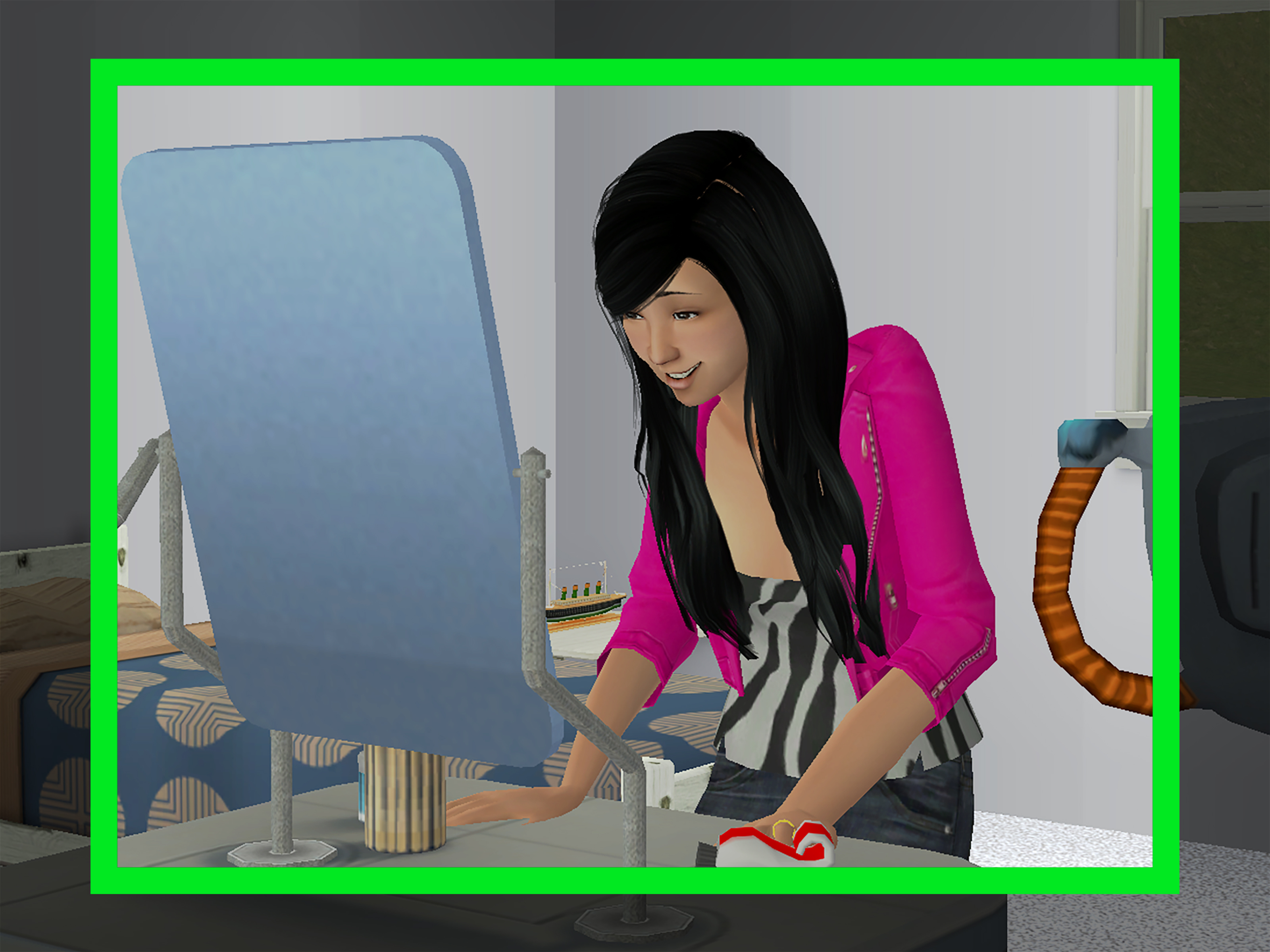
The mirror is the easiest and safest way to change a Sim’s appearance in The Sims 2. It handles the “face and styling” side of a makeover without touching deep genetics. If your Sim woke up looking like they lost a fight with a beauty salon, this is usually your first stop.
How to Use the Mirror
Buy any mirror from the Buy Mode catalog and place it somewhere your Sim can reach. Then click the mirror and choose Change Appearance. The game opens a limited appearance editor where you can change several visible features.
With the mirror, you can usually edit:
- Hairstyle
- Visible hair color
- Makeup
- Face paint
- Eyebrows
- Facial hair and stubble for eligible Sims
- Glasses and certain accessories
This is perfect for everyday storytelling. Maybe your teen Sim has entered their dramatic eyeliner era. Maybe your Fortune Sim wants a cleaner look before opening a business. Maybe your Romance Sim needs sunglasses because consequences are finally catching up. The mirror handles all of that.
What the Mirror Cannot Do
The mirror does not let you reshape the Sim’s facial structure. You cannot move the nose, widen the jaw, change the chin, or rebuild the eyes the way you can in Create-a-Sim. It also does not truly alter genetic hair color. A Sim can look like they have red hair after using a mirror, but their original genetic information may still say something else.
For most players, that limitation is not a problem. If you are only trying to make a Sim look better on screen, the mirror does the job quickly. If you are running a legacy family and care about inherited traits, remember that cosmetic changes are like stage makeup. The audience sees them; the baby generator does not.
Helpful Mirror Tips
Place the mirror with clear floor space in front of it. If a Sim waves, complains, or drops the action from the queue, the mirror may be blocked by another object. Wall mirrors placed above sinks, dressers, or counters can sometimes behave strangely depending on the setup, so try moving the mirror to an open wall if the option fails.
Also, keep expansion pack differences in mind. Some objects, such as vanity tables or makeover stations, can access similar appearance options. With certain expansion packs, toddlers can have their appearance changed when helped by an older Sim. That is useful when a toddler ages up with hair that suggests they were styled by a raccoon with ambition.
Way 2: Use a Dresser, Wardrobe, or Makeover Object to Change Clothing
If the mirror is for hair and face styling, the dresser is for clothing. This is the second major way to change a Sim’s appearance in The Sims 2, and it is especially important because outfits in this game work differently from later entries in the series.
How to Change Clothes with a Dresser
Place a dresser, wardrobe, or closet object on the lot. Click it and look for options such as Plan Outfit or Change Into. The exact wording and available clothing categories may vary depending on the game version and expansion packs installed.
Common clothing categories include:
- Everyday
- Formal
- Sleepwear
- Swimwear
- Underwear
- Outerwear, if Seasons is installed
- Athletic or other categories depending on expansion content
The important thing to remember is that a dresser does not magically contain every outfit in the game. In the original The Sims 2 system, Sims often need to buy new clothing from a community lot before that clothing becomes available at home. If you click a dresser and cannot find the outfit you want, your Sim may not own it yet.
Buying Clothes Before Planning an Outfit
To expand a Sim’s wardrobe, send them to a community lot with clothing racks or a clothing store. Buy the outfits you want, return home, and then use a dresser to plan the outfit. This shopping step is one of those charmingly old-school Sims 2 details. Modern players sometimes expect a giant closet of infinite fashion. The Sims 2 says, “Not so fast, runway legend. Pay for the pants.”
When buying separates, make sure you purchase both a top and a bottom if you want a complete look. Also pay attention to age groups. Young adult clothing, adult clothing, teen clothing, and elder clothing are not always interchangeable. A missing option may not be a glitch; it may simply be the wrong category.
Using Makeover Stations and Vanity Objects
Expansion packs add more appearance-related objects. The Open for Business makeover station, for example, can be used for makeovers and salon-style gameplay. A Sim can give another Sim a makeover, which may change hair, makeup, or clothing depending on the interaction. This is fun for businesses, storytelling, and screenshots.
However, makeovers can go wrong. A failed makeover may leave a Sim with strange makeup or an unexpected hairstyle. Fortunately, selectable Sims can usually fix the damage by using a mirror. That means your salon disaster does not have to become a permanent neighborhood legend, unless you want it to. Honestly, a bad makeover can be excellent drama.
Best Uses for the Dresser Method
The dresser method is best when you want to update a Sim’s wardrobe after aging up, changing careers, getting married, moving neighborhoods, starting a business, or entering a new life stage. It is also useful for creating consistent family styles, themed households, and storytelling arcs.
For example, a shy Knowledge Sim might start college wearing plain clothes, then graduate into sharper outfits after gaining confidence. A Family Sim might switch from party wear to cozy sweaters after having kids. A villainous Sim might wear black formalwear everywhere because subtlety left the household years ago. Outfits help tell the story before the Sim even speaks Simlish.
Way 3: Use Advanced Tools to Reshape the Face or Edit Genetics
The third way to change a Sim’s appearance is for bigger edits. This is where you move beyond hairstyles and outfits and start dealing with facial structure, inherited traits, and external editing tools. Proceed carefully. This is the part of the makeover where the game may smile politely and hide a fire extinguisher behind its back.
Using Dr. Vu’s Automated Cosmetic Surgeon
In The Sims 2: University, Sims in the Show Business career can unlock Dr. Vu’s Automated Cosmetic Surgeon, a career reward object. This machine allows eligible Sims to reshape facial features using controls similar to the face-editing tools from Create-a-Sim.
This is the closest normal gameplay method for changing an existing Sim’s facial structure. You can adjust the face in ways a mirror cannot, making it useful if you want to soften features, fix proportions, or give a Sim a dramatic new look.
There are several catches. First, the object is tied to the Show Business career reward system. Second, it does not truly change the Sim’s genetic facial structure. Children may still inherit features from the Sim’s original face, not the surgically edited one. Third, the machine can malfunction. When it does, the result can be a distorted face. You can use the machine again to try to fix the Sim, but saving before use is strongly recommended.
In other words, Dr. Vu’s machine is powerful, funny, and slightly cursed. Very on-brand for The Sims 2.
Using Cheats to Access Career Rewards Faster
Players who do not want to climb the Show Business career ladder may use cheats to unlock career rewards. On PC, the cheat console opens with Ctrl + Shift + C. Cheat availability can vary by version, expansion pack, and collection, but many players use testing cheats or career reward unlocks to access special objects more quickly.
As always, save before experimenting. Cheats are useful, but they can also create confusing situations if used carelessly. It is wise to test advanced changes on a backup copy of a neighborhood before modifying a legacy save you care about. Nobody wants to lose ten generations because Uncle Mortimer needed cheekbones.
Using SimPE for Genetic Changes
If your goal is to change genetic hair color, eye color, skin tone, or inherited facial structure, you are entering SimPE territory. SimPE is a third-party editor used by experienced The Sims 2 players to inspect and modify neighborhood data, Sim DNA, memories, relationships, and more.
SimPE can be extremely powerful, but it is not a casual makeover mirror. Before editing with SimPE, back up your neighborhood. Then back it up again. Then maybe name the backup something obvious, like “Pleasantview Before I Touched The Dangerous Buttons.” That way, if something goes wrong, you can restore your save instead of staring at the screen like a Sim whose fridge just caught fire.
Genetic edits are most useful for players who care about long-term inheritance. For instance, if you changed a Sim’s visible hair color with a mirror but want their children to inherit that new color, a genetics edit may be necessary. The same applies to correcting mismatched eyes, custom skins, or face templates in carefully managed neighborhoods.
Which Method Should You Choose?
The best method depends on what you want to change. For quick styling, use a mirror. For clothes, use a dresser or wardrobe. For facial structure, use Dr. Vu’s machine. For genetics, use SimPE only if you understand the risks and have backups.
| Goal | Best Method | Difficulty |
|---|---|---|
| Change hairstyle, makeup, glasses, or facial hair | Mirror: Change Appearance | Easy |
| Change everyday, formal, sleepwear, or other outfits | Dresser or wardrobe: Plan Outfit | Easy |
| Give a Sim a salon-style makeover | Makeover station or vanity object | Easy to medium |
| Reshape facial features | Dr. Vu’s Automated Cosmetic Surgeon | Medium |
| Change genetic hair, eyes, skin, or inherited face data | SimPE | Advanced |
Common Problems When Changing a Sim’s Appearance
The “Change Appearance” Option Is Missing
If the mirror does not show the option, make sure you are clicking a usable mirror and that the Sim can route to it. Move nearby furniture, try another wall, or buy a different mirror. Some custom content objects may not behave exactly like standard mirrors.
The “Plan Outfit” Option Does Not Show What You Bought
Your Sim may not own the right clothing category, or the item may be for a different age group. If you downloaded custom clothing, it may also be categorized incorrectly. For example, a custom outfit might appear in CAS but not show up properly in a dresser if it was not flagged for the right category.
The Sim Looks Different, But Their Kids Do Not Inherit the Change
That is normal. Mirror changes and plastic surgery are generally cosmetic. They change what you see, not necessarily what the game stores as genetic data. For inheritance changes, you need genetic editing through advanced tools.
A Makeover Went Horribly Wrong
Use a mirror to fix selectable Sims. For non-selectable Sims, a makeover station may be needed again. Or you can keep the disastrous look and call it character development. Sometimes the game writes better comedy than we do.
Practical Examples for Better Sims 2 Makeovers
Suppose Cassandra Goth gets tired of the same old look. A mirror can update her hair, makeup, and glasses while keeping her identity intact. A dresser can give her a more modern formal outfit. If you want to dramatically change her facial structure, Dr. Vu’s machine can do that, but her original genetics may still influence future children.
Or imagine a teen Sim aging into adulthood with an outfit that screams “random townie generator had a rough morning.” Use a dresser to plan a better everyday look, then use a mirror to adjust hair and makeup. This two-step makeover is usually enough for most gameplay needs.
For a legacy founder, decide early whether appearance changes are cosmetic or genetic. If you care about descendants inheriting specific traits, do not rely only on the mirror. If you only care about screenshots, storytelling, or personal style, the mirror and dresser are perfect.
Extra Experience: What Changing Appearance in The Sims 2 Teaches You
After spending enough time with The Sims 2, you start to realize that changing a Sim’s appearance is not just a menu option. It is storytelling. The game may be older, but its limitations actually make makeovers feel more meaningful. You do not casually rebuild a Sim every five minutes. You choose a hairstyle, buy clothes, place a dresser, send someone to a mirror, and work within the rules. That process gives every change a little more weight.
One of the best experiences is using appearance changes to mark life stages. A teen who once wore messy hair and loud clothes can become a polished adult after college. A Sim who loses a job might grow stubble and switch to cheaper clothes. A new parent may trade clubwear for comfortable outfits. A wealthy business owner might start wearing formal clothing around the house because apparently the kitchen is now a boardroom.
The mirror is especially good for small emotional shifts. A new haircut after a breakup, darker makeup during a rebellious phase, or glasses for a Knowledge Sim can instantly make a character feel refreshed. These changes are simple, but they help players connect with their Sims as people rather than little pixel employees who keep burning grilled cheese.
The dresser adds another layer because clothing in The Sims 2 feels earned. Sending Sims to a community lot to buy outfits can become part of the story. Maybe a mother takes her teenager shopping before college. Maybe a broke Sim can only afford one decent formal outfit. Maybe a Romance Sim owns suspiciously many date-night clothes and absolutely no accountability. Because the game makes clothing feel like inventory, wardrobe changes can reflect money, lifestyle, and personality.
Advanced tools create a different kind of experience. Dr. Vu’s Automated Cosmetic Surgeon is funny because it feels risky. You are not simply opening a safe editor; you are putting your Sim into a strange machine and hoping it does not punish your vanity. That little bit of danger makes big facial changes memorable. It is very The Sims 2: useful, weird, and capable of turning a normal Tuesday into neighborhood folklore.
SimPE, meanwhile, teaches patience. It reminds players that behind every Sim is data: genetics, memories, relationships, tokens, and tiny digital secrets. Editing genetics can be rewarding, but it also encourages respect for the save file. The smartest habit is to back up before every major edit. A good backup is like a smoke alarm for your neighborhood. You hope you never need it, but when disaster arrives wearing custom hair, you will be grateful.
In the end, the best Sims 2 makeovers are not always the most dramatic ones. Sometimes the strongest change is a new hairstyle after a promotion, a softer outfit after marriage, or a pair of glasses that finally makes a Sim look like the bookworm they have always been. Appearance tools are not just cosmetic. They help players show growth, chaos, ambition, heartbreak, and reinvention without writing a single line of dialogue.
Conclusion
Changing a Sim’s appearance in The Sims 2 is easy when you know which tool matches the job. Use a mirror for hair, makeup, glasses, and facial details. Use a dresser, wardrobe, vanity, or makeover station for clothing and style updates. Use Dr. Vu’s Automated Cosmetic Surgeon or SimPE only when you need deeper changes, such as facial structure or genetics.
The key is understanding the difference between cosmetic appearance and genetic data. A mirror can create a stunning new look, but it will not rewrite the Sim’s family tree. A dresser can save a Sim from fashion tragedy, but it will not change their face. Dr. Vu’s machine can reshape features, but it comes with risk and does not fully replace genetics. SimPE can go deeper, but it should be used carefully and only with backups.
That is part of the charm. The Sims 2 makes style feel practical, personal, and occasionally ridiculous. Whether you are fixing a townie, refreshing a legacy founder, or giving your Sim the glow-up they desperately deserve, these three methods will keep your neighborhood looking sharp, strange, and wonderfully dramatic.