

Your office desk should help you work, not function as an expensive parking lot for tangled cables, abandoned coffee mugs and a mysterious collection of pens that no longer write. The best office gadgets of 2024 focused on solving those small daily annoyances while making workspaces more comfortable, organized and enjoyable.
This roundup combines product testing, long-term impressions and expert recommendations from major American technology and consumer publications, including Good Housekeeping, Men’s Health, Fast Company, Engadget, Lifewire, GQ, WIRED, Tom’s Guide, Popular Mechanics, Ars Technica and Architectural Digest. Rather than selecting gadgets merely because they blink, spin or look impressive on social media, priority was given to useful features, desk-friendly design, ergonomics and everyday reliability.
Charging and Connectivity Gadgets
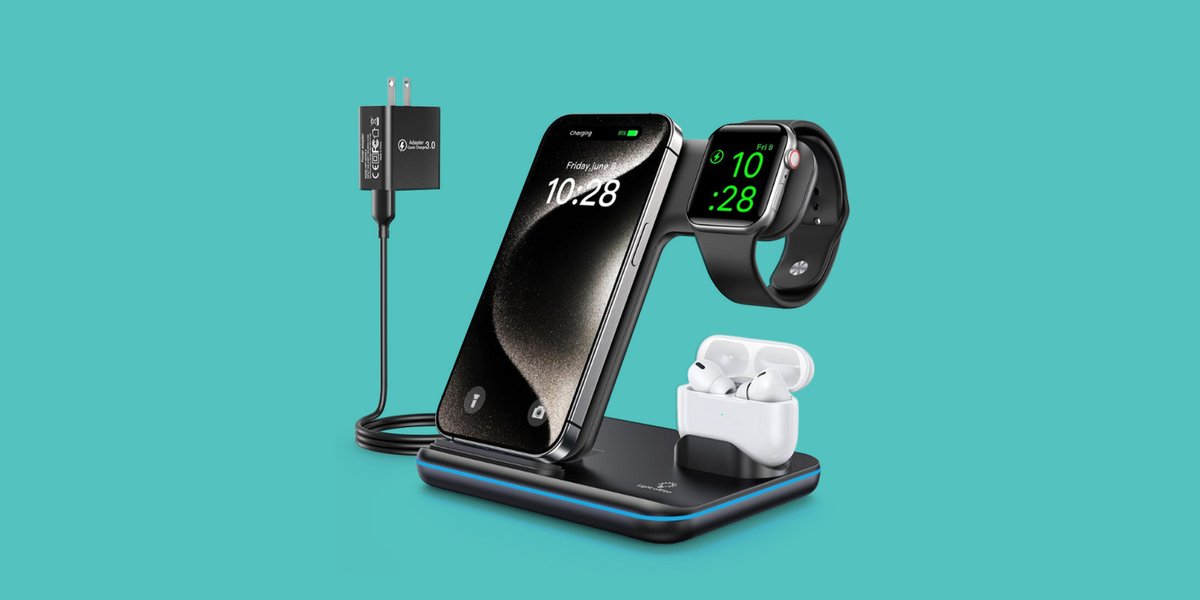
1. Belkin BoostCharge Pro 3-in-1 Wireless Charging Stand
The Belkin BoostCharge Pro gives an iPhone, Apple Watch and wireless earbuds one organized charging location. Its upright design also keeps notifications visible without leaving three separate cables sprawling across the desk like electronic spaghetti. It is especially practical for workers already invested in Apple’s ecosystem.
2. CalDigit TS3 Plus Docking Station
A docking station is the peace treaty between a thin laptop and an office full of peripherals. The CalDigit TS3 Plus adds USB-A, USB-C, Ethernet, audio and display connections through one central device. It is a premium option, but it can transform a laptop into a full desktop workstation with one cable.
3. Anker Prime Charging Station
Anker’s multi-device charging station combines traditional outlets with USB connections and magnetic wireless charging. It brings power onto the desktop, reducing the undignified ritual of crawling under the desk whenever a laptop charger needs to be unplugged. It is most valuable for people who regularly charge several devices at once.
4. SanDisk Ultra Dual Drive Go
This compact flash drive includes USB-C and USB-A connectors, making it useful for transferring files between newer laptops and older office computers. The rotating design protects the unused connector, while the small body fits easily in a laptop bag. It is a simple gadget, but simple gadgets often save the most time.
5. KAFRI RGB Headphone Stand
The KAFRI stand gives full-size headphones a proper home while adding USB ports, power outlets and customizable lighting. The illumination is optional, which is fortunate for anyone whose accounting department does not share their enthusiasm for rainbow mode. Its real advantage is combining storage and charging in one compact accessory.
Keyboards, Mice and Productivity Controls
6. Logitech MX Master 3S Mouse
Logitech’s productivity mouse is shaped for long work sessions and includes fast scrolling, side-to-side navigation and programmable buttons. It can also move between multiple computers, making it particularly useful for hybrid workers. The price is higher than that of an ordinary mouse, but the difference becomes obvious after several hours of spreadsheets, design work or browser tabs.
7. Logitech K380 Multi-Device Keyboard
The compact K380 can connect to three Bluetooth devices and switch between them using dedicated buttons. It works well for employees who move among a laptop, tablet and smartphone during the day. Its rounded keys and lightweight construction also make it easier to carry than a full-size office keyboard.
8. Lofree Flow84 Mechanical Keyboard
The Flow84 offers the tactile feel of a mechanical keyboard without sounding like someone is preparing popcorn during a quarterly meeting. Its low-profile body, aluminum frame and hot-swappable switches provide a polished balance of office-friendly appearance and enthusiast-level customization.
9. Programmable Macro Pad
A macro pad places frequently used commands on physical buttons. Workers can program shortcuts for launching software, muting calls, pasting standard replies or performing editing commands. It is especially helpful for programmers, designers, video editors and anyone who has ever performed the same three-click action 400 times before lunch.
10. Rocketbook Reusable Smart Notebook
Rocketbook combines handwritten notes with digital storage. Users write with a compatible erasable pen, scan pages through the mobile app and wipe the notebook clean for reuse. It preserves the satisfying experience of writing on paper while reducing the mountain of notebooks that otherwise develops beside the printer.
Lighting, Displays and Video-Meeting Gear
11. BenQ ScreenBar Pro
The BenQ ScreenBar mounts above a monitor and directs light onto the desk without consuming valuable surface space. Adjustable brightness and color temperature help it support both detailed daytime work and gentler evening lighting. The Pro version also adds automatic controls that make the lamp feel almost suspiciously attentive.
12. Cyezcor Video Conference Light
This compact light clips onto a monitor or laptop and provides several brightness levels and color temperatures. It improves facial lighting during video calls without requiring a full photography setup. The result is a clearer image and fewer meetings in which you resemble a confidential witness being interviewed in a dark room.
13. Logitech Brio 500 Webcam
The Brio 500 is designed for professional video calls, with improved image quality, automatic framing and flexible positioning. It is a sensible upgrade for laptops with mediocre built-in cameras. A dedicated webcam also allows the laptop to sit at a healthier height without producing an unfortunate view directly up the user’s nose.
14. Xebec Tri-Screen 2
The Xebec Tri-Screen 2 attaches additional displays to a laptop, creating a portable multi-monitor workspace. It is aimed at analysts, developers and traveling professionals who need more screen space away from their main office. The setup is not subtle, but neither is trying to manage six spreadsheets on one 13-inch display.
15. Dyson Solarcycle Morph Desk Lamp
Dyson’s premium task lamp offers adjustable positioning, powerful illumination and app-connected settings that can adapt light output to local conditions. It is undeniably expensive, yet its engineering and flexibility make it more than decorative desk jewelry. This is the office lamp for someone who has already optimized everything else, including the angle of the stapler.
Organization and Ergonomic Office Accessories
16. Simple Trending Two-Tier Monitor Stand
This metal stand raises a monitor while creating storage space underneath for notebooks, laptops and small accessories. Elevating the display can improve the viewing position, while the lower shelf prevents loose office supplies from colonizing the entire desk. It is inexpensive, practical and refreshingly free of subscription fees.
17. Orbitkey Desk Mat Slim
The Orbitkey mat protects the desk, provides a consistent mousing surface and includes a channel for cables or writing tools. Its restrained appearance works well in professional spaces where a giant illustrated gaming mat might generate questions from human resources. The smaller Slim version is particularly suitable for compact desks.
18. Oakywood Dual Laptop Vertical Stand
A vertical stand stores closed laptops on their edges instead of allowing them to consume half the desk. Oakywood’s version can hold two devices and uses natural materials that look more like furniture than computer equipment. It is useful for workers who alternate between personal and company laptops.
19. ComfiLife Under-Desk Footrest
The ComfiLife footrest supports the feet and can be turned over for gentle rocking. Its memory-foam construction makes it more comfortable than balancing on a cardboard box left over from office supplies. It is most helpful when a chair or desk cannot be adjusted enough to support a comfortable seated position.
20. SIDUCAL Mobile Standing Desk
This compact desk uses adjustable surfaces and rolling wheels to create a portable sit-stand workstation. It is not a replacement for every full-size standing desk, but it works well in small apartments, shared rooms or flexible office areas. The two-level design also separates the keyboard from the display.
21. Blue Key World Cable Clips
Adhesive cable clips hold charging cords near the edge of the desk, preventing them from dropping onto the floor whenever a device is disconnected. They cost little, require no technical knowledge and eliminate a surprisingly frequent annoyance. Placement should be planned carefully because strong adhesive is loyal, sometimes more loyal than intended.
Focus, Comfort and Wellness Gadgets
22. Sony WH-1000XM5 Noise-Canceling Headphones
Sony’s headphones provide effective noise cancellation, comfortable padding and strong audio quality for calls or focused work. They are particularly helpful in open offices and homes where family members interpret “working remotely” as “available for conversation.” Their microphone system also supports clearer communication during meetings.
23. Amazon Echo Fourth Generation
An Echo speaker can handle reminders, timers, calendar questions, music and compatible smart-office controls through voice commands. It allows users to perform small tasks without leaving the current application. The speaker also delivers enough volume for background music, though coworkers may have opinions about the playlist.
24. Ember Mug 2
The Ember Mug maintains a selected beverage temperature, preventing coffee from progressing from pleasantly hot to forgotten desk swamp. It is a luxury rather than a necessity, but workers who repeatedly reheat the same drink may appreciate its consistency. The companion app offers additional temperature control and customization.
25. Cubii Go Under-Desk Elliptical
The Cubii Go introduces gentle leg movement during seated work. It is quieter and more compact than full exercise equipment, allowing users to pedal while reading, attending calls or completing routine tasks. It will not replace a complete workout, but it can make long sedentary periods less motionless.
26. HoMedics Tower Air Purifier
A compact air purifier can help filter dust, pollen and other airborne particles in a home office. HoMedics models designed for smaller rooms are easier to position near a desk than full-size household units. The main trade-offs are fan noise, replacement filters and the temptation to blame every unfinished assignment on air quality.
27. AVINIA Digital Productivity Timer
A dedicated timer makes focused work intervals visible without requiring a phone. That matters because opening a timer app can somehow lead to checking messages, weather forecasts and a video about restoring a 300-year-old spoon. A simple rotating or magnetic timer supports Pomodoro sessions, meetings and scheduled breaks.
Creative and Conversation-Starting Desk Gadgets
28. SELEAD Desktop Glass Whiteboard
This angled glass writing surface sits between the keyboard and monitor, providing a reusable place for reminders and quick notes. Certain versions include a wireless charging area, making the board both a planning tool and a phone dock. It is ideal for tasks too urgent for an app but too temporary for permanent ink.
29. Novium Hoverpen Interstellar Edition
The Hoverpen rests at an angle within a magnetic base, creating the appearance of a pen floating in midair. It still functions as an ordinary writing instrument, but its real contribution is making visitors ask how it works. This is a rare novelty gadget that remains useful after the initial demonstration.
30. AeroPress Original Coffee Maker
The AeroPress prepares a concentrated cup of coffee using manual pressure and requires less space than a countertop machine. It is useful for private offices or home workspaces where the nearest communal coffee pot tastes like it was brewed during a previous administration. Cleanup is quick, although office brewing rules should always be respected.
How to Choose the Best Office Gadgets
Start with the problem, not the product. A charging station is worthwhile when several devices compete for outlets. A monitor light makes sense when desk space is limited. An ergonomic mouse matters when discomfort appears after hours of computer use. A floating pen, meanwhile, is best purchased because floating pens are delightfulnot because it will revolutionize corporate productivity.
Compatibility deserves equal attention. Check charging standards, connector types, operating-system support, desk dimensions and the thickness of surfaces used with clamps. Portable monitors and docking stations also have different power and video requirements. A product can receive excellent expert reviews and still be completely wrong for a particular computer.
Finally, consider visual and physical clutter. Multifunction devices often provide more value than single-purpose accessories, but only when every function is genuinely useful. The goal is not to transform the desk into a technology museum. The goal is to create a workspace where essential tools remain accessible and distractions remain manageable.
Experience-Based Lessons From Building a Gadget-Friendly Office
The most important lesson from using office technology over time is that small improvements usually matter more than dramatic ones. A new computer may feel exciting, but a well-positioned light, a comfortable mouse or a cable that no longer disappears behind the desk can improve hundreds of ordinary workdays. These upgrades rarely produce a cinematic transformation. Instead, they remove tiny moments of irritation until the workspace simply feels easier to use.
Charging accessories are a good example. A multi-device dock does not make anyone type faster, yet it creates a dependable location for a phone, watch and earbuds. Once that habit forms, fewer devices begin the morning with a nearly empty battery. The desk also becomes visually calmer because several cables are replaced by one organized station. The practical experience is less about charging speed and more about reducing decisions.
Ergonomic accessories require more experimentation. A highly rated mouse may feel perfect for one person and uncomfortable for another because hand size, grip and desk height vary. Footrests and monitor stands have the same limitation. The best approach is to adjust one element at a time, use it for several working days and notice whether tension develops in the shoulders, wrists, lower back or legs. Buying five ergonomic products at once makes it difficult to identify which change actually helped.
Lighting can produce one of the fastest improvements. Harsh overhead lights may create glare, while a dark desk encourages leaning toward the screen. A monitor-mounted lamp or adjustable task light gives direct illumination without crowding the work surface. During video calls, a small front-facing light can also improve image quality more effectively than an expensive camera used in poor lighting.
Productivity gadgets work best when assigned specific jobs. A macro pad becomes useful when its buttons launch daily applications or automate repetitive commands. A smart notebook is valuable when scanned notes are filed consistently. A timer helps when it signals both working intervals and breaks. Without a routine, these products become attractive objects that quietly collect dust while judging their owner.
Novelty gadgets deserve a place too, provided they do not interrupt concentration. A levitating pen, kinetic display or playful desk clock can make a workspace feel personal. That emotional benefit is difficult to measure, but it matters when someone spends eight hours a day in the same room. The most successful novelty items combine visual appeal with at least one practical purpose.
Cable management should happen before adding more electronics. Routing power cords, labeling chargers and securing frequently used cables creates a foundation for everything else. Otherwise, every new gadget adds another wire to the nest beneath the desk. A few inexpensive clips and a mounted power strip can sometimes improve a workspace more than a sophisticated connected device.
The final lesson is to upgrade gradually. Begin with the problem that interrupts work most often. Fix it, observe the result and then choose the next improvement. A thoughtful office develops over time. It does not need every gadget on this list, and it certainly does not need all 30 arriving in one delivery unless the mail carrier has been warned in advance.
Conclusion
The coolest office gadgets of 2024 succeeded because they blended technology with practical workplace needs. Products such as the Logitech MX Master 3S, BenQ ScreenBar, Rocketbook notebook and Belkin charging stand addressed daily problems without demanding complicated changes to established routines.
The right choices depend on the workspace. Remote employees may benefit most from lighting, webcams and noise-canceling headphones. Mobile professionals may prioritize docking stations, portable displays and compact keyboards. Traditional office workers may see greater value in ergonomic accessories, smart notebooks and discreet cable management.
A gadget deserves space on the desk when it saves time, improves comfort or makes work slightly more pleasant. Everything else is decorationand, to be fair, a floating pen is excellent decoration.
Note: This article is a retrospective guide to products and expert recommendations associated with 2024. Product availability, software support, specifications and model names may change over time.