

Great software can still make people feel like they accidentally wandered into a spaceship cockpit. The buttons may be beautiful, the dashboard may sparkle, and the feature list may be impressive enough to make a product manager weep with joy. But when a user is where in-app support earns its keep. Instead of sending users away to search a help center, open another browser tab, or compose a mildly panicked support ticket, in-app support gives them answers while they are already inside the product. Userpilot helps SaaS teams build that experience with contextual guidance, searchable resources, interactive walkthroughs, and targeted support content that appears when it is actually useful.
Done well, in-app support does not feel like a robot shouting instructions through a megaphone. It feels like a helpful guide standing nearby, ready to point users in the right direction before frustration turns into abandonment.
What Is In-App Support?
In-app support is customer assistance delivered directly inside a software product. It can include help articles, onboarding checklists, tooltips, interactive product tours, video tutorials, feature announcements, FAQs, live chat entry points, surveys, and links to human support.
The key difference between ordinary support and in-app support is context. A traditional help center may contain hundreds of useful articles, but users still have to leave the product and figure out which article applies to their problem. In-app support reduces that friction by bringing relevant help closer to the task at hand.
For example, imagine a new customer creating their first report in an analytics platform. Instead of forcing them to search “how to create a report” in a separate knowledge base, the product can display a short checklist, an interactive walkthrough, or a quick tutorial directly on the reporting page. The user learns by doing, which is generally more effective than memorizing a 2,000-word article while quietly questioning every career decision they have ever made.
In-app support is especially valuable for SaaS products with complicated workflows, multiple user roles, configurable settings, and features that users may only need occasionally. It helps customers get unstuck faster while reducing repetitive support requests for the team behind the product.
Why In-App Support Matters for SaaS Companies
Users Want Answers at the Moment of Friction
Most users do not wake up excited to read product documentation. They want to complete a task, solve a problem, or reach a result. When they hit a confusing screen, a missing setting, or an unfamiliar workflow, they want an answer immediately.
Contextual support removes unnecessary steps. Instead of leaving the app, opening a search engine, finding an article, returning to the product, and trying to remember what they read, users can access guidance without breaking their workflow.
Self-Service Support Can Reduce Repetitive Tickets
Customer support teams often receive the same questions again and again: “How do I invite a teammate?” “Where can I change billing details?” “Why is this report empty?” “How do I export data?” These are not bad questions. They are simply expensive questions when they arrive hundreds of times per month.
A strong in-app support experience can help customers resolve common issues independently. This gives support agents more room to handle complex, urgent, or high-value conversations that genuinely require human judgment.
Better Support Improves Product Adoption
A feature cannot create value if users never discover it, misunderstand it, or give up halfway through using it. In-app support helps close the gap between feature availability and feature adoption.
A well-timed tooltip can introduce a useful setting. A checklist can guide a new account through activation. A walkthrough can explain a multi-step workflow. A resource center can offer tutorials for advanced users who need help without interrupting everyone else.
The result is a more confident user experience. And confident users are far more likely to continue using a product than users who feel like they need a map, compass, flashlight, and emergency ration kit just to export a CSV file.
How Userpilot Supports In-App Help
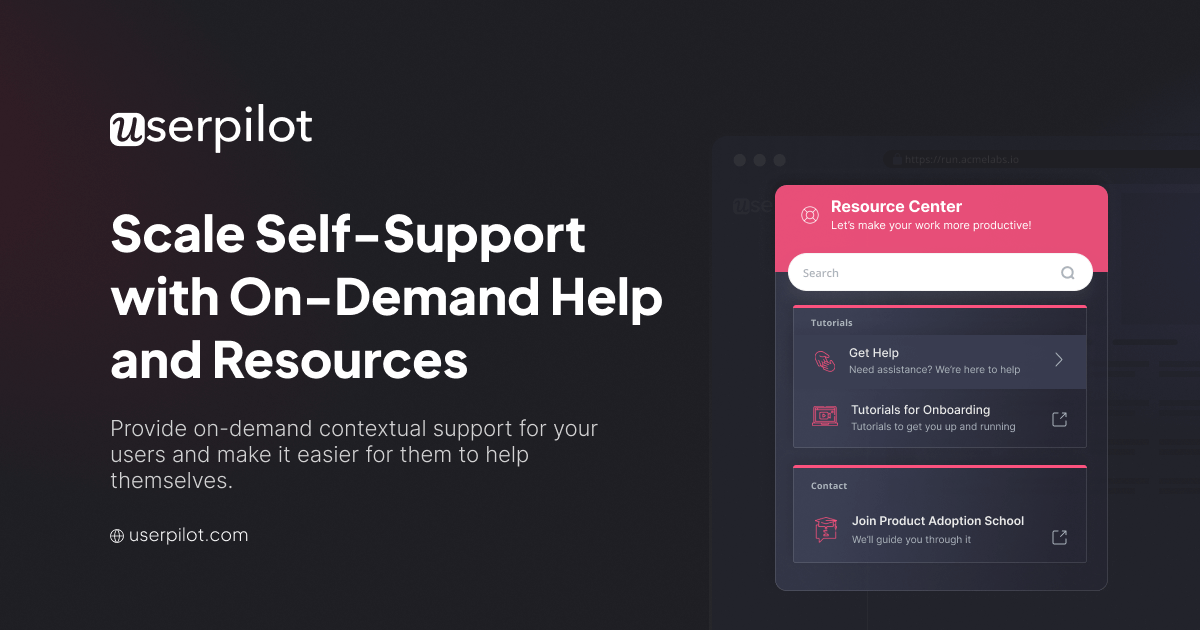
Userpilot is designed to help product, customer success, and support teams create in-app experiences without relying on engineering for every small update. Its Resource Center can serve as an on-demand support hub inside a web application, giving users a central place to find help when they need it.
Create an In-App Resource Center
A Userpilot Resource Center can bring together several types of support content in one accessible location. Teams can include product walkthroughs, FAQs, tutorial videos, checklists, help articles, announcements, surveys, and links to external resources.
This creates a practical support destination within the product rather than scattering help across emails, documentation pages, webinars, and forgotten chat threads. Users do not need to hunt through a digital attic to find an answer. They can open the resource center and choose the type of assistance they need.
Offer Searchable Knowledge Base Content
Search is one of the most important parts of a self-service support experience. Users rarely describe problems using the exact words a company uses internally. A customer may search for “invite coworkers,” while the product team calls the feature “workspace member provisioning.”
Userpilot can help teams surface knowledge base content directly through the in-app experience. This makes support articles easier to discover without forcing users to leave the product. A searchable support center is especially useful for customers who know what they need but do not know where the answer lives.
Use Interactive Walkthroughs Instead of Static Instructions
A long help article can explain a process, but it cannot always show users where to click. Interactive walkthroughs are useful when a task involves multiple screens, settings, permissions, or product-specific decisions.
For example, a project management platform could use a walkthrough to help a workspace owner create a new project template. The guide could point to the correct menu, explain the purpose of each setting, and lead the user through the setup process step by step.
This approach is more practical than publishing a 12-step article that users have to read, remember, and translate into action while switching between tabs like a very determined office octopus.
Target Support Content by Page, Segment, or Behavior
Not every user needs the same help. A new trial user may need onboarding guidance. An administrator may need account-level instructions. A power user may need advanced tips. Someone who has already completed a workflow probably does not need a giant tooltip explaining how to start it.
Userpilot allows teams to personalize resource center content and in-app guidance based on user characteristics, company data, product events, segments, pages, engagement history, and feedback. This makes support more relevant and less intrusive.
Contextual targeting is important because support should feel useful, not noisy. Showing the right message to the wrong person is still the wrong message.
Connect Users to Human Support When Needed
Self-service support should not become a maze with no exit. Some problems are too specific, too technical, or too urgent for a help article. The best in-app support strategies give users a clear path to contact a real person when self-service is not enough.
Userpilot can be configured to connect resource center modules with third-party chat tools, including support chat options. This creates a helpful escalation path: users can first try a guide, article, video, or FAQ, then quickly reach a support representative if the problem remains unresolved.
The goal is not to hide customer support behind twelve layers of automation. The goal is to help simple questions stay simple while ensuring difficult questions reach the right person faster.
How to Build an Effective Userpilot In-App Support Strategy
Start With Real Support Questions
Do not begin by writing content for every possible feature. Start with the questions customers already ask. Review support tickets, chat transcripts, onboarding calls, customer success notes, product feedback, and search queries from your help center.
Look for patterns. If customers repeatedly ask how to set up integrations, create reports, invite teammates, adjust permissions, or understand billing, those topics deserve priority in your in-app support plan.
A useful rule is simple: build help around high-friction moments, not around whatever feature your team is currently most excited about.
Match the Content Format to the Problem
Different problems need different types of assistance. A short tooltip may be perfect for explaining a button. A checklist may work well for onboarding. A video may help users understand a visual workflow. A detailed article may be better for troubleshooting an integration.
Do not use a seven-step product tour to explain a one-line setting. Likewise, do not expect a tiny tooltip to teach a complicated process with approvals, permissions, and consequences that could accidentally alert the entire finance department.
Keep Content Short, Clear, and Action-Oriented
Support content should help users complete a task, not win a literary award. Use plain language, short paragraphs, clear headings, screenshots when appropriate, and direct calls to action.
Instead of writing, “This functionality enables the facilitation of collaborative participation,” say, “Invite teammates to work in your workspace.” The second version is clearer, faster, and far less likely to cause users to stare at the screen with the emotional intensity of someone reading a confusing tax form.
Use Progressive Disclosure
Good in-app support does not dump every possible instruction in front of the user at once. It reveals information gradually based on what the person is trying to accomplish.
Start with the most important next step. Offer optional details through links, expandable resources, tutorial videos, or deeper help articles. This keeps the product interface cleaner while giving users access to more support when they need it.
Make the Resource Center Feel Like Part of the Product
Your in-app support experience should match the product’s visual style and voice. If the app is calm and professional, the resource center should not suddenly look like a neon arcade machine from 1997.
Use consistent terminology, friendly labels, readable typography, logical categories, and straightforward navigation. A resource center should feel like a natural extension of the product, not a side project that escaped from another website.
Metrics to Measure In-App Support Performance
In-app support is not something teams should publish once and forget forever. It needs regular measurement and improvement. Userpilot analytics can help teams understand how users engage with support content, which modules attract attention, and what people search for inside the resource center.
| Metric | What It Can Tell You |
|---|---|
| Resource center opens | How often users seek help inside the product. |
| Module clicks | Which tutorials, articles, videos, or guides users find most useful. |
| Search terms | What users are trying to find and where support content may be missing. |
| Guide completion rate | Whether users finish an interactive walkthrough or abandon it midway. |
| Support ticket trends | Whether common support requests decline after relevant self-service content is added. |
| Feature adoption | Whether contextual guidance helps users engage with important product features. |
The most useful insight often comes from combining support data with product behavior. For instance, if users frequently search for “permissions” and many accounts abandon the role setup screen, that is a strong clue that the workflow needs better guidance, clearer copy, or a simpler design.
Common In-App Support Mistakes to Avoid
Showing Too Many Pop-Ups
In-app messages can be useful, but too many messages can feel like being followed around a store by an overly enthusiastic salesperson. Avoid launching multiple modals, tooltips, banners, and announcements at the same time.
Using Generic Support Content for Everyone
A workspace owner, a new trial user, and an experienced administrator do not have the same needs. Use segmentation and behavioral data to make support content more relevant.
Ignoring Failed Searches
When users search for something and get no useful result, they are telling you what is missing. Treat failed searches as a support-content roadmap rather than an annoying report nobody wants to open.
Forgetting to Update Old Guides
Product interfaces change. Features move. Settings get renamed. Screenshots become historical artifacts. Review and update in-app guidance regularly so users do not follow instructions that lead to a button that disappeared three product releases ago.
Making Human Help Hard to Reach
Self-service is powerful, but it should never become a barrier. Provide clear escalation options for billing problems, account access issues, bugs, security concerns, and complex technical questions.
Conclusion: Make Support Part of the Product Experience
In-app support is no longer a nice extra for SaaS companies. It is a practical way to help users succeed faster, reduce avoidable friction, improve product adoption, and give customer support teams more time for meaningful conversations.
Userpilot gives teams a flexible way to create an in-app Resource Center, offer searchable help content, deliver interactive guidance, personalize support by audience and behavior, and connect users to human support when self-service is not enough.
The best support experience is not the one with the most articles, pop-ups, or clever automation. It is the one that helps users move forward with the fewest possible sighs. Build for that moment, and your product will feel less like software users must survive and more like a tool they are genuinely happy to use.
Experiences With Userpilot In-App Support: What Teams Commonly Learn
Teams that introduce Userpilot in-app support often discover that the biggest opportunity is not creating more content. It is putting the right content in front of the right user at the right time. A help center can already contain excellent articles, but those articles do little good when customers cannot find them during the exact moment they need help.
One common experience is realizing that onboarding questions are usually more predictable than expected. New users often struggle with a small number of repeat tasks: connecting an integration, inviting coworkers, setting up a workspace, creating the first project, or understanding how data appears in the product. Once these moments are identified, teams can build short walkthroughs and checklists that guide users toward early success.
Another lesson is that not every user wants a tour. Some customers love interactive walkthroughs because they want clear directions. Others are experienced users who only need a quick answer or a searchable article. A strong Userpilot Resource Center supports both styles. It can offer a short “show me how” flow for beginners while providing documentation, videos, and FAQs for users who prefer self-service research.
Support teams also tend to appreciate how in-app guidance changes the quality of incoming tickets. Instead of receiving endless questions about basic navigation, they may receive more detailed reports about unusual scenarios, account-specific issues, or genuine product bugs. That is a good trade. It means the support team can spend less time copying the same instructions and more time solving problems that require real expertise.
Product teams often find unexpected value in search behavior. Users may search for terms that do not exist in the company’s official vocabulary. For example, customers might search for “download invoice,” while the product labels the option “billing history.” That mismatch is useful. It may reveal that the feature name is unclear, the navigation is buried, or the documentation needs to use customer language instead of internal jargon.
Another practical experience involves feature adoption. A company may launch a useful feature and assume users will naturally discover it. Usually, that assumption has the survival rate of a houseplant in a windowless basement. In-app support can introduce the feature with a small contextual prompt, explain the value, and provide a quick tutorial only to users who are likely to benefit from it.
Teams also learn that support content needs maintenance. A walkthrough that worked perfectly six months ago may become confusing after a redesign. A video may reference an old menu label. A help article may show an interface that no longer exists. The most successful in-app support programs treat content as a living product asset, reviewing it regularly and improving it based on user feedback, product changes, and search trends.
Finally, the strongest Userpilot experiences usually come from collaboration. Product managers understand feature intent. Support teams know the recurring pain points. Customer success teams understand adoption barriers. Designers protect usability. When these groups work together, in-app support becomes more than a collection of pop-ups. It becomes a thoughtful system that helps users feel capable, informed, and supported throughout the customer journey.
Note: Userpilot features, integrations, localization options, and plan availability can change over time. Review your current Userpilot account settings and product documentation before publishing or implementing an in-app support workflow.