

Note: Baby-G watches share many Casio-style controls, but not every model uses the exact same button sequence. Before changing settings, check the module number engraved on the case back or printed in your manual. This guide explains the most common method used on many digital and analog-digital Baby-G watches, while also pointing out what to do when your buttons behave a little differently.
Introduction: Your Baby-G Alarm Is More Useful Than You Think
A Baby-G watch is not just a cute, tough little wrist companion that survives rain, backpacks, gym lockers, and the occasional “oops, I dropped it again” moment. It is also a surprisingly handy alarm tool. Whether you need a reminder for school, work, medication, workouts, cooking, travel, or simply waking up without reaching for your phone, learning how to set an alarm on a Baby-G watch can make your day run smoother.
The good news is that setting a Baby-G alarm is usually easy once you understand the four main buttons. The not-so-good news is that Casio has made many Baby-G models over the years, and some button names or functions can vary by module. One model may use the upper-left button as Adjust, the lower-left button as Mode, and the right-side buttons to scroll or change numbers. Another model may toggle the alarm with a different button. That is why this guide focuses on the pattern behind the process, not just button memorization.
In this step-by-step Baby-G alarm guide, you will learn how to enter Alarm Mode, choose an alarm slot, set the hour and minutes, confirm AM or PM, turn the alarm on, disable the hourly beep, test the sound, and fix common problems. By the end, your watch will be less mysterious and more useful. Tiny wrist computer, meet responsible human.
Before You Start: Know Your Baby-G Buttons
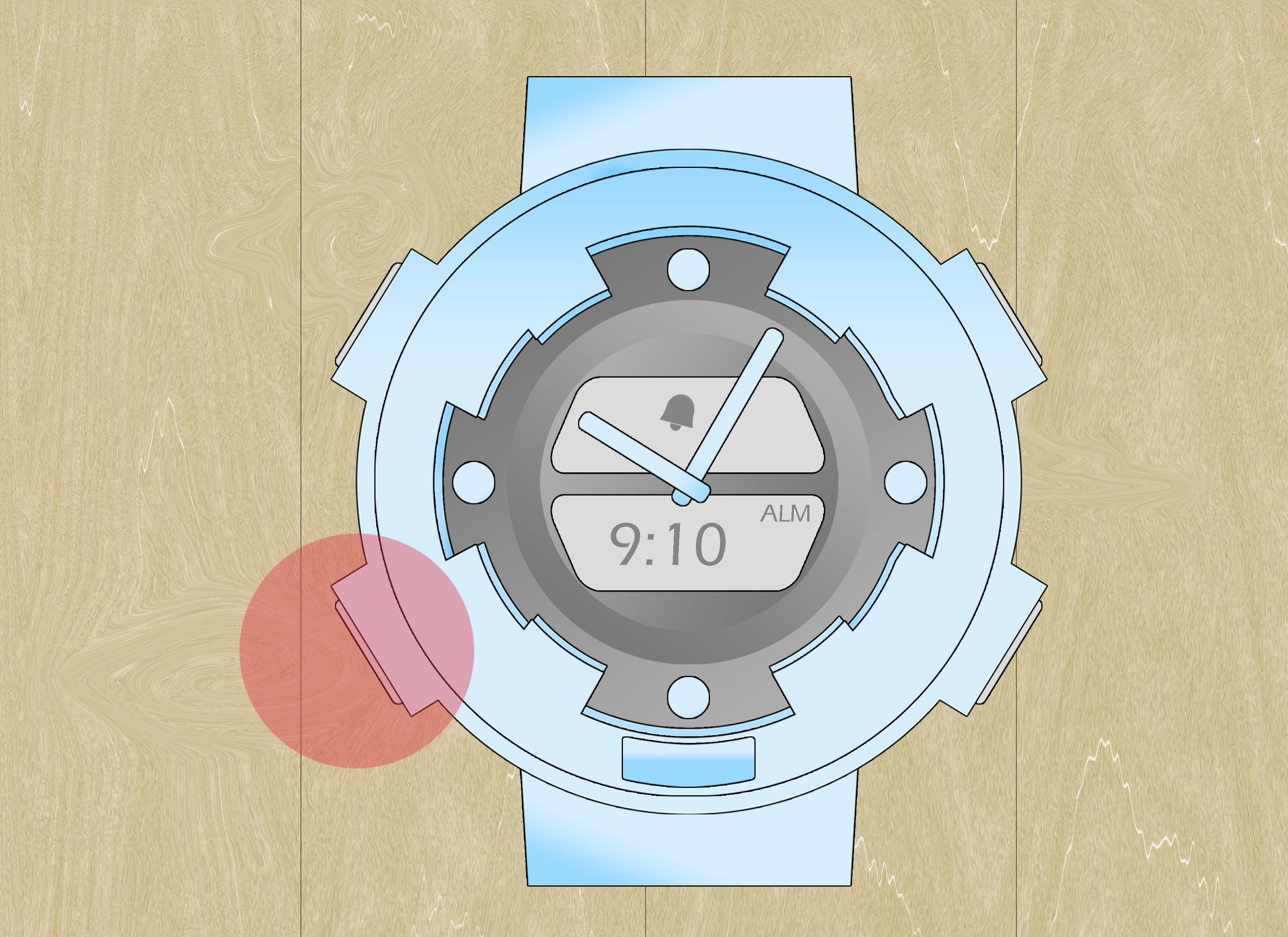
Most Baby-G watches have four main buttons. They are usually placed at the upper left, lower left, upper right, and lower right sides of the case. Depending on the model, they may be labeled or described like this:
- A / Adjust: Usually the upper-left button. Often used to enter setting mode or save changes.
- B / Light or Reverse: Often the upper-right button. Sometimes used to decrease values, toggle on/off, or activate the backlight.
- C / Mode: Usually the lower-left button. Used to cycle through Timekeeping, Alarm, Stopwatch, Timer, and other modes.
- D / Start, Forward, or Search: Often the lower-right button. Commonly used to scroll alarm numbers or increase hour and minute settings.
If your Baby-G has five buttons, Bluetooth, solar charging, or analog hands that move out of the way when settings flash, do not panic. The alarm logic is still similar: enter Alarm Mode, choose an alarm, edit the time, save it, and make sure the alarm icon is displayed.
How to Set an Alarm on a Baby-G Watch: 11 Steps
Step 1: Start from Timekeeping Mode
Begin on the normal time screen. This is the display that shows the current time, day, and date. If your watch is in Stopwatch, Timer, World Time, or another mode, press the Mode button until you return to the main time display.
This matters because Baby-G watches cycle through modes in order. If you start from a random screen, you may press Mode too many times and end up playing a tiny game of “Where did my watch go?” Starting from Timekeeping Mode makes the process predictable.
Step 2: Press the Mode Button Until You Reach Alarm Mode
Press the Mode button several times until the display shows something like AL, ALM, AL1, AL2, or a small alarm indicator. On many Baby-G watches, Alarm Mode appears after pressing Mode a few times from the main time screen.
Some models include multiple alarm slots, usually shown as AL1 through AL5. Others may show alarm names, numbers, or icons. If you see SIG, that usually means the hourly time signal, not a daily alarm. The hourly signal makes the watch beep every hour on the hour. Useful for some people. Mildly annoying for everyone sitting near you in a quiet room.
Step 3: Choose the Alarm You Want to Set
Once you are in Alarm Mode, press the lower-right button, often labeled D, Start, Search, or Forward, to scroll through available alarm slots. Many Baby-G models allow up to five alarms, such as AL1, AL2, AL3, AL4, and AL5.
Choose the alarm slot you want to edit. For example, use AL1 for your morning alarm, AL2 for a class reminder, and AL3 for “drink water before becoming a raisin.” Keeping alarms organized helps you avoid mystery beeps later.
Step 4: Hold the Adjust Button Until the Hour Flashes
After selecting the alarm slot, hold the upper-left Adjust button. On many models, you need to hold it for about one or two seconds. Release it when the hour digits begin flashing. Flashing digits mean the watch is ready for editing.
If nothing flashes, try holding the button a little longer. If the watch exits the mode or changes screens, you may be using a model with a slightly different layout. Return to Alarm Mode and try again, or check the module-specific manual.
Step 5: Set the Alarm Hour
Use the forward or reverse buttons to change the hour. On many Baby-G watches, the lower-right button increases the hour, while the upper-right button may decrease it. Holding the button often scrolls faster, which is helpful unless you overshoot and suddenly your 7:00 AM alarm becomes a 7:00 PM surprise.
If your watch uses 12-hour time, pay attention to the A or P indicator. A usually means AM, and P usually means PM. This is one of the most common alarm mistakes. A perfectly set 6:30 alarm is useless if it politely waits until dinner.
Step 6: Move to the Minute Setting
Press the Mode button, often the lower-left button, to move from the hour digits to the minute digits. The minutes should begin flashing. This tells you the watch is ready for the next part of the alarm time.
Some Baby-G models may use another button to move between settings, but Mode is common. If pressing Mode exits the alarm screen, your model may use Adjust or another button to move through fields. Again, the module number is your best friend here.
Step 7: Set the Alarm Minutes
Use the forward and reverse buttons to set the minutes. Choose the exact time you want the alarm to sound. If you are setting a wake-up alarm, give yourself a realistic buffer. A 6:00 AM alarm is ambitious. A 6:15 AM alarm may be honest. A 6:45 AM alarm may be the start of a very dramatic morning.
For reminders, exact minutes can be useful. For example, setting an alarm for 3:55 PM can remind you to pack up before an after-school activity, meeting, or commute. A Baby-G alarm is simple, but when used well, it can replace several phone notifications.
Step 8: Save the Alarm Setting
Press the Adjust button again to save the alarm time. The digits should stop flashing. On many models, the alarm turns on automatically after you set the time. Look for an alarm icon, the word ON, or an ALM indicator on the display.
If you do not see an alarm indicator, the time may be set but the alarm may not be active. That is like putting a pizza in the oven and forgetting to turn the oven on. Technically, you did something. Practically, nothing useful will happen.
Step 9: Turn the Alarm On or Off
While still in Alarm Mode, select the alarm slot you want to control. Press the button your model uses to toggle the alarm on or off. On many Baby-G modules, this may be the upper-right or lower-right button. The display may show ON, OFF, ALM, or a small bell-like icon.
When the alarm is on, an alarm indicator usually remains visible in Alarm Mode and may also appear in Timekeeping Mode. When all alarms are off, the alarm indicator disappears. This is the easiest way to check whether your watch is actually armed and ready to beep.
Step 10: Check the Hourly Time Signal
Scroll through Alarm Mode until you see SIG. This is the hourly time signal. If it is enabled, your Baby-G will beep every hour on the hour. Some people love this because it helps them track time. Other people discover it during a test, meeting, or quiet library session and suddenly develop strong opinions.
Use the toggle button to turn SIG on or off. If your watch keeps beeping every hour even though your alarm is not set, the hourly time signal is probably the culprit. Turn off SIG, and peace may return to your wrist kingdom.
Step 11: Return to Timekeeping Mode and Test Your Setup
Press the Mode button until you return to the normal time screen. Your alarm is now set. If your Baby-G model allows alarm testing, you may be able to hold certain buttons in Alarm Mode to hear the beep. Not every model has the same test command, so check your manual before button-mashing like you are trying to unlock a video game cheat code.
For the first time you set an alarm, choose a time one or two minutes ahead and wait for it to sound. This quick test confirms that the alarm is on, the AM/PM setting is correct, and the volume is audible enough for your needs.
Common Baby-G Alarm Problems and How to Fix Them
The Alarm Did Not Sound
First, check whether the alarm is turned on. A set alarm time is not always the same as an active alarm. Look for ON, ALM, or the alarm icon. Next, check AM and PM. If the time is correct but the alarm still does not sound, inspect the battery level. Some models may mute sounds when battery power is too low or when power-saving conditions are active.
The Watch Beeps Every Hour
This is almost always the hourly time signal. Enter Alarm Mode, scroll to SIG, and toggle it off. If the SIG indicator disappears, you have solved the mystery. Congratulations, detective.
I Cannot Find Alarm Mode
Press Mode slowly and watch the screen labels. Baby-G watches may include Timekeeping, World Time, Stopwatch, Timer, Alarm, and other modes. If your model has a Bluetooth or sensor function, the mode cycle may be longer. Keep pressing Mode until you see AL, ALM, AL1, or another alarm label.
The Hands Block the Digital Display
Some analog-digital Baby-G watches have hands that may cover the small digital screen. Newer modules may automatically shift the hands during settings. Other models have a hand-shift feature. If the display is blocked, look for the hand-shift function in your manual or wait until the hands move away from the digital window.
The Buttons Do Not Match This Guide
This is normal. Baby-G models use different modules, and the module controls the exact button behavior. Look at the back of your watch case for a small module number, then search for the official operation guide for that number. The basic steps will still look familiar: enter Alarm Mode, choose an alarm, edit the time, save, and toggle on.
Tips for Using Baby-G Alarms Like a Pro
Use one alarm slot for your most important daily reminder and keep it consistent. For example, AL1 can always be your morning alarm. Use AL2 and AL3 for flexible reminders, such as workouts, study sessions, or appointments. This makes it easier to remember which alarm does what.
If you use your phone for alarms, your Baby-G can still be a great backup. Phones run out of battery, get silenced, or disappear under blankets like they are training for a magic act. A watch alarm stays on your wrist and does one job without asking for app updates.
When traveling, check your home time, world time, and alarm time carefully. Some Baby-G models base alarm operation on the main Timekeeping Mode. If you change time zones, make sure your alarm still matches your actual schedule. Nobody wants a 5:30 AM alarm that was technically correct in another state.
Real-Life Experience: What Setting a Baby-G Alarm Teaches You
The first time you set an alarm on a Baby-G watch, it can feel more complicated than it should. There are tiny letters, flashing numbers, buttons with mysterious names, and a display that seems to be judging your life choices. But after a few tries, the process becomes surprisingly satisfying. You press Mode, find ALM, hold Adjust, change the hour, change the minutes, save, and suddenly you feel like you have joined a secret society of people who still know how to operate things without a touchscreen.
One useful experience is learning to test the alarm immediately after setting it. Many people set a watch alarm for the next morning and trust it completely, only to discover that it was set for PM, turned off, or assigned to the wrong alarm slot. A simple test prevents that. Set the alarm for two minutes ahead, wait for it to beep, then reset it to the real time you need. It takes almost no effort and saves you from blaming the watch for a very human mistake.
Another practical lesson is that the hourly time signal can fool almost everyone once. You may think an alarm is randomly going off, but the watch is simply doing exactly what SIG tells it to do: beep every hour. This feature is helpful for time awareness, especially during study sessions or workouts, but it can also become annoying if you forget it is on. Once you learn the difference between ALM and SIG, you gain a lot more control over your Baby-G.
Baby-G alarms are especially useful when you want reminders without opening your phone. A phone reminder can turn into a 20-minute detour through messages, videos, and “just one quick scroll.” A watch alarm is beautifully boring. It beeps, you notice, and life continues. That makes it perfect for simple habits: leaving on time, checking food in the oven, switching laundry, drinking water, taking a study break, or remembering when practice starts.
There is also something dependable about a physical watch alarm. It does not need Wi-Fi. It does not care about your notification settings. It does not get buried under app banners. Once the battery is good and the alarm is active, it simply works. That reliability is one reason Baby-G watches remain popular with students, travelers, athletes, nurses, outdoor workers, and anyone who wants a tough watch that can handle daily chaos.
The best experience comes after you customize your alarms to match your routine. Maybe AL1 is your wake-up alarm, AL2 is your commute reminder, AL3 is your workout cue, and SIG stays off because hourly beeping is not your personality. Over time, your Baby-G becomes more than a fashion accessory. It becomes a tiny time-management assistant that lives on your wrist and never asks to borrow your charger.
Conclusion
Setting an alarm on a Baby-G watch is simple once you understand the rhythm: start from Timekeeping Mode, enter Alarm Mode, choose an alarm slot, hold Adjust, set the hour and minutes, save the setting, and confirm that the alarm is turned on. The exact buttons may vary by module, but the core process is consistent across many Baby-G watches.
The most important details are easy to remember. Watch for AM and PM, make sure the alarm indicator appears, and do not confuse the daily alarm with the hourly time signal. If something seems different, use the module number on the back of your watch to find the correct manual. Once you learn the process, your Baby-G alarm becomes a reliable tool for mornings, reminders, workouts, travel, school, work, and all the tiny deadlines that make life interesting.
In a world where phones do everything except politely leave us alone, a Baby-G alarm is refreshingly focused. It beeps. You act. No distractions, no drama, no 47 notifications. Just a tough little watch helping you stay on time.