

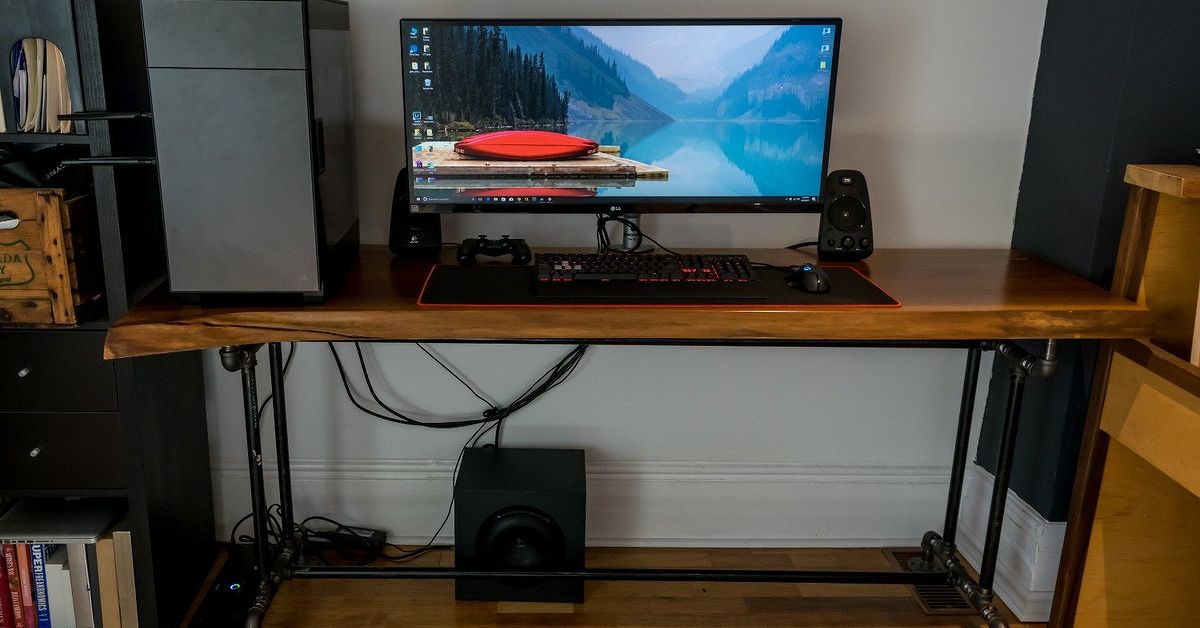
An adjustable height live edge desk brings together two ideas that rarely share the same conference room: cutting-edge workplace ergonomics and a chunk of wood that proudly refuses to be rectangular. The result is a sit-stand workstation with modern motors, natural contours, distinctive grain, and enough personality to make ordinary office furniture look like it was designed by a spreadsheet.
However, combining a solid wood slab with an electric standing desk frame requires more thought than simply placing one on top of the other. The slab must be properly dried and flattened, the frame must support its weight, and the mounting system must allow seasonal wood movement. Ergonomic details such as height range, desktop depth, monitor position, and cable management matter just as much as the dramatic live edge.
This guide explains how to choose, build, configure, and maintain an adjustable live edge standing desk that looks impressive without wobbling every time you type an enthusiastic email.
What Is an Adjustable Height Live Edge Desk?
An adjustable height live edge desk combines a natural-edged solid wood desktop with a mechanical or electric base that moves between seated and standing positions. Instead of trimming both long sides into perfectly straight lines, the maker preserves at least one edge that follows the original contour of the tree.
The desk may use a single wide slab, two bookmatched slabs, or several boards joined into a panel. Walnut, maple, white oak, ash, cherry, and elm are popular choices because they offer attractive grain and enough durability for daily office use.
Why the Combination Works
A standing desk frame tends to look industrial. A live edge top adds warmth, visual texture, and individuality. Meanwhile, the adjustable frame solves one of the major limitations of a conventional slab desk: a fixed height that may not suit the user.
The design is especially appealing in home offices, creative studios, executive workspaces, and modern interiors where natural materials soften metal, glass, and technology. No two slabs have identical grain, checks, knots, sapwood, or edge contours, so the finished desk feels custom even when the base is commercially manufactured.
Benefits of a Live Edge Sit-Stand Desk
It Encourages Changes in Working Position
The primary ergonomic advantage is not standing all day. It is having the freedom to change positions. Workplace guidance from OSHA, NIOSH, university ergonomics programs, and major medical organizations consistently emphasizes avoiding prolonged static postures.
An adjustable desk allows you to sit during concentrated tasks, stand during calls, and move briefly between work sessions. Standing without moving is not a magic health potion. It is simply another position, and staying frozen in it for hours can become uncomfortable too.
It Can Be Adjusted to the Individual
Standard desks are commonly designed around an average user who may bear little resemblance to the person actually using the furniture. A height-adjustable frame lets shorter and taller users bring the keyboard closer to elbow height while keeping the shoulders relaxed.
This flexibility is also useful in shared workspaces. Each person can save a preferred seated and standing position rather than negotiating with a chair, a footrest, and three suspiciously unstable books.
It Creates a Long-Lasting Focal Point
A quality hardwood slab can be sanded and refinished many times. Scratches, worn areas, and small dents are usually repairable, unlike damage to thin veneer or printed laminate. The natural irregularities also help disguise minor evidence of real life.
The desk becomes both furniture and functional sculpture. Grain patterns, mineral streaks, knots, and natural color variation give the surface depth that mass-produced tops cannot easily imitate.
Choosing the Right Live Edge Slab
Start With Properly Dried Wood
Moisture content is one of the most important considerations. Wood continues to exchange moisture with the surrounding air after it has been cut and finished. As humidity changes, a slab can expand, contract, cup, twist, or develop new checks.
For an indoor desk, buy a slab that has been professionally kiln-dried or carefully air-dried and verified with a moisture meter. Many furniture makers look for a moisture level near the conditions in which the finished desk will live, often within a single-digit to low-double-digit percentage range depending on the region and indoor environment.
Do not rely solely on a seller saying the slab is “dry.” Ask how it was dried, when it was milled, and whether readings were taken in several locations. A thick slab may feel dry at the surface while retaining more moisture inside.
Select an Appropriate Species
Walnut is prized for rich brown color, elegant grain, and contrasting sapwood. White oak offers prominent grain and excellent durability. Hard maple creates a brighter, cleaner appearance, while cherry develops a deeper reddish tone with age. Ash and elm can deliver dramatic grain at a price that may be more approachable than premium walnut.
Species matters, but slab quality matters more. A stable, properly dried ash slab is usually a better desk top than a glamorous walnut slab that is wet, badly twisted, or held together by optimism.
Consider Thickness, Width, and Depth
A finished thickness of roughly 1.5 to 2 inches often provides a substantial appearance without making the top unnecessarily heavy. Very thick slabs can be stunning, but they increase the load on the motors and mounting hardware.
For computer work, depth is particularly important. OSHA workstation purchasing guidance recommends enough room to place the monitor at least about 20 inches from the eyes. A desk around 28 to 32 inches deep generally provides comfortable space for a monitor, keyboard, and mouse, although the live edge may make the usable depth vary from one end to the other.
A width of 55 to 72 inches suits many home offices. Wider tops accommodate multiple monitors, speakers, and paperwork, but they also demand a broader, more rigid frame.
Inspect the Natural Edge
Bark may look rustic, but loose bark can collect dust, flake onto the floor, and separate from the slab over time. Many builders remove it while preserving the underlying contours and sapwood. The exposed edge can then be brushed, sanded, and sealed.
Examine the slab for insect holes, soft areas, active powder, major splits, rot, and structural weakness. Small checks and knots can add character, but they should not compromise areas where frame fasteners or monitor arms will be installed.
Choosing an Adjustable Standing Desk Frame
Check the Real Load Requirement
Add the weight of the slab, monitors, computer, speakers, accessories, and anything likely to accumulate on the desk. Then choose a frame with a meaningful safety margin above that total.
A large hardwood slab can weigh considerably more than a conventional laminate desktop. The frame should lift the entire setup smoothly without operating near its maximum capacity every day. Review the manufacturer’s published dynamic lifting capacity rather than assuming all steel legs are equally heroic.
Prefer a Stable Dual-Motor Design
For a wide or heavy live edge top, a dual-motor frame is generally preferable to a lightweight single-motor base. Two motors can distribute the load more evenly, while a rigid cross-support system can reduce side-to-side movement.
Look for a frame designed and tested for height-adjustable desks, with attention to stability, leg strength, load performance, and obstruction response. Standards developed for office furniture provide useful benchmarks, although certifications and test claims should still be verified for the specific product.
Confirm the Height Range
The frame must go low enough for comfortable seated typing and high enough for standing work. OSHA guidance notes that keyboard heights may need to span approximately 22 to 30 inches for seated tasks and 36 to 46.5 inches for standing tasks, although individual needs vary.
Remember that frame specifications may list the height before the desktop is added. A 2-inch slab raises the final working surface by 2 inches, which can make a supposedly suitable frame too tall at its lowest setting.
Look for Useful Controls
A programmable handset is worth having. Memory buttons make it easy to switch between tested ergonomic positions rather than repeatedly tapping arrows and guessing. Anti-collision or obstruction-detection technology can help protect chairs, cabinets, window ledges, and knees when the desk moves.
Other useful features include adjustable frame width, replaceable control components, cable-routing points, a low standby power mode, and a warranty that covers the motors, control box, and legs.
How to Build an Adjustable Height Live Edge Desk
1. Acclimate and Inspect the Slab
Store the slab in the room or a similar indoor environment before final machining. Keep it supported and allow air to circulate around both faces. Check moisture readings, twist, cup, cracks, and the intended top face.
2. Flatten Both Faces
A flat surface is essential for comfortable writing, accurate frame installation, and stable monitor equipment. Wide slabs may be flattened with a commercial planer, wide-belt sander, CNC machine, or router sled. A router sled is slower but practical for a DIY shop without industrial equipment.
Remove only as much material as necessary. Aggressive flattening can turn an impressive 2-inch slab into a perfectly flat but emotionally disappointing cutting board.
3. Remove Loose Bark and Clean the Edge
Use a chisel, drawknife, stiff brush, or controlled wire-wheel technique to remove unstable bark and soft material. Preserve the organic shape rather than sanding the edge into a suspiciously straight approximation of nature.
Round sharp projections that could catch clothing or scrape an arm. The front working edge should feel comfortable where the forearms may contact it.
4. Stabilize Cracks and Voids
Small checks may be left visible, but unstable cracks should be reinforced or filled. Tinted epoxy is commonly used for knots and voids because it can stabilize fragile areas while preserving visual contrast. Large structural splits may require bow-tie keys or other mechanical reinforcement.
Do not fill every natural feature simply because epoxy exists. A desk can celebrate the tree without resembling a glowing river viewed from space.
5. Sand Methodically
Begin with a grit appropriate to the machining marks, then progress through finer grits without skipping excessively. Many makers stop around 180 or 220 grit for a film finish. Remove dust between stages and inspect the surface under low-angle light.
Ease the bottom and front edges slightly. A sharp desk edge can create uncomfortable contact pressure on the forearms, especially during long typing sessions.
6. Apply Finish to All Sides
Oil-based finishes deepen the grain and create a warm appearance. Water-based polyurethane preserves a lighter color and offers strong surface protection. Hard-wax oils are popular because they produce a natural feel and can often be repaired locally.
Apply finish to the top, underside, edges, recesses, and end grain. Finishing both faces helps slow moisture exchange more evenly, although no finish can completely prevent seasonal movement. Allow every coat to cure according to the product instructions before installing electronics.
7. Position the Frame Carefully
Center the frame based on the slab’s usable shape, not merely its maximum dimensions. An irregular live edge can make the visual center different from the structural center.
Leave room for knees, monitor clamps, cable trays, and control boxes. Before drilling, place the keyboard, chair, monitors, and accessories in their likely locations. This simple rehearsal prevents discovering that a crossbar occupies the exact space intended for a keyboard tray.
8. Allow for Wood Movement
Solid wood moves mostly across the grain as humidity changes. Avoid locking a wide slab rigidly to a steel frame through fixed holes at every mounting point. Depending on the frame design, use elongated holes, sliding fasteners, figure-eight connectors, or another method that allows controlled lateral movement.
The center may be located firmly while outer attachment points permit expansion and contraction. Follow sound furniture-building practices and do not overtighten screws until the wood is trapped between steel components like a suspect in an interrogation room.
9. Install Cable Management
Use an under-desk cable tray, adhesive mounts, reusable ties, and a flexible cable sleeve. Leave enough slack for the desk to reach its highest position without pulling plugs from equipment or lifting the power strip off the floor.
Test the full travel range while watching every cord. Secure the control box and handset wiring away from moving leg sections.
Setting Up the Desk Ergonomically
Adjust the desktop so the keyboard is near elbow height. Keep the shoulders relaxed, the elbows close to the body, and the wrists straight rather than bent upward or sideways. Place the keyboard and mouse close enough that reaching does not pull the torso forward.
The monitor should be directly in front of the user, with sufficient viewing distance and a height that supports a neutral head position. Large monitor arms must be clamped to a structurally sound section of the slab, not a thin natural projection or cracked area.
Save seated and standing presets only after testing them during actual work. Shoes, anti-fatigue mats, chair height, and keyboard thickness can all change the ideal setting.
Alternate positions regularly and include movement. Walk to refill water, stretch briefly, or take calls away from the screen. The adjustable height live edge desk is a tool for variation, not a machine that converts standing still into exercise.
Common Mistakes to Avoid
- Buying a wet slab: Excess moisture can lead to cupping, cracking, and twisting after assembly.
- Ignoring total weight: A frame must lift the slab and the complete workstation, not just the empty desktop.
- Choosing a frame that does not go low enough: Thick wood adds to the minimum working height.
- Mounting the slab rigidly: Solid wood needs room for seasonal movement across its width.
- Keeping loose bark: Unstable bark eventually becomes floor decoration.
- Using a shallow top: Insufficient depth can force the monitor too close to the eyes.
- Forgetting cable slack: The desk should rise without unplugging the monitor in a dramatic display of independence.
- Standing all day immediately: Transition gradually and continue changing positions.
Maintenance and Long-Term Care
Dust the surface with a soft cloth and clean spills promptly. Use cleaning products compatible with the chosen finish. Avoid soaking the wood, placing extremely hot objects directly on it, or allowing wet cups to remain overnight.
Inspect cracks, mounting screws, frame bolts, cables, and monitor-arm clamps periodically. Tighten hardware when necessary, but preserve any movement allowance built into the desktop attachments.
Maintain reasonable indoor humidity when possible. Large swings between very dry winters and humid summers can increase seasonal movement. Small changes are normal; sudden severe warping may indicate moisture imbalance, inadequate support, or an improperly dried slab.
Oil and hard-wax finishes may need occasional renewal. Film finishes generally last longer before refinishing but can be less convenient to repair in one isolated area.
Real-World Experience With an Adjustable Height Live Edge Desk
The first experience many owners notice is not the standing function. It is the physical presence of the slab. A wide walnut, oak, or maple top feels substantial in a way that a thin commercial desktop does not. The grain changes with daylight, knots become landmarks, and the natural edge turns an ordinary workstation into something people ask about during video calls.
That initial admiration is usually followed by a practical discovery: solid wood is heavy. Moving the finished desk may require two or three people, even after the frame has been lowered. Owners who expect to rearrange the room frequently are better off choosing a moderately thick slab and a frame with feet that accept suitable casters.
The First Week: Finding the Right Positions
New users often set the standing height too high. The shoulders rise, the wrists bend, and standing begins to feel uncomfortable after twenty minutes. Lowering the desk until the forearms rest close to horizontal usually produces a more relaxed posture.
The seated preset may require similar experimentation. A thick slab can interfere with chair armrests or reduce thigh clearance. In some cases, lowering the chair is not the answer because that changes the relationship between the feet and floor. A footrest, adjustable armrests, or a lower-range frame may provide a better solution.
After several days, switching positions becomes less of an event. Users may stand for calls, routine email, or light administrative work while sitting for precision tasks and deep concentration. The desk becomes most useful when height changes are tied to normal parts of the day rather than an ambitious schedule that is forgotten by Tuesday.
The First Few Months: Small Details Become Important
Cable management quickly separates a polished workstation from an expensive wooden octopus. A cable tray and a power strip mounted beneath the top allow one power cord to travel toward the wall. Monitor, speaker, lamp, and computer cables can move with the desk without hanging in loops around the legs.
Monitor stability also becomes noticeable. A rigid dual-motor frame paired with a well-positioned slab can feel steady at seated height, but every standing desk will reveal more movement when fully extended. Heavy monitors on long arms amplify that movement. Keeping arms compact, tightening joints, and placing the frame feet on a solid floor can improve the experience.
The natural edge may require behavioral adjustment too. It looks beautiful, but an extreme curve can reduce usable desk depth in one area. Owners often place decorative items along the irregular side while reserving the straighter section for the keyboard and mouse.
Seasonal Changes and Wood Movement
During the first change of seasons, a live edge desktop may expand slightly, contract, or reveal a small new check. This does not automatically mean the desk is failing. Wood is hygroscopic, meaning it responds to surrounding moisture even after finishing.
A properly dried slab attached with movement-friendly hardware generally handles these changes without trouble. Problems are more likely when the top was wet, finished unevenly, stored in an uncontrolled space, or screwed tightly through fixed steel holes across its entire width.
Owners may also notice that a natural oil finish becomes slightly dull near the keyboard and mouse. That high-contact area can often be cleaned and renewed without stripping the entire desk. A polyurethane-style film finish may resist wear longer, although repairs can require more preparation.
What Owners Commonly Appreciate Most
The strongest long-term benefit is flexibility. A height-adjustable desk can adapt to different chairs, footwear, tasks, users, and future workspace arrangements. The live edge top adds durability and emotional value. Instead of replacing the entire workstation when the surface is scratched, the slab can often be refinished and installed on a new frame.
People also tend to keep the surface more organized because the wood itself feels worth displaying. That does not mean clutter disappears permanently. It merely becomes more tasteful clutter.
Lessons Worth Remembering
A successful adjustable height live edge desk is rarely the product of choosing the fanciest slab or the frame with the most buttons. It comes from balancing weight, stability, height range, usable depth, wood movement, finish durability, and the user’s actual body dimensions.
Measure first. Verify the slab’s moisture content. Calculate the complete load. Test the frame at full height. Plan every cable before mounting equipment. Most importantly, treat standing as one part of an active work routine rather than the destination.
When those details are handled correctly, the finished desk can deliver years of comfortable work while looking less like office equipment and more like a piece of functional craftsmanship.
Conclusion
An adjustable height live edge desk offers a rare combination of ergonomic flexibility, natural beauty, and long-term durability. Its success depends on more than visual appeal: the wood must be properly dried, the frame must safely support the total load, and the attachment method must respect seasonal movement.
Choose a slab with sufficient depth, a comfortable front edge, and sound structural areas for mounting equipment. Pair it with a stable frame that provides the required seated and standing range. Finish all surfaces, manage cables carefully, and create presets based on neutral posture rather than arbitrary numbers.
Done well, a live edge standing desk is not simply a trendy home-office upgrade. It is adaptable furniture that can be maintained, repaired, refinished, and enjoyed long after less memorable desks have retired to the mysterious corner of a garage.