

Need to pay your roommate back for utilities, send birthday cash to your cousin, or buy a vintage lamp from someone who swears it is “mid-century” and definitely not “found near a dumpster”? PayPal can handle all of that with a few taps or clicks. It remains one of the best-known peer-to-peer payment platforms because it is fast, familiar, and easy to use on both desktop and mobile.
Still, knowing how to send money via PayPal the right way matters. One wrong tap can mean sending money to the wrong person, choosing the wrong payment type, or paying a fee you did not need to pay. This guide walks you through the full process step by step, explains the difference between Friends and Family and Goods and Services, covers common PayPal fees, and shares smart safety tips so your money goes where you actually want it to go.
Why People Use PayPal to Send Money
PayPal is popular because it is convenient. You can send money from a linked bank account, PayPal balance, debit card, or credit card. You can also send to someone using an email address, mobile number, PayPal username, or sometimes a PayPal.Me link. That makes the process feel less like wiring funds through a bank and more like sending a very expensive text message.
Another reason people like PayPal is flexibility. It works for casual payments between friends, online purchases, and many international transfers. If both people already use PayPal, sending money can feel almost instant on the front end, even if the recipient later chooses a standard bank transfer that takes a bit longer to finish settling.
Before You Send Money on PayPal
Before you hit the send button, take a minute to set yourself up properly. That small pause can save you a major headache later.
1. Make sure your PayPal account is ready
You need an active PayPal account with your login details working, your identity information up to date, and at least one payment method linked. Most people link a bank account first because that is typically the cheapest way to send domestic personal payments.
2. Add a payment method
You can usually fund a payment with:
- Your PayPal balance
- A linked bank account
- A debit card
- A credit card
For everyday personal payments in the U.S., a linked bank account or your PayPal balance is usually the most cost-effective option. Cards are convenient, but convenience often arrives wearing a tiny fee cape.
3. Confirm the recipient’s information
Ask for the exact email address, mobile number, PayPal username, or PayPal.Me link tied to the recipient’s account. Do not guess. Do not “pretty sure” your way through it. Peer-to-peer payments can be difficult to reverse, so accuracy matters.
4. Know what kind of payment you are making
This step is a big deal. PayPal may ask you to choose between:
- Friends and Family: Best for personal payments like gifts, splitting dinner, or paying your half of rent.
- Goods and Services: Best for purchases, freelance work, tickets, secondhand items, or any other payment connected to a product or service.
If you are buying something, do not casually click Friends and Family just because it sounds warm and wholesome. That option is generally for personal payments and is not covered by PayPal Purchase Protection. For a purchase, Goods and Services is usually the smarter choice.
How to Send Money via PayPal: Step by Step
Step 1: Log in to PayPal
Open the PayPal website or the PayPal app and sign in. If you use two-factor authentication, complete that step too. Yes, it adds a few seconds. Yes, it is worth it.
Step 2: Go to “Send and Request”
On desktop, look for the Send and Request option. On the mobile app, you will usually see Send/Request. This is the control center for moving money to another person.
Step 3: Enter the recipient’s details
Type in the person’s name, PayPal username, email address, or mobile number. If you have the right person saved in your contacts, you may also be able to select them directly.
At this point, double-check the name that appears on the screen. If you are sending money to “Aunt Lisa” and the account suddenly says “LaserWolf_87,” stop and verify before continuing.
Step 4: Enter the amount
Type in how much money you want to send. You may also be able to choose the currency if the payment involves another country or a different currency. Add a note if you want, such as “birthday gift,” “March utilities,” or “thanks for not making me build that IKEA shelf alone.”
Step 5: Choose the payment type
If the option appears, select the right category:
- For Friends and Family for personal transfers
- For Goods and Services for purchases
This is one of the most important screens in the whole process. The wrong selection can affect fees, protections, and what happens if the deal goes sideways.
Step 6: Choose your funding source
Now select how you want to pay. Depending on your setup, PayPal may show your PayPal balance, linked bank account, debit card, or credit card.
Here is the simple rule:
- Use bank account or PayPal balance when you want to minimize fees on domestic personal payments.
- Use a card when you need convenience, rewards, or extra flexibility, but understand there may be a fee.
Also remember that some credit card issuers may treat certain person-to-person payments as cash advances. That is a separate issue from PayPal’s own fee and can get expensive fast.
Step 7: Review the details carefully
Before you send, review everything:
- Recipient name and account info
- Amount
- Currency
- Payment type
- Funding source
- Any visible fees or conversion charges
This is your last chance to catch a typo, wrong amount, or mystery fee before the money launches into the digital universe.
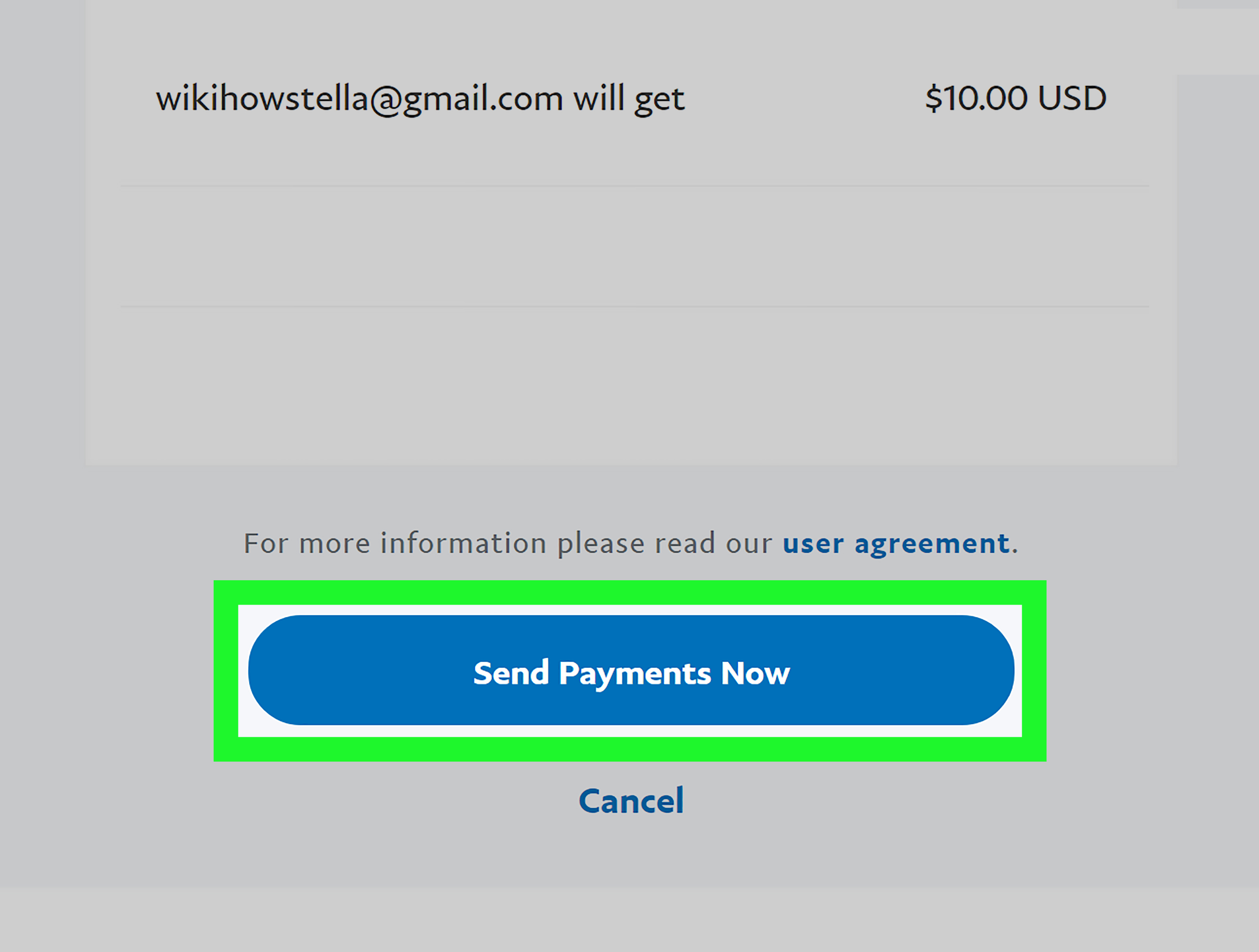
Step 8: Click “Send Payment Now”
Once everything looks correct, send the payment. You should get confirmation on-screen, and the transaction should appear in your PayPal activity history.
Step 9: Save the confirmation
Keep the confirmation email, screenshot, or transaction record, especially for larger payments or any transaction related to goods or services. Documentation is not glamorous, but neither is arguing over whether somebody ever got paid.
How to Send Money via the PayPal App
The mobile app is very similar to the website. Open the app, tap Send/Request, enter the recipient’s details, type the amount, add a note, choose the payment type, review, and tap send. The main difference is the layout, not the logic.
If someone sends you a PayPal.Me link, the process can be even simpler. Open the link, enter the amount, confirm the payment type if prompted, choose your funding method, and send.
PayPal Fees: What You Might Pay
If you are sending a personal payment within the U.S. and fund it with your PayPal balance or a linked bank account, the fee is generally $0. That is the sweet spot for many users.
If you fund a domestic personal payment with a debit or credit card, PayPal charges a fee. That can make a small payment noticeably less small. Sending $20 for tacos is fun. Sending $20 for tacos plus extra fees is still fun, but slightly more annoying.
International personal transfers usually cost more. PayPal’s consumer fee schedule shows an added international fee for sending personal payments abroad, and currency conversion may add another layer of cost. That means the total price of an international transfer is not just about the amount you type into the box. It is also about where the money is going, how you fund it, and which currency is involved.
Always check the final review screen before sending. If the number surprises you, it is better to find out before clicking than after.
Sending Money Internationally with PayPal
PayPal can send money to another PayPal account internationally, which is useful if both sender and recipient already use the platform. But depending on the country and delivery method, Xoom, a PayPal service, may be a better fit.
Xoom is especially useful when the recipient needs money delivered to a bank account, debit card, mobile wallet, or even through cash pickup or home delivery in some places. So if your relative overseas does not actively use PayPal, Xoom may give you more practical delivery options.
For international payments, pay attention to two things:
- The fee
- The exchange rate
People often focus only on the upfront fee, but the exchange rate can quietly change how much the recipient actually receives. That is why it is smart to review the complete transfer summary before sending money abroad.
Common Mistakes to Avoid
Sending money to the wrong person
Always verify the recipient. A single wrong digit in a phone number or one off-by-one typo in an email address can send your money on an unexpected vacation.
Choosing the wrong payment type
Use Friends and Family for actual personal transfers. Use Goods and Services when you are paying for something. Do not let someone pressure you into using a personal payment for a purchase just to “make things easier.” Easier for whom is the question.
Ignoring fees
Card-funded payments and international payments can cost more than people expect. Review the payment summary before you send.
Leaving too much money in the app
Receiving money into PayPal is convenient, but it is often wise to move funds to your linked bank account rather than treating the app like a long-term parking spot for large balances.
Sending money to strangers
Consumer agencies repeatedly warn that person-to-person payment apps can feel a lot like cash. If the recipient is a scammer, getting that money back may be difficult. If the story sounds urgent, dramatic, or suspiciously perfect, pause before you pay.
Smart Safety Tips When Using PayPal
- Turn on two-factor authentication.
- Use a strong, unique password.
- Double-check the recipient’s info before every payment.
- Confirm unexpected payment requests through a separate trusted contact method.
- Be careful with strangers selling event tickets, pets, electronics, or “limited-time miracles.”
- Review your activity history regularly.
- Transfer received money to your linked bank account if you do not need to keep it in the app.
When PayPal Makes the Most Sense
PayPal works especially well when:
- You and the recipient already have PayPal accounts
- You want a familiar platform for personal payments
- You are paying for an online item or service and want the right purchase setup
- You need a flexible option that works on desktop and mobile
- You may need international options through PayPal or Xoom
It may be less ideal if the fees for cards or international payments are too high for your situation, or if your recipient wants money delivered through a method PayPal itself does not handle directly.
Final Thoughts
Learning how to send money via PayPal is easy, but sending money well is about more than clicking a button. The smartest users verify the recipient, choose the correct payment type, watch for fees, and pause long enough to avoid dumb mistakes that become expensive stories later.
If you stick to the basics, PayPal can be one of the most convenient ways to move money for personal payments, online purchases, and some international transfers. In other words, it is a great tool, as long as you use it like a careful adult and not like someone trying to pay rent while half asleep.
Experiences and Practical Lessons from Using PayPal
One reason people keep coming back to PayPal is that it removes a lot of awkward friction from everyday money moments. Think about the classic situation: a group dinner, one friend pays, and suddenly the table becomes an accounting seminar. With PayPal, people can send their share quickly, add a note, and move on with their lives before someone starts calculating tax, tip, and emotional damages from the appetizer debate.
In real life, the best PayPal experiences usually happen when both sides are already set up. The sender has a linked bank account, the recipient has confirmed their PayPal email or username, and the payment type is obvious. Those transactions feel easy. You open the app, enter the amount, tap a few times, and done. It is the financial equivalent of a door that opens smoothly instead of one you have to shoulder-check.
Where people run into trouble is not usually the technology itself. It is the human part. Someone types the wrong email. Someone chooses Friends and Family when they are actually buying concert tickets from a stranger. Someone assumes a payment can be canceled as easily as deleting a text. Someone sends money first and asks questions second. That order of operations has ruined many otherwise peaceful afternoons.
Another common experience is surprise over fees. Plenty of users assume all digital payments are free all the time, then discover that funding a payment with a card or sending internationally changes the math. The lesson here is simple: the review screen is your friend. Read it. Those few extra seconds are cheaper than regret.
International use brings another layer of reality. Many people love the convenience of PayPal for cross-border sending, but they also learn that delivery options and total cost matter just as much as speed. In some cases, using Xoom makes more sense because the recipient needs bank deposit, cash pickup, or mobile wallet delivery instead of another PayPal balance. The best experience is not always the flashiest option. It is the option that gets the money to the right person in the most useful form.
There is also a security lesson that experienced users learn quickly: treat unexpected requests with suspicion. If a “friend” suddenly needs emergency money, verify it outside the app. If a seller insists on a personal payment for an item, slow down. If the deal sounds too perfect, it probably belongs in a scam warning, not in your transaction history.
Overall, the most successful PayPal users tend to do the same small things consistently. They verify the recipient, choose the correct payment type, review the fees, and keep records. None of that sounds glamorous. Neither does losing money. So if you want smooth PayPal experiences, the recipe is simple: be fast, but not rushed; be trusting, but not gullible; and never send money to “maybe the right account.”