

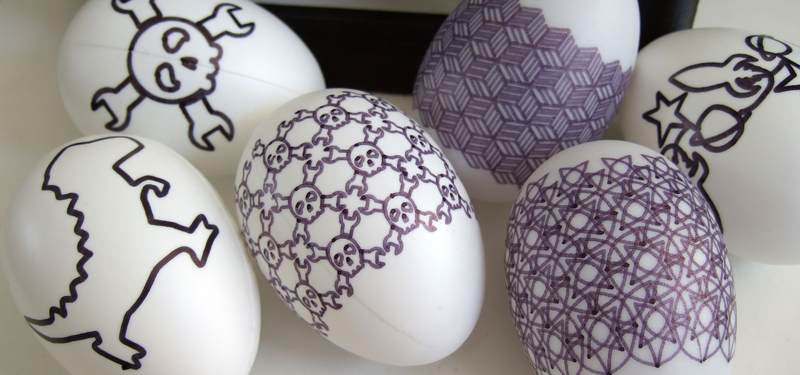
At first glance, an Eggbot looks like a charming little machine with one suspiciously specific job: drawing on eggs. That sounds adorable, slightly unnecessary, and exactly the kind of thing a curious person would stop to watch at a maker fair. But spend a little time with one, and you quickly realize the Eggbot is not just an egg-decorating gadget. It is a tiny classroom, a pocket-sized engineering lab, a patient art teacher, and occasionally a mischievous reminder that even robots can have “bad handwriting” if you do not set them up correctly.
So, what can you learn from an Eggbot? Quite a lot. You can learn how machines translate digital drawings into physical movement. You can learn why geometry matters, why calibration is not just a fancy word for “please stop wobbling,” and why creative projects are often the fastest way to understand technical ideas. The Eggbot teaches robotics, design thinking, computer-controlled drawing, patience, iteration, and the strange joy of watching a pen glide across a curved surface without falling into total chaos.
This article explores the lessons hidden inside this small open-source art robot. Whether you are a student, teacher, artist, engineer, hobbyist, parent, or someone who simply enjoys watching technology do delightfully weird things, the Eggbot has more to teach than its name suggests.
What Is an Eggbot?
An Eggbot is a compact, computer-controlled drawing machine designed to print or draw on spherical and egg-shaped objects. It is often described as an open-source CNC art robot, meaning it uses computer numerical control to move a pen with precision. Instead of printing on flat paper like a regular printer, it rotates an objectsuch as an egg, ornament, ping-pong ball, golf ball, or small pumpkinwhile a pen arm moves across the surface.
The original Eggbot concept is closely associated with motion control artist Bruce Shapiro, and the well-known EggBot kits were developed and popularized by Evil Mad Scientist Laboratories. Its design is intentionally accessible: small enough for a desk, flexible enough for experiments, and simple enough that beginners can understand what is happening without needing an engineering degree or a secret handshake from the Society of Overcomplicated Machines.
At its core, the Eggbot combines hardware, software, mechanics, and creativity. A user creates or imports vector artwork, often through software such as Inkscape, then sends the design to the Eggbot. The machine interprets the paths and moves the motors accordingly. The object rotates, the pen lifts and lowers, and a digital design becomes a physical drawing. That process may sound simple, but it opens the door to many powerful learning experiences.
The Big Lesson: Technology Becomes Easier When You Can See It Move
One of the most important things you can learn from an Eggbot is that technology is less mysterious when it becomes visible. Many people think of coding, robotics, and CNC machines as abstract or intimidating. Lines of code on a screen can feel like a foreign language. Motor control can sound like something reserved for industrial engineers wearing serious safety glasses.
The Eggbot changes that. When the machine draws a line, you can immediately see the relationship between a digital command and a physical result. If the design is stretched, misaligned, or upside down, the mistake is right there on the egg, staring back at you like a tiny oval-shaped critic. This instant feedback makes the learning process concrete and memorable.
Instead of asking, “What does this setting do?” you can test it. Change the scale. Adjust the pen pressure. Rotate the design. Modify the speed. Each change produces a visible result. That kind of hands-on experimentation is one of the strongest ways to learn STEM skills because it connects theory with action.
Learning Robotics Without Feeling Like You Joined a Space Program
Robotics can sound intimidating, but the Eggbot offers a gentle introduction. It has motors, a control board, moving parts, software instructions, and a mechanical structure. In other words, it contains many of the same basic ideas found in larger robotic systems, just in a friendly desktop format.
Motors and Motion Control
The Eggbot typically uses stepper motors, which move in precise increments. These motors are ideal for controlled positioning because they allow the machine to rotate an object or move a pen arm step by step. By watching the Eggbot work, learners can understand how machines create smooth curves and detailed patterns from many tiny movements.
This is a great entry point into motion control. You do not need to start with a six-axis industrial robot. You can begin with an egg, a pen, and the realization that accurate movement is built from careful coordination. That lesson applies to 3D printers, laser cutters, CNC routers, robotic arms, plotters, and automated manufacturing systems.
Mechanical Design
The Eggbot also teaches mechanical thinking. The object must be held securely. The pen must touch the surface with enough pressure to draw, but not so much pressure that it scrapes, skips, or turns your egg into breakfast confetti. The frame must remain stable. The rotation must be centered. The drawing area must match the size and shape of the object.
These challenges show learners that good machines are not just about software. Physical design matters. A beautiful digital pattern will not save you if the egg is mounted crooked or the pen holder is wobbling like a nervous flamingo.
What the Eggbot Teaches About Geometry
The Eggbot is a sneaky geometry teacher. It makes you think about curves, rotation, symmetry, scale, and distortion. Drawing on a sphere or egg-shaped object is different from drawing on flat paper. A circle on the screen may not appear exactly the same when wrapped around a curved surface. Lines may stretch, patterns may meet imperfectly, and designs may need adjustment to look balanced.
This helps learners understand that surfaces matter. A flat design must be translated onto a three-dimensional form. That idea is useful in many fields, including product design, packaging, architecture, animation, cartography, and textile design.
Symmetry and Repetition
Eggbot projects often involve repeating patterns, mandalas, spirals, waves, and decorative borders. These designs naturally introduce radial symmetry, rotational symmetry, spacing, and pattern logic. Students can experiment with repeating shapes around an object and see how small changes affect the final appearance.
For example, a simple row of triangles can become a crown-like border around an egg. A sine wave can wrap around the surface like a ribbon. A repeating floral pattern can turn into a miniature sculpture of math wearing its Sunday best.
Scale and Proportion
The Eggbot also teaches scale. A design that looks perfect on a laptop screen may be too detailed for a small egg. Thin lines can blur. Tiny text may become unreadable. Large shapes may wrap awkwardly. This teaches a valuable design principle: context changes everything.
Designers must consider the final medium, not just the digital preview. The Eggbot makes this lesson impossible to ignore. The egg does not care that your design looked amazing at 300 percent zoom.
Learning Creative Coding Through Eggbot Projects
Creative coding is the practice of using code to make visual art, interactive experiences, animations, or design systems. The Eggbot is a natural partner for creative coding because it turns algorithmic designs into physical drawings.
A learner can write code to generate patterns, export the artwork as vector paths, and then plot those paths onto an egg or other curved object. This process connects programming with visual creativity. It also shows that coding is not only for apps, spreadsheets, and mysterious corporate dashboards. Code can make art. Code can decorate an egg. Code can make your kitchen table look like a tiny robot studio.
Algorithms Become Art
With an Eggbot, simple algorithms can create beautiful results. A loop can generate repeated lines. Random numbers can create organic patterns. Mathematical functions can produce waves, spirals, grids, and geometric textures. Learners begin to see code as a creative tool rather than a dry technical requirement.
This is especially powerful for students who may not think they are “math people” or “coding people.” When they see a formula become a delicate pattern on a real object, the subject becomes more approachable. The result is not just correct or incorrect; it is interesting, surprising, and sometimes frame-worthy.
Debugging Becomes Less Painful
Debugging is part of every coding journey. The Eggbot makes debugging visual. If a line goes the wrong direction, if a pattern overlaps, or if the pen draws during a travel move, the problem is visible. Learners can trace the issue back to the design file, the machine settings, or the physical setup.
This turns debugging into detective work. The egg becomes the crime scene, the pen is the suspect, and the settings panel is full of questionable alibis.
Design Thinking: Prototype, Test, Adjust, Repeat
One of the most valuable lessons from an Eggbot is the design thinking process. You rarely get a perfect result on the first try. The first egg may be misaligned. The second may have a pen pressure problem. The third may reveal that your intricate dragon illustration looks more like a confused noodle when wrapped around a curved surface.
That is not failure. That is prototyping.
The Eggbot encourages a healthy creative workflow: make a design, test it, observe what happens, adjust the file or machine, and try again. This cycle is central to engineering, product development, art, software design, and scientific experimentation.
Failure Becomes Useful
Because Eggbot projects are small and relatively low-risk, failure feels manageable. A ruined egg is not the end of the world. It is a data point with a shell. Learners can laugh, adjust, and continue.
This matters because fear of failure often blocks creativity. The Eggbot teaches that mistakes are part of the process. A bad print can reveal what needs to change. A crooked pattern can teach alignment. A skipped line can teach pen pressure. A broken egg can teach the importance of not tightening the holder like you are securing cargo for a moon landing.
Art and Engineering Are Not Opposites
The Eggbot is a wonderful example of STEAM learning: science, technology, engineering, art, and math working together. It proves that art and engineering are not enemies sitting on opposite sides of the cafeteria. They are collaborators.
To make a successful Eggbot design, you need artistic judgment and technical understanding. You must choose shapes, patterns, contrast, and composition. You must also understand file formats, machine settings, surface limitations, and mechanical setup. The final object is both a designed artwork and a technical achievement.
This combination is valuable because many real-world careers require both creative and technical thinking. Industrial designers, architects, game designers, animators, engineers, UX designers, roboticists, and digital artists all benefit from blending imagination with practical constraints.
What Teachers Can Learn From an Eggbot
For educators, the Eggbot offers a compact way to make abstract lessons tangible. It can support projects in robotics, math, art, computer science, physics, and design. More importantly, it gives students a reason to care about the technical details.
A lesson on coordinate systems becomes more exciting when students use coordinates to place artwork. A lesson on motors becomes clearer when students watch a motor rotate an object. A lesson on symmetry becomes memorable when students create decorative patterns that wrap around an egg.
Project-Based Learning
Eggbot activities work well for project-based learning because students can complete a visible final product. They can plan, design, build, test, and present their work. The finished egg or ornament gives them something physical to hold and discuss.
Teachers can also adapt the difficulty level. Beginners might use pre-made vector designs and focus on setup. Intermediate students might create their own artwork in design software. Advanced students might generate designs with code, modify hardware, or explore custom control systems.
Collaboration and Communication
Eggbot projects are also good for teamwork. One student may focus on design, another on machine setup, another on documentation, and another on troubleshooting. The group must communicate clearly because small changes can affect the final result.
This mirrors real-world technical projects, where designers, engineers, programmers, and project managers must work together. The Eggbot may be small, but it can teach big collaboration skills.
What Artists Can Learn From an Eggbot
Artists can learn a lot from the Eggbot because it challenges the assumption that art must be made only by hand or only on traditional surfaces. The machine becomes a creative partner. It does not replace the artist; it expands what the artist can explore.
An Eggbot can produce precise patterns that would be difficult to draw manually. It can repeat motifs, create delicate linework, and turn mathematical designs into decorative objects. Artists can use it to explore generative art, ornament design, typography, geometric illustration, and experimental surfaces.
The Beauty of Constraints
The Eggbot has limitations. It draws with a pen. It works best on certain object sizes and surfaces. It may struggle with heavy detail or awkward shapes. But constraints often make art more interesting.
When artists work within limits, they make sharper decisions. They simplify. They exaggerate. They test patterns. They discover unexpected effects. The Eggbot teaches that creative constraints are not creative prisons. They are playground fences, and sometimes the best ideas happen because you cannot do everything.
What Makers and Hobbyists Can Learn From an Eggbot
For makers, the Eggbot is a gateway into the wider world of digital fabrication. It introduces many concepts used in 3D printing, CNC machining, laser cutting, and pen plotting. You learn about machine calibration, file preparation, tool paths, repeatability, and material behavior.
You also learn the maker mindset: take something apart, understand how it works, improve it, customize it, and share what you discover. Because the Eggbot ecosystem has strong open-source roots, it encourages experimentation and community learning.
Customization
Many makers enjoy modifying Eggbot-style machines. They may change the frame, experiment with different pens, use alternative controllers, adjust firmware, or build homemade versions inspired by the original concept. These projects teach practical skills in electronics, fabrication, wiring, software configuration, and mechanical troubleshooting.
Even simple modifications can be educational. Trying a different pen can teach ink flow and surface friction. Changing the object holder can teach grip and alignment. Adjusting speed can reveal the relationship between motion and line quality.
Practical Skills You Can Build With an Eggbot
The Eggbot teaches more than theory. It builds practical skills that transfer to many creative and technical fields.
Vector Design
Because the Eggbot works with paths rather than pixel-based images, users learn the importance of vector graphics. They discover the difference between a raster image and a scalable path. They learn how lines, curves, nodes, and strokes affect machine output.
File Preparation
Users also learn that preparing a file for a machine is different from making a design that simply looks good on a screen. Path direction, grouping, scaling, stroke width, and layout can all influence the final drawing.
Calibration
Calibration is one of the most useful skills the Eggbot teaches. You must align the object, position the pen, set the drawing boundaries, and test the movement. This builds attention to detail and patience.
Material Testing
Different surfaces behave differently. A permanent marker on a plastic ornament does not act the same as a fine pen on an eggshell. A glossy object may smear. A rough object may interrupt the line. A fragile object may crack. Testing materials teaches observation and adaptation.
Why the Eggbot Is Still Relevant
In a world full of AI tools, 3D printers, advanced robots, and high-speed manufacturing systems, a small egg-drawing robot might seem quaint. But that is exactly why it remains valuable. The Eggbot is understandable. You can watch the whole process. You can see the motors move, the pen touch the surface, and the design slowly appear.
Many modern technologies hide their complexity behind sleek interfaces. The Eggbot reveals its process. That makes it a strong educational tool. It gives learners a bridge between digital design and physical making, between code and craft, between imagination and machine behavior.
Specific Examples of Eggbot Learning Projects
If you are wondering how to use an Eggbot for learning, here are several project ideas that connect creativity with technical skills.
1. Geometry Pattern Eggs
Students create repeating geometric designs using circles, triangles, waves, or polygons. They test how the patterns wrap around an egg and then revise their designs for better alignment.
2. Code-Generated Ornaments
Learners write a simple program to generate vector patterns, then use the Eggbot to draw those designs on holiday ornaments. This connects programming, math, and product design.
3. Typography on Curved Surfaces
Students experiment with names, short quotes, or labels. They learn quickly that text on a curved object requires careful sizing, spacing, and placement.
4. Cultural Pattern Study
A class can study decorative traditions from around the world, then create original patterns inspired by historical motifs. This blends art history, design, and digital fabrication.
5. Engineering Troubleshooting Challenge
Students intentionally change one setting at a timespeed, pen height, object alignment, or scaleand document how the output changes. This turns troubleshooting into a structured experiment.
The Human Lesson: Patience Is Part of the Machine
Perhaps the most surprising thing you can learn from an Eggbot is patience. The machine may be precise, but it is not magic. You must slow down, observe, adjust, and try again. That patience is not separate from the learning process; it is the learning process.
In a culture that loves instant results, the Eggbot rewards careful attention. It asks you to notice small things: whether the pen is too dry, whether the egg is centered, whether the artwork is too complex, whether the surface is clean. These details matter, and learning to respect them is a valuable habit.
Experiences Related to “What Can You Learn From An Eggbot?”
Working with an Eggbot feels a little like having a conversation with a tiny robot that is both brilliant and deeply literal. It will do exactly what you tell it to do, which is wonderful until you realize you told it to draw a beautiful design three millimeters too far to the left. Then it calmly obeys while you watch your masterpiece drift into the awkward zone. This is one of the first real experiences people have with the Eggbot: the machine is not guessing your intention. It follows instructions. That lesson alone is worth the price of admission.
One memorable experience is the first setup. You place an egg between the holders, adjust the pen arm, send a test drawing, and wait. There is a moment of suspense before the pen touches the shell. Then the line appears. It may be perfect, or it may look like a caffeinated spider went ice skating. Either way, you learn something immediately. You learn that setup matters. You learn that a small tilt can affect the whole design. You learn that a physical machine has moods, or at least enough variables to make it seem that way.
Another useful experience comes from comparing digital expectation with physical reality. On the screen, a design may look crisp and balanced. On the egg, it may feel crowded, distorted, or too delicate. This teaches a lesson that applies far beyond Eggbot projects: design is not finished until it meets its real environment. A website mockup must work on actual devices. A package design must fit actual shelves. A product must feel right in actual hands. The Eggbot teaches this through a humble egg, which is honestly a pretty efficient professor.
The troubleshooting process is also surprisingly satisfying. When a line skips, you investigate. Is the pen dry? Is the surface oily? Is the speed too high? Is the egg uneven? When a pattern overlaps, you check the file size, rotation, and drawing boundaries. Each problem encourages methodical thinking. Instead of randomly changing everything and hoping for mercy from the robot gods, you learn to isolate variables. That is scientific thinking in a very approachable form.
There is also a creative confidence that grows from using an Eggbot. Many people begin with simple designs: stripes, stars, names, borders. Soon they start asking bigger questions. What happens if I use generative patterns? Can I draw a map? Can I create a set of matching ornaments? Can I combine hand coloring with machine linework? The Eggbot invites playful experimentation because the results are quick, visible, and personal.
Finally, the Eggbot experience teaches humility in the best possible way. You may start the project thinking you are simply decorating an egg. By the end, you have learned about robotics, geometry, vector graphics, calibration, materials, creative coding, and iteration. You have also learned that eggs are less cooperative than they look. They sit quietly in the refrigerator pretending to be simple, but put one in a drawing robot and suddenly it becomes a curved engineering challenge with breakfast potential.
Conclusion
So, what can you learn from an Eggbot? You can learn that robotics does not have to be intimidating, that coding can become art, and that math is much more interesting when it shows up as a pattern on a curved surface. You can learn the value of calibration, the importance of testing, and the joy of turning digital ideas into physical objects.
The Eggbot may be small, but its lessons are surprisingly large. It teaches engineering through play, design through experimentation, and patience through tiny imperfections. It reminds us that learning works best when curiosity is invited to the tableand if that table happens to have a robot drawing on an egg, even better.