

Working from home sounds peaceful until your “office” becomes the kitchen table, your coworker is a barking dog, and your lunch break somehow turns into answering six “quick” messages. Remote work gives people flexibility, fewer commutes, and more control over the day, but it also creates a sneaky kind of pressure: blurred boundaries, long screen hours, fewer casual conversations, and the feeling that you should always be available.
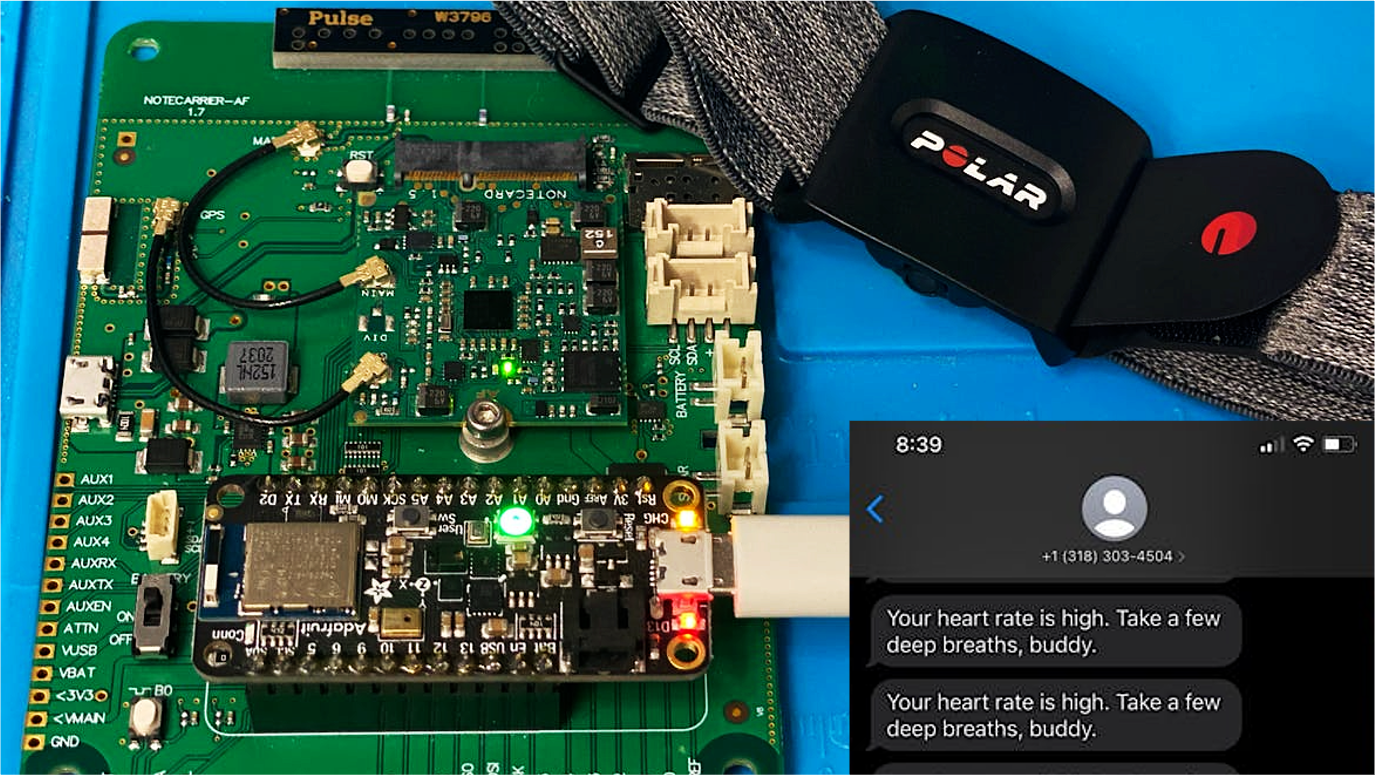
That is where a stress monitor designed specifically to help you work from home becomes more than a shiny gadget. The best version is not a bossy wrist computer that vibrates every time you breathe dramatically. It is a quiet, intelligent companion that reads patterns in your body, your schedule, and your work habits, then nudges you toward healthier choices before stress turns into burnout with Wi-Fi.
This article explores what a work-from-home stress monitor should do, how stress tracking technology works, which features matter most, and how remote workers can use it without becoming obsessed with every heartbeat. Because yes, stress data can helpbut staring at stress data like it owes you rent is probably not the wellness strategy we are looking for.
Why Remote Workers Need a Smarter Stress Monitor
Remote work is no longer a temporary experiment. Millions of professionals now work from home full-time or in hybrid arrangements. For many people, that is a major upgrade: no commute, more flexibility, and the magical ability to start laundry between meetings. But working from home also changes the way stress shows up.
In a traditional office, stress may come from commuting, interruptions, office politics, or fluorescent lighting that makes everyone look like they are starring in a low-budget crime documentary. At home, stress often comes from different sources: isolation, back-to-back video calls, sitting too long, household distractions, unclear boundaries, and the pressure to prove productivity because nobody can physically see you working.
A regular fitness tracker may count steps and monitor sleep, but a remote work stress tracker needs to understand the rhythm of a home-office day. It should notice when you have had three meetings in a row, when your heart rate stays elevated after a difficult call, when your posture has turned into “shrimp over laptop,” and when you have not moved since your first cup of coffee achieved retirement age.
What Is a Work-From-Home Stress Monitor?
A work-from-home stress monitor is a wearable device, desktop app, or connected health system designed to help remote workers identify stress patterns and respond with practical, low-friction interventions. Unlike general wellness trackers, it focuses on the specific stressors of remote work: screen fatigue, meeting overload, sedentary behavior, poor boundaries, digital interruptions, and lack of recovery time.
The ideal monitor combines body signals with work-context clues. For example, it may track heart rate variability, resting heart rate, breathing patterns, movement, sleep quality, and electrodermal activity. Then it may connect those patterns with calendar density, focus time, breaks, and daily routines. The goal is not to shout, “You are stressed!” like an emotional smoke alarm. The goal is to say, “Your body looks overloaded, and your next meeting starts in 12 minutes. Try a two-minute reset before you go in.”
How Stress Monitoring Technology Works
Heart Rate and Heart Rate Variability
One of the most common stress-tracking signals is heart rate variability, often shortened to HRV. HRV measures the tiny changes in time between heartbeats. A higher HRV is often associated with better recovery and adaptability, while a lower HRV may suggest fatigue, stress, poor sleep, illness, dehydration, or overtraining.
For remote workers, HRV can be useful because stress is not always obvious in the moment. You may think you are “fine” after a tense client call, but your body may still be running in alert mode. A wearable stress monitor can help reveal those hidden patterns. Over time, you may notice that your HRV drops after late-night work sessions, long video calls, or days when you skip lunch and call it “efficiency.”
Electrodermal Activity
Some advanced wearable stress monitors use electrodermal activity, or EDA. This measures small changes in skin conductance related to sweat gland activity. Since the nervous system influences sweating, EDA can help detect moments of physical arousal. That does not always mean “bad stress.” It may also happen during excitement, exercise, concentration, or that moment when your spreadsheet freezes before you saved it.
EDA works best when it is interpreted alongside other signals. A spike during exercise is expected. A spike during a meeting with no movement, elevated heart rate, and shallow breathing may be a sign that your body is reacting to pressure. Context matters.
Breathing, Movement, and Sleep
A practical stress monitor should also track breathing trends, daily movement, and sleep. Stress and sleep are close friends in the worst possible way. High stress can harm sleep, and poor sleep can make stress feel louder the next day. Add a sedentary workday and too much screen time, and the body may start waving tiny red flags.
A smart monitor can detect when you have been still for too long, suggest a stretch break, recommend a short walk after intense focus work, or remind you that answering messages at 11:47 p.m. is not “getting ahead”it is feeding the stress raccoon.
Key Features a Work-From-Home Stress Monitor Should Have
1. Real-Time Stress Alerts Without Panic
The best alerts are calm, specific, and helpful. Instead of saying, “Stress level high,” a better message would be, “Your body is showing signs of strain. Try a 90-second breathing reset before your next call.” The tone matters. A stress monitor should reduce stress, not become another tiny manager on your wrist.
2. Calendar-Aware Break Suggestions
Remote workers often live inside digital calendars. A strong home office stress monitor should understand meeting load and suggest recovery moments between tasks. If your calendar shows four video calls in a row, the monitor can recommend a five-minute walking break, a screen-free lunch, or a no-meeting block later in the day.
3. Focus and Recovery Scoring
A simple stress score is useful, but a better system separates focus load from recovery capacity. Some days you can handle deep work, calls, and decisions. Other days, your body may be asking for lighter tasks, shorter meetings, or more breaks. This does not mean you are lazy. It means you are human, an inconvenient but medically confirmed condition.
4. Ergonomic Reminders
Stress is not only emotional. Physical strain from poor posture, low monitor height, tight shoulders, and long sitting sessions can contribute to fatigue and discomfort. A remote work stress monitor should include posture-friendly reminders: adjust your chair, relax your shoulders, look away from the screen, stand up, or move your laptop off the stack of mystery mail.
5. Privacy-First Design
Stress data is personal. Very personal. A good stress monitor should keep health data private, give users control over what is shared, and avoid turning wellness into workplace surveillance. Employers should never use stress scores to judge performance, assign tasks, or label people as “resilient” or “fragile.” That is not wellness; that is a spreadsheet wearing a villain cape.
How a Stress Monitor Helps During a Typical Remote Workday
Imagine a remote worker named Maya. She starts the day with coffee, checks messages, and jumps into a 9 a.m. meeting. Her stress monitor notices her sleep score was low and her resting heart rate is slightly higher than usual. It does not scold her. It simply suggests beginning with administrative tasks instead of heavy strategy work.
By 11 a.m., Maya has completed two meetings and one tense client call. Her heart rate remains elevated, and her movement level is low. The monitor suggests a three-minute reset: stand up, breathe slowly, stretch the neck and shoulders, and walk to refill water. This is not dramatic. It is basic body maintenance, like rebooting a router, but with hamstrings.
After lunch, the monitor notices a long focus block. Instead of interrupting constantly, it waits until her concentration naturally dips and recommends a screen break. Later, when Maya keeps working past her planned stop time, the system reminds her to close the day with a shutdown ritual: review tomorrow’s top tasks, turn off work notifications, and step away from the desk.
Over time, Maya sees patterns. Her stress rises on days with no lunch break. Her sleep suffers when she checks work messages late at night. Her mood improves when she takes a short walk between meetings. The monitor does not solve her life, but it gives her something powerful: visibility.
Benefits of Using a Stress Monitor at Home
Better Self-Awareness
Many remote workers push through stress because there is no obvious transition between work and home. A stress monitor provides feedback that helps you notice when tension is building. You may discover that your most stressful task is not the big presentationit is the constant message switching that turns your brain into a browser with 47 tabs open.
Healthier Break Habits
Breaks are easy to ignore at home. You may feel guilty stepping away because the office is technically right there. A stress monitor helps normalize recovery. Short breaks, breathing exercises, movement, hydration, and sunlight are not luxuries. They are maintenance for a nervous system that was not designed to live inside email.
Improved Work Boundaries
A work-from-home stress monitor can help users recognize when the workday is stretching too far. It can encourage shutdown routines, notification limits, and healthier evening habits. Boundaries are not a lack of ambition. They are what keep ambition from eating your entire Tuesday.
More Personalized Productivity
Productivity advice often assumes every person works the same way. Stress data shows otherwise. Some people do best with deep work in the morning. Others need movement before complex tasks. Some recover quickly after meetings; others need buffer time. Personalized stress tracking helps you design a schedule that matches your body instead of forcing your body to worship your calendar.
Limitations: What a Stress Monitor Cannot Do
A stress monitor is not a doctor, therapist, or crystal ball with Bluetooth. It cannot diagnose anxiety, depression, heart disease, burnout, or any medical condition. It may miss stress signals, misread excitement as stress, or produce data that varies based on device fit, skin tone, movement, temperature, caffeine, hydration, medication, and sleep.
That is why stress tracking should be treated as guidance, not gospel. If you experience chest pain, fainting, severe anxiety, panic attacks, ongoing insomnia, depression symptoms, or stress that interferes with daily life, it is important to speak with a qualified healthcare professional. A wearable can provide clues, but professional care provides assessment and support.
How to Choose the Best Stress Monitor for Working From Home
Look for Useful Metrics, Not Just Fancy Ones
A good device should track more than one signal. HRV, resting heart rate, movement, sleep, breathing rate, and EDA can all be useful. But the best monitor is not the one with the longest feature list. It is the one that turns data into helpful action.
Choose Clear Insights Over Confusing Dashboards
If the app requires a neuroscience degree and three cups of espresso to understand, it is probably not helping. Look for simple explanations, trend views, and practical suggestions. “Your recovery is lower than usual; take lighter breaks today” is more useful than a neon graph that looks like a stock market having a panic attack.
Make Sure It Fits Your Work Style
Some people prefer wrist wearables. Others like smart rings, desktop reminders, or app-based check-ins. If you type all day, a bulky device may annoy you. If you dislike wearing gadgets at night, sleep tracking may be incomplete. The best stress monitor is one you will actually use consistently.
Check Privacy Controls
Before choosing a stress monitor, review what data it collects, where that data is stored, whether it is shared with third parties, and whether you can delete it. For employer-sponsored tools, workers should know exactly what managers can and cannot see. Stress support should empower employees, not turn wellness into digital surveillance.
Practical Ways to Use a Stress Monitor Without Overthinking It
Start by tracking trends for two weeks without changing everything. Look for patterns: poor sleep before stressful days, high stress after certain meetings, low movement during heavy deadlines, or better recovery after outdoor breaks. Then choose one small behavior to improve.
For example, you might create a five-minute buffer between meetings, take a walk after lunch, stop checking work messages after dinner, or do a short breathing exercise before presentations. Small habits are easier to maintain than dramatic life redesigns. Nobody needs to become a monk with a standing desk by Friday.
It also helps to combine device feedback with personal reflection. Ask yourself: What was happening when stress rose? Was I focused, anxious, excited, hungry, tired, or annoyed by a software update that appeared at exactly the wrong time? The monitor gives data. You give meaning.
Best Practices for Employers Offering Stress Monitoring Tools
Companies that support remote workers can benefit from wellness tools, but the approach must be ethical. Employers should offer stress monitors as optional resources, not mandatory productivity trackers. Data should be private by default. Aggregated insights may help identify organizational problems, such as meeting overload or unrealistic response expectations, but individual stress scores should not be used for performance reviews.
The most helpful employers use stress data to improve the work system. If many employees show signs of overload on meeting-heavy days, the solution is not a motivational poster about resilience. The solution may be fewer meetings, better staffing, clearer priorities, and protected focus time. Technology can reveal patterns, but leadership has to fix the workplace habits causing them.
The Future of Remote Work Stress Tracking
The next generation of stress monitors will likely become more personalized and less intrusive. Instead of simply reporting stress, they will learn what helps each person recover. One worker may benefit from breathing exercises. Another may recover best through walking, music, sunlight, stretching, or calling a friend. A smart system should adapt.
Artificial intelligence may also help connect patterns across work habits, health signals, and daily routines. But the future should be human-centered. The goal is not to optimize every second of the day until life feels like a productivity spreadsheet. The goal is to help people work well, rest well, and notice stress before it becomes a lifestyle.
Real-World Experiences: What It Feels Like to Use a Stress Monitor While Working From Home
The first thing many remote workers notice when using a stress monitor is not a dramatic discovery. It is a quiet “Oh.” Oh, my stress rises every time I start the day by checking messages in bed. Oh, my body does not love four hours of video calls. Oh, my “quick lunch at my desk” is basically a crumbs-based support system.
At first, the data can feel surprising. A person may feel calm but see a lower recovery score after a short night of sleep. Another may feel productive but notice elevated stress after constant task switching. This is where the experience becomes useful. A monitor does not accuse you; it reflects patterns you may be too busy to notice.
One of the most helpful experiences is learning which breaks actually work. Many people assume a break means scrolling social media for six minutes. Unfortunately, that often keeps the brain in stimulation mode. A stress monitor may show better recovery after walking outside, stretching, breathing slowly, or simply looking away from the screen. The lesson is not “never use your phone.” The lesson is that not all breaks are created equal. Some breaks refill the tank. Others just add glitter to the dashboard light.
Another common experience is discovering the power of transitions. In an office, the commute creates a boundary between work and home. Remote workers often lose that signal. A stress monitor can encourage a replacement ritual: close tabs, review tomorrow’s priorities, write down unfinished tasks, turn off notifications, and leave the workspace. Even a short routine can tell the brain, “The workday is over. Please stop mentally attending meetings while brushing your teeth.”
Stress monitors can also make remote workers more honest about workload. If stress stays high for weeks, the problem may not be personal weakness. It may be workload, poor communication, too many meetings, unclear priorities, or lack of support. In that case, the data can help someone prepare for a conversation with a manager: “I am noticing consistent overload on meeting-heavy days. Could we protect two focus blocks each week?” That is much better than waiting until burnout arrives wearing steel-toed boots.
The best experience comes when the monitor fades into the background. It becomes less about checking numbers and more about building habits. You start standing up before stiffness becomes pain. You take a breath before replying to a spicy message. You schedule buffer time after difficult calls. You stop treating rest like a reward and start treating it like part of the job.
Used wisely, a stress monitor designed for working from home does not make you more dependent on technology. It helps you listen to your body sooner. It turns invisible strain into visible patterns and visible patterns into better decisions. That is the real promise: not a perfect stress-free workday, but a healthier one where your nervous system is no longer the unpaid intern of your remote career.
Conclusion
A stress monitor designed specifically to help you work from home can be a valuable tool for modern remote workers. By combining wearable health signals, calendar awareness, movement reminders, sleep insights, and privacy-first design, it can help users notice stress earlier and respond with healthier habits.
The key is balance. Stress data should guide, not control. The right monitor helps you take breaks, protect focus, improve boundaries, and understand your body’s response to remote work. The wrong approach turns wellness into another thing to worry about, and nobody needs a stress monitor that creates stress. That is like hiring a firefighter who brings fireworks.
For remote workers, the future of productivity is not just doing more. It is working in a way that protects energy, attention, and long-term health. A thoughtful stress monitor can help make that future more practical, more personal, and a lot less crispy around the edges.
Note: This article is for informational purposes only. A stress monitor or wearable device can support self-awareness, but it should not replace professional medical advice, diagnosis, or treatment.