

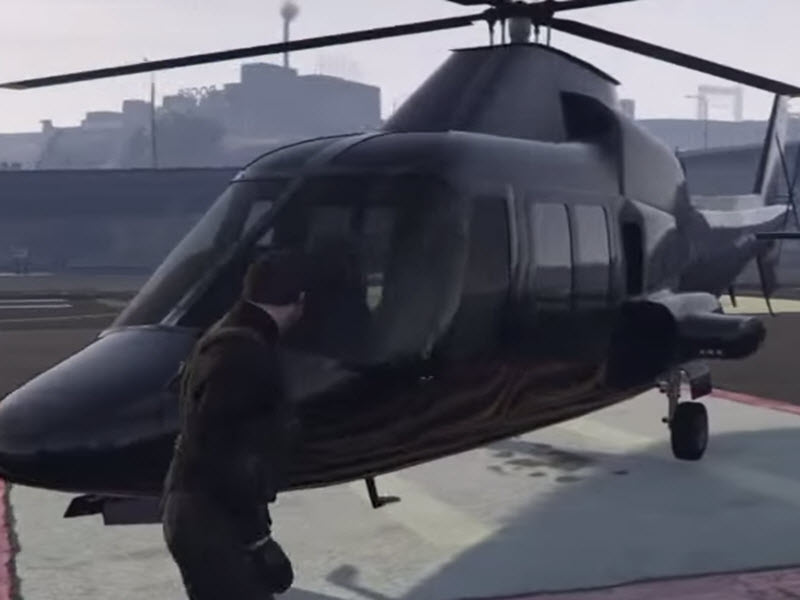
Learning how to use a chopper in GTA Online is one of those skills that can instantly change the way you play. One minute you are stuck in Los Santos traffic behind someone driving like they are eating soup with a steering wheel. The next, you are lifting off from a rooftop, crossing the entire map in minutes, and landing near your mission objective like a criminally fashionable eagle.
In GTA Online, “chopper” usually means a helicopter, and helicopters are some of the most useful vehicles in the game. They help you travel faster, complete setup missions, escape enemies, attack ground targets, move cargo, and avoid the daily chaos of public lobbies. Whether you are flying a Buzzard Attack Chopper, Sparrow, Frogger, Akula, Cargobob, Sea Sparrow, or another helicopter, the basics are the same: control your lift, tilt carefully, manage your landing, and do not treat every rooftop like a mattress.
This guide explains how to use a chopper in GTA Online in 14 steps, including how to get one, take off, fly smoothly, land safely, use weapons, avoid missiles, and practice like a pilot instead of a confused ceiling fan.
Why Choppers Matter in GTA Online
Helicopters are not just flashy toys for players with too much GTA$ and suspiciously shiny garages. They are practical tools. A good chopper can help you finish business missions faster, escape police attention, reach remote areas, support teammates, and save time during heist prep. For solo players, helicopters like the Sparrow and Buzzard are especially valuable because they can be requested quickly and used for fast travel between objectives.
Unlike cars, choppers ignore roads. Unlike planes, they can hover. Unlike motorcycles, they usually do not launch you into a light pole because you blinked at the wrong time. That balance makes helicopters one of the most flexible vehicle types in GTA Online.
How to Use a Chopper in GTA Online: 14 Steps
Step 1: Get Access to a Chopper
Before you can become the sky menace Los Santos clearly deserves, you need a helicopter. There are several ways to get one in GTA Online. You can find helicopters at certain helipads, airports, police stations, hospitals, and other aircraft spawn points, though availability depends on your rank, session, and location.
You can also buy helicopters from in-game vehicle websites such as Warstock Cache & Carry or Elitás Travel. After purchase, some helicopters are delivered through Pegasus, some are stored as personal aircraft in a Hangar, and others are tied to specific properties or services. For example, the Sparrow is connected to the Kosatka submarine, while the Buzzard Attack Chopper becomes especially useful when accessed through the CEO/VIP vehicle menu after purchase.
If you are new, do not worry about owning the most expensive aircraft immediately. Practice with whatever helicopter you can access. A free helicopter that teaches you control is better than a luxury chopper you crash into a billboard in twelve seconds.
Step 2: Choose the Right Chopper for the Job
Not every chopper in GTA Online is built for the same purpose. Some are fast, some are heavily armed, some carry passengers, and some are made for utility work. Choosing the right one makes your mission easier.
The Buzzard Attack Chopper is a popular all-around choice because it has weapons, carries multiple players, and can be called conveniently by CEOs. The Sparrow is excellent for solo grinding because it is fast, can be requested through Kosatka Services, and can be upgraded with weapons. The Cargobob is useful for lifting vehicles with its hook, especially in certain missions. The Akula is valuable for stealth because it can hide from the radar in stealth mode, although weapons are disabled while stealth is active. The Sea Sparrow is handy near water because it can land on the surface.
For beginners, a stable helicopter is better than the fastest one. Speed is wonderful until you discover the side of a mountain at full confidence.
Step 3: Enter the Chopper Safely
Approach the helicopter and press the enter vehicle button. On PC, the default key is usually F. On PlayStation and Xbox controllers, use the standard vehicle entry button. Make sure the rotor blades are clear of walls, poles, trees, and pedestrians who have made poor life choices by standing too close.
If the helicopter is on a rooftop or tight landing pad, look around before taking off. Many crashes happen before the aircraft even leaves the ground because the pilot throttles up directly into a streetlight, billboard, crane, or another player who parked like a refrigerator.
Step 4: Learn the Basic Chopper Controls
The most important rule of helicopter controls is this: throttle controls height, tilt controls movement. Pressing the throttle does not automatically move you forward. It lifts the helicopter upward. To move forward, you must tilt the nose down while keeping enough throttle to stay airborne.
On PC, default controls commonly use W to increase altitude, S to decrease altitude, A and D for yaw, and the numpad keys for pitch and roll. Numpad 8 tilts forward, 5 tilts backward, 4 rolls left, and 6 rolls right. Some players remap these controls or use a controller because helicopter flying can feel smoother with analog sticks.
On PlayStation and Xbox controllers, the right trigger usually increases lift, the left trigger lowers the helicopter, the left stick controls pitch and roll, and the shoulder buttons rotate the helicopter left and right. The right stick controls the camera. Controls may vary if you changed your settings, so always check the in-game key bindings if something feels wrong.
Step 5: Take Off Slowly
To take off, gently increase throttle until the chopper rises. Do not immediately tilt forward like you are late for a dentist appointment in Sandy Shores. First, climb high enough to clear nearby objects. Once you are safely above buildings, trees, vehicles, and chaos, tilt forward slightly to begin moving.
A smooth takeoff is about patience. New players often overcorrect because the helicopter feels wobbly. Small inputs work better than dramatic ones. Imagine you are guiding the aircraft, not arguing with it.
Step 6: Move Forward by Tilting the Nose Down
Once airborne, tilt the nose of the helicopter forward. This shifts the rotor’s force so the chopper moves horizontally instead of only upward. Keep holding enough throttle to maintain altitude. If you tilt too far forward, the helicopter will gain speed but may lose height. If you do not tilt enough, you will float around like an expensive balloon.
The trick is balance. Tilt forward to gain speed, then reduce the angle slightly once you are moving. Think of it like leaning into a run. Too little lean and you barely move. Too much lean and you faceplant into Los Santos International Airport.
Step 7: Turn with Roll and Yaw
Turning a helicopter smoothly requires two movements: roll and yaw. Rolling tilts the chopper left or right. Yaw rotates the nose left or right. Beginners often use only yaw, which makes turns feel slow and awkward. More experienced pilots combine roll and yaw for cleaner, faster turns.
For example, if you want to turn left, gently roll left while using yaw to point the nose into the turn. Do not hold the controls too aggressively. Oversteering causes wobbling, spinning, and the kind of aviation behavior that makes passengers start writing goodbye texts.
Step 8: Control Your Speed
Speed in a chopper comes mainly from forward tilt. To go faster, tilt forward more. To slow down, pull the nose up and reduce forward momentum. If you are approaching a landing zone, mission marker, rooftop, or teammate, start slowing down early.
A common beginner mistake is flying directly over the destination at full speed and then trying to stop instantly. Helicopters do not brake like cars. They need space. Pull back gently, level out, and use controlled descent. If you wait too long, your landing becomes less “tactical arrival” and more “rotor-powered insurance claim.”
Step 9: Practice Hovering
Hovering is one of the most useful helicopter skills in GTA Online. It helps when you are aiming weapons, picking up teammates, waiting near an objective, or preparing to land. To hover, level the helicopter and use small throttle adjustments to hold altitude. If the chopper drifts, correct it with tiny stick or key inputs.
Do not chase every tiny movement. Helicopters naturally drift. If you constantly overcorrect, you will create a wobble loop. Instead, make small corrections and let the chopper settle. Hovering well takes practice, but once you learn it, missions feel much easier.
Step 10: Land Without Becoming Modern Art
Landing is where many new pilots discover that gravity has excellent customer service. To land safely, slow down first. Pull back to reduce forward speed, level the helicopter, and descend gradually. Keep the landing zone in view and avoid coming down at a sharp angle.
Use short throttle adjustments as you approach the ground. If you descend too quickly, increase lift briefly to soften the landing. If you drift sideways, correct gently before touching down. Flat areas are easiest, but rooftops, beaches, wide roads, and open fields can also work.
Never rush a landing just because enemies are shooting. A rushed landing often destroys the chopper, the mission, and your dignity in one efficient package.
Step 11: Use Chopper Weapons Carefully
Weaponized helicopters can be extremely powerful in GTA Online, but they require discipline. Missiles, miniguns, and explosive weapons are useful for missions, enemy vehicles, and hostile players, but reckless firing can destroy cargo, fail objectives, or turn a simple job into a public lobby circus.
When using missiles, line up your approach before firing. Homing missiles can lock onto many targets, but they are not magic. Buildings, bridges, and terrain can block shots. Miniguns and cannons require more aim because the helicopter’s nose usually determines where the weapon points. If you want better accuracy, slow down, hover, or make a controlled pass.
Also remember that public lobbies have consequences. If you fire first at another player, do not be shocked when the entire session suddenly auditions for an action movie.
Step 12: Avoid Homing Missiles and Enemy Fire
Enemy missiles are one of the biggest threats to helicopter pilots. If your chopper has countermeasures, learn when to use them. Flares and chaff can help break missile tracking, but timing matters. Deploying too early may waste them. Deploying too late may turn your aircraft into confetti.
Use terrain to your advantage. Fly low behind buildings, hills, bridges, or mountains to break line of sight. Change direction often. Do not fly in a straight line toward an armed enemy unless your plan is to become a warning label.
Some helicopters are tougher than others. Light choppers may be fast but fragile, while larger or armored helicopters can survive more punishment. Still, the best defense is smart movement. A pilot who avoids being targeted usually lives longer than one who relies only on armor.
Step 13: Use the Interaction Menu for Fast Requests
The Interaction Menu is one of the most important tools for helicopter users in GTA Online. Depending on what you own, you can request certain aircraft through CEO/VIP abilities, Pegasus, Kosatka Services, or personal aircraft menus.
If you own a Buzzard Attack Chopper, registering as a CEO can make it especially convenient to request. If you own the Kosatka and Sparrow, Kosatka Services lets you call the Sparrow near your location. If you own a Hangar, personal aircraft can be requested, though they may spawn at nearby aircraft locations rather than directly beside you.
Knowing how to request your chopper quickly saves time during missions. It also saves you from running across the map like a person who forgot Los Santos has aircraft.
Step 14: Practice in Low-Pressure Situations
The best way to master a chopper in GTA Online is to practice away from chaos. Use invite-only sessions, quiet areas, airfields, beaches, or open desert spaces. Practice takeoffs, turns, hovering, landings, rooftop approaches, and emergency stops.
Once you can land consistently without bouncing, smoking, spinning, or apologizing to your passengers, move on to mission practice. Try using your chopper for supply runs, setup missions, cargo transport, or fast travel. Over time, the controls become natural.
Every experienced pilot started as someone who accidentally landed upside down. The difference is practice. And possibly a lot of replacement rotor blades.
Best Choppers for Beginners in GTA Online
Buzzard Attack Chopper
The Buzzard is one of the best helicopters for players who want a reliable mix of speed, weapons, and convenience. It is not the newest or flashiest chopper, but it remains useful because it is easy to call through CEO options after purchase and works well for mission grinding.
Sparrow
The Sparrow is excellent for players who own the Kosatka. It is fast, convenient, and great for moving between objectives. It can also be upgraded with weapons, making it a strong tool for solo players. Its main drawback is durability. It is quick, but it does not enjoy rough landings, missile hits, or pilots who believe rooftops are optional.
Frogger
The Frogger is a simple transport helicopter. It is not a combat monster, but it is useful for learning basic flight. Because it is less aggressive than weaponized choppers, it can help beginners focus on flying rather than immediately trying to solve every problem with rockets.
Cargobob
The Cargobob is slower and heavier, but it has a unique lifting hook. It is useful for certain vehicle-related missions and can be fun for creative gameplay. It is not ideal for beginners who want speed, but it teaches careful control and patience.
Common Chopper Mistakes to Avoid
The first mistake is overcorrecting. Helicopters respond best to smooth inputs. If you jerk the controls constantly, the chopper will wobble. The second mistake is flying too low at high speed. Low flying looks cool until a palm tree becomes your final boss. The third mistake is ignoring the tail rotor. The rear of the helicopter can hit walls, poles, or rooftops during turns.
Another common mistake is landing too fast. You should reduce speed before descending, not after you are already falling. Finally, do not forget that some helicopters are fragile. The Sparrow, for example, is extremely useful but can smoke quickly after bad landings. Treat it like a sports car with blades: fast, stylish, and emotionally sensitive.
Practical Examples of Using a Chopper
If you are doing heist prep, a chopper helps you move between locations quickly. Instead of driving across Los Santos and Blaine County, you can fly directly to the marker, land nearby, complete the task, and leave before enemies pile up.
If you are helping friends, a four-seat chopper like the Buzzard can carry the team to objectives. One pilot can focus on flying while passengers mark targets, shoot enemies, or prepare for the next step. If you are playing solo, a fast two-seat chopper like the Sparrow can still save huge amounts of time.
If you are moving vehicles or experimenting with utility gameplay, the Cargobob gives you options that most aircraft do not. It can lift certain vehicles, move them across the map, or create the kind of GTA Online moment that starts as a clever plan and ends with everyone laughing.
Extra Experience: What It Feels Like to Learn Chopper Flying in GTA Online
Learning to use a chopper in GTA Online feels strange at first because the game does not fly like a simple arcade toy. A helicopter has lift, drift, tilt, momentum, and attitude. The first time many players take off, they expect the chopper to move forward like a car in the sky. Instead, it rises straight up, wobbles slightly, and waits for the player to understand that forward motion requires pitch. That is usually the exact moment panic enters the cockpit wearing sunglasses.
The early experience is often messy. You climb too fast, tilt too hard, slam into a crane, apologize to no one, and respawn with a deep respect for aviation. But after a few flights, the pattern starts to make sense. You learn that the throttle is not a gas pedal. You learn that the nose controls direction. You learn that slowing down before landing is not optional; it is the difference between a professional arrival and a flaming helicopter sculpture.
One of the best practice routines is to fly from Los Santos International Airport to Sandy Shores Airfield, then land, take off, and return. This route gives you open space, mountains, roads, water, and different landing surfaces. Try landing on wide roads, then rooftops, then small clearings. Each location teaches a different skill. Rooftops teach precision. Beaches teach soft descent. Desert areas teach recovery when you come in too fast.
Another useful experience is practicing mission-style approaches. Pick a building, pretend it is your objective, and approach it from different angles. Come in high, slow down, hover, and land nearby. Then try a fast approach where you pull up and stop before the target. This builds confidence for real missions where enemies are shooting, teammates are yelling, and the map marker appears to be placed by someone with a grudge.
Public sessions add another layer. In a quiet session, flying is peaceful. In a busy lobby, every missile lock sound feels like the game whispering, “Good luck, captain.” This is where terrain flying becomes important. Stay near buildings, hills, and bridges when hostile players are around. Avoid flying in a long, straight line across open sky. If someone is using homing missiles, change direction, dip behind cover, and use countermeasures if your helicopter has them.
Over time, a chopper becomes less intimidating and more natural. You stop thinking about each button and start feeling the aircraft. You know when to climb, when to tilt, when to brake, and when to abandon the landing because that rooftop is absolutely not as flat as it looked. That is the real reward of learning helicopters in GTA Online: freedom. The map feels smaller, missions feel faster, and your gameplay becomes more flexible.
The best pilots are not the ones who never crash. They are the ones who understand why they crashed and come back better. Also, they usually stop trying to land on narrow signs after the third explosion. Usually.
Final Thoughts
Using a chopper in GTA Online is one of the most useful skills you can learn. It improves travel, mission efficiency, combat options, and overall freedom across Los Santos and Blaine County. The controls may feel awkward at first, especially on PC keyboard settings, but the learning curve is worth it. Once you understand lift, tilt, hovering, turning, and landing, helicopters become one of the strongest tools in the game.
Start with a simple chopper, practice in open areas, use small control inputs, and learn to land calmly. Then move on to weaponized helicopters, utility aircraft, and mission grinding. Whether you choose the Buzzard, Sparrow, Akula, Cargobob, or another favorite, the goal is the same: fly smart, land smoother, and try not to give Los Santos another smoking crater to explain.
Note: GTA Online controls can vary by platform, custom key bindings, controller layout, and future updates. Always check your in-game settings if a control does not match your setup.