

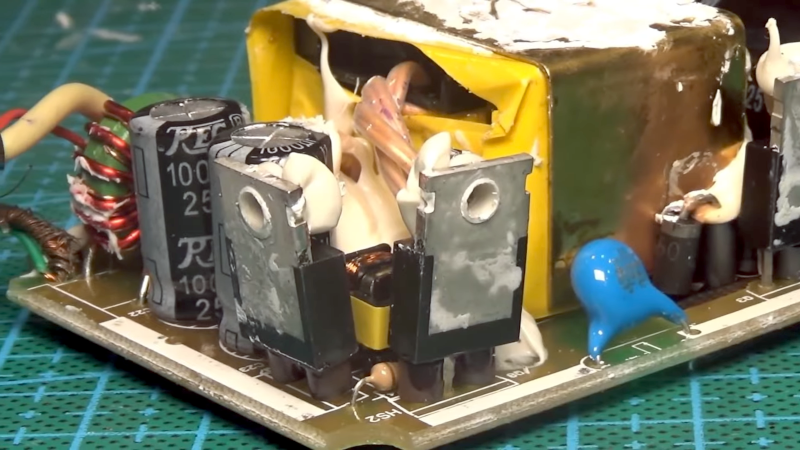
A laptop power brick is one of those humble gadgets we ignore until it stages a dramatic retirement. One day it is quietly feeding your computer like a loyal cafeteria worker. The next day, your laptop is blinking at 3%, your charger is colder than a forgotten cup of coffee, and your entire digital life is holding a tiny funeral.
The phrase “Laptop Brick Is Brought Back From The Brink” sounds like a superhero origin story for a rectangular lump of plastic, but it captures something surprisingly useful: many laptop charger failures are not mysterious magic. They often come down to predictable electrical problems, worn cables, damaged connectors, failed capacitors, blown fuses, tired solder joints, overheated parts, or a protection circuit doing exactly what it was designed to do.
That does not mean every laptop AC adapter should be opened on the kitchen table next to a sandwich. These devices handle mains electricity, store energy in capacitors, and can be dangerous when repaired carelessly. But understanding how a laptop power adapter works, how it fails, and when repair makes sense can save money, reduce electronic waste, and prevent a perfectly good laptop from being mistaken for a very expensive paperweight.
What Is a Laptop Brick, Really?
A laptop brick, also called a laptop AC adapter, power adapter, charger, or external power supply, converts wall power into the lower-voltage direct current your laptop needs. In the United States, the wall outlet supplies alternating current, while most laptops require direct current at a specific voltage and wattage. The brick performs that conversion, usually through a compact switching power supply.
Modern laptop chargers are much more sophisticated than the old heavy adapters that felt like they were filled with recycled dumbbells. A typical switching power supply may include input filtering, rectification, high-voltage capacitors, switching transistors, a transformer, optocoupler feedback, output rectification, protection circuitry, and sometimes power factor correction. In plain English: it takes messy wall power, chops it up very quickly, transforms it, smooths it, watches itself, and sends the laptop a polite, regulated meal.
The charger also has to match the laptop’s needs. Voltage matters. Polarity matters. Wattage matters. Connector type matters. Some modern laptops use USB-C Power Delivery, while others use barrel plugs or brand-specific connectors. A charger that “kind of fits” is not the same as one that belongs there. Electronics are picky eaters.
Why Laptop Power Bricks Fail
Laptop adapters live a harder life than they get credit for. They are kicked under desks, yanked from bags, bent near strain reliefs, forgotten in hot cars, wrapped too tightly, plugged into questionable power strips, and occasionally chewed by pets who believe copper is a snack category.
1. Cable and Connector Fatigue
The most common visible failure is cable damage. A laptop charger may stop working when the low-voltage DC cable frays near the brick or connector. If the laptop charges only when the cable is bent at a certain angle, that is not “personality.” It is often a broken conductor or loose connection. Continued use can create heat, arcing, intermittent charging, or damage to the laptop’s charging port.
2. Failed Capacitors
Capacitors smooth voltage and help the power supply behave. Over time, heat and age can make electrolytic capacitors dry out, bulge, leak, or lose capacity. When that happens, the adapter may chirp, pulse, refuse to start under load, produce unstable output, or trigger protection circuits. A failed capacitor is like a shock absorber that has given up on life; the ride gets bumpy fast.
3. Blown Fuse or Protection Component
Many laptop adapters include a fuse or fusible resistor on the input side. If it opens, the charger may appear completely dead. But a blown fuse is often a symptom, not the original villain. Replacing a fuse without checking why it failed is like replacing a smoke alarm because it was rude enough to make noise during a fire.
4. Shorted MOSFETs or Diodes
Switching power supplies rely on high-speed switching components such as MOSFETs and rectifier diodes. When these parts short, the adapter may blow a fuse, trip protection, or fail instantly. This is where repair becomes more advanced, because finding the failed part requires testing and understanding the circuit rather than simply pointing at the board and saying, “That tiny black square looks suspicious.”
5. Heat and Poor Ventilation
Power conversion produces heat. Efficient adapters waste less energy, but no adapter is perfectly cool. If a brick runs under blankets, behind furniture, or in a dusty corner with no airflow, heat stress can shorten component life. Warm is normal. Too hot to touch, melted plastic, a burning smell, or sparking is not normal. That is your charger auditioning for a safety bulletin.
First: Diagnose Before You Disassemble
Before anyone reaches for a screwdriver, the first step is basic troubleshooting. This is the boring part, which is why it works.
Start with the outlet. Plug in a lamp or another simple device to confirm the wall socket works. Then remove power strips, surge protectors, extension cords, docking stations, and adapters from the equation. Plug the charger directly into a known working outlet. Check both ends of the power cable. Make sure the AC cord is fully seated in the brick. Many “dead chargers” have been resurrected by pushing a cable in the final two millimeters, which is both satisfying and mildly embarrassing.
Next, inspect the entire charger. Look for cracked plastic, swollen sections, exposed copper, burn marks, melted insulation, bent pins, or a connector that wiggles like a loose tooth. Check the laptop’s charging port for lint, debris, bent contacts, or looseness. If the laptop supports a battery or power diagnostic tool in BIOS or system software, use it. Some brands report whether the adapter is recognized and whether the wattage is sufficient.
If you have access to a correct replacement adapter, test the laptop with it. If the laptop charges normally, the original brick is likely the problem. If neither adapter works, the issue may be the laptop battery, charging port, motherboard, firmware, or power management system.
When Repair Makes Sense
Repairing a laptop brick can make sense when the adapter is high quality, expensive, rare, or attached to older hardware where replacements are difficult to find. A repair may also be worthwhile for educational purposes if performed by someone qualified to work safely around mains-powered electronics.
Common repairable issues include a broken DC cable, a cracked solder joint, an aging capacitor, or an obvious connector problem. In those cases, the repair may involve opening the sealed case, identifying the fault, replacing the damaged component, restoring insulation, and reassembling the brick securely.
However, replacement is often the better choice for standard laptop chargers. Reliable replacement adapters are widely available, and the cost of parts, labor, tools, and risk can exceed the value of the brick. If the adapter is recalled, counterfeit, visibly burned, water damaged, or producing unstable voltage, replacement is the sensible path. Heroism is admirable, but not when it turns a desk into a toaster.
Safety Rules That Are Not Optional
A laptop power brick is not the same as replacing a keyboard key. Inside the case, high-voltage capacitors can hold a charge after unplugging. The primary side of the circuit connects to mains voltage. A poor repair can create fire, shock, or equipment damage. Anyone who lacks proper tools and experience should not open a charger. Period.
For readers who simply want a working laptop, the safest advice is clear: buy a certified replacement adapter from the laptop manufacturer or a reputable brand, and match the output voltage, current, wattage, connector, and protocol. Avoid mystery chargers with vague labels, suspiciously light weight, misspelled certifications, or prices that seem too good to be true. A bargain charger is not a bargain if it turns your backpack into a smoke machine.
Also, stop using any adapter that sparks, smells burned, gets extremely hot, has exposed wires, or causes the laptop to shut down. Unplug it and replace it. Chargers are allowed to be boring. In fact, boring is the goal.
Inside the Comeback: How a Brick Can Be Brought Back
A successful laptop brick repair usually starts with observation. Does the adapter have an indicator light? Does it blink? Does it go out when connected to the laptop? Is there any output voltage with no load? Does the voltage collapse under load? These clues help separate cable faults from internal power supply failures.
If the case is opened safely by a qualified person, the next step is visual inspection. Bulging capacitors, cracked solder joints, scorched resistors, blown fuses, damaged MOVs, and broken cable strain reliefs are all possible suspects. After that comes electrical testing with a multimeter and, for more advanced work, load testing or oscilloscope checks.
In many repair stories, the satisfying moment comes when a tiny failed component is identified and replaced. A capacitor gets swapped. A cable is resoldered. A cracked joint is reflowed. A shorted diode is found. The adapter is tested under controlled conditions, the output voltage holds steady, and the laptop finally wakes up. The brick has returned from the brink, blinking politely like nothing happened.
That moment is rewarding because it proves a larger point: electronics repair is not just about saving money. It is about understanding systems, respecting safety, and refusing to throw away repairable devices too quickly. The charger may be small, but the idea is big.
Repair vs. Replace: The Practical Decision
Here is the honest decision tree. If the charger is physically damaged at the cable, repair may be possible, but replacement is usually safer for most users. If the adapter is a rare model or expensive workstation brick, professional repair may be worth considering. If it is a common 45-watt, 65-watt, or 90-watt adapter, replacement may cost less than a lunch for two and will likely be safer.
If the adapter is part of a known recall, do not repair it. Follow the manufacturer’s replacement process. A recall means the risk is not theoretical; someone has already done the unpleasant research for you.
If you do buy a replacement, read the label on the original adapter. Match the output voltage exactly. The replacement current rating should be equal to or higher than the original requirement, and the wattage should meet the laptop’s specification. Connector size and polarity must match unless the laptop uses a negotiated standard such as USB-C Power Delivery. For USB-C laptops, choose a charger with enough wattage and support for the correct PD profiles.
How to Make Your Laptop Brick Last Longer
Most charger failures are helped along by stress. Treat the cable gently. Do not wrap it tightly around the brick. Avoid bending it sharply near the connector. Keep the adapter on a hard surface where heat can escape. Do not cover it with blankets, papers, or clothing. Keep it away from liquids. Unplug by the connector, not by yanking the cable like you are starting a lawn mower.
Use a surge protector if your area has unstable power. Keep pets away from cables. Store the charger loosely in a bag instead of crushing it under books, headphones, and one mysterious object that may have been a granola bar in 2022. Finally, periodically inspect the cable and brick. Early signs of wear are easier to address than a full electrical soap opera.
Experience Notes: Lessons From the Laptop Brick Trenches
Anyone who has worked around laptops long enough has seen the same scene play out: a user arrives convinced the laptop is dead, when the real culprit is the charger. The machine looks lifeless. The power button does nothing. Panic starts warming up in the background. Then a known-good adapter is plugged in, the charging light appears, and suddenly everyone in the room believes in miracles again.
The first experience worth remembering is that intermittent charging is a warning, not a personality quirk. A charger that works only when the cable is twisted into a pretzel is already failing. Many people keep using it because the laptop still charges “if I hold it just right.” That is not a workaround; that is an audition for a short circuit. The better move is to stop using the damaged adapter, back up important files while the laptop still has power, and test with a safe replacement.
The second lesson is that heat tells a story. A slightly warm power brick is normal, especially when charging a battery and running a laptop under load. But an adapter that becomes painfully hot, smells like burnt plastic, or leaves marks on a surface deserves immediate retirement. In real-world use, heat problems often happen when the brick is buried under bedding or trapped behind furniture. Give it air. A laptop charger is not a decorative pillow.
The third lesson is that cheap universal adapters can be useful in an emergency, but they demand attention. The voltage setting must be correct. The tip must fit securely. The wattage must be adequate. A low-wattage charger may power a laptop slowly, fail under load, trigger BIOS warnings, or refuse to charge the battery. Worse, a poor-quality adapter may have weak protection or unstable output. When a laptop is used for work, school, or business, a reliable charger is not an accessory; it is infrastructure.
The fourth lesson is that not every repair should be attempted just because it is technically possible. A skilled electronics technician may repair a brick by replacing capacitors, rebuilding a cable, or tracing a fault in the switching circuit. But for most users, opening a sealed mains adapter is unnecessary risk. The smartest repair decision sometimes sounds boring: buy the correct certified replacement, recycle the old one properly, and move on with your day. Boring decisions are underrated. They rarely catch fire.
The fifth lesson is emotional. A dead charger can make a laptop feel dead, but the two are not the same thing. Before assuming the motherboard has failed, test the outlet, cable, adapter, battery behavior, and charging port. Many “dead laptop” stories end with a $25 to $70 adapter replacement instead of a new computer. That is good news for budgets, the environment, and everyone who has ever whispered, “Please turn on,” to a laptop at 1:00 a.m.
In the end, bringing a laptop brick back from the brink is about more than one repaired adapter. It is a reminder that small failures can have simple causes, that electronics deserve careful diagnosis, and that safety should always outrank curiosity. A power brick may never win a design award or get applause when it works, but when it fails, we suddenly appreciate its quiet importance. Treat it well, troubleshoot it wisely, and know when to repair, replace, or respectfully retire it.
Conclusion
A laptop brick may look like a dull black rectangle, but inside it is a carefully engineered power supply doing a demanding job. When it fails, the cause may be as simple as a damaged cable or as complex as a fault deep in the switching circuit. The smart approach is to diagnose carefully, respect electrical hazards, avoid unsafe repairs, and choose certified replacement adapters when repair is not practical.
“Laptop Brick Is Brought Back From The Brink” is a great reminder that repair culture still matters. Understanding the problem can save money, reduce waste, and help users make better decisions. Just remember: the best repair is not the most dramatic one. It is the one that restores reliable power without turning your desk into a fireworks show.