

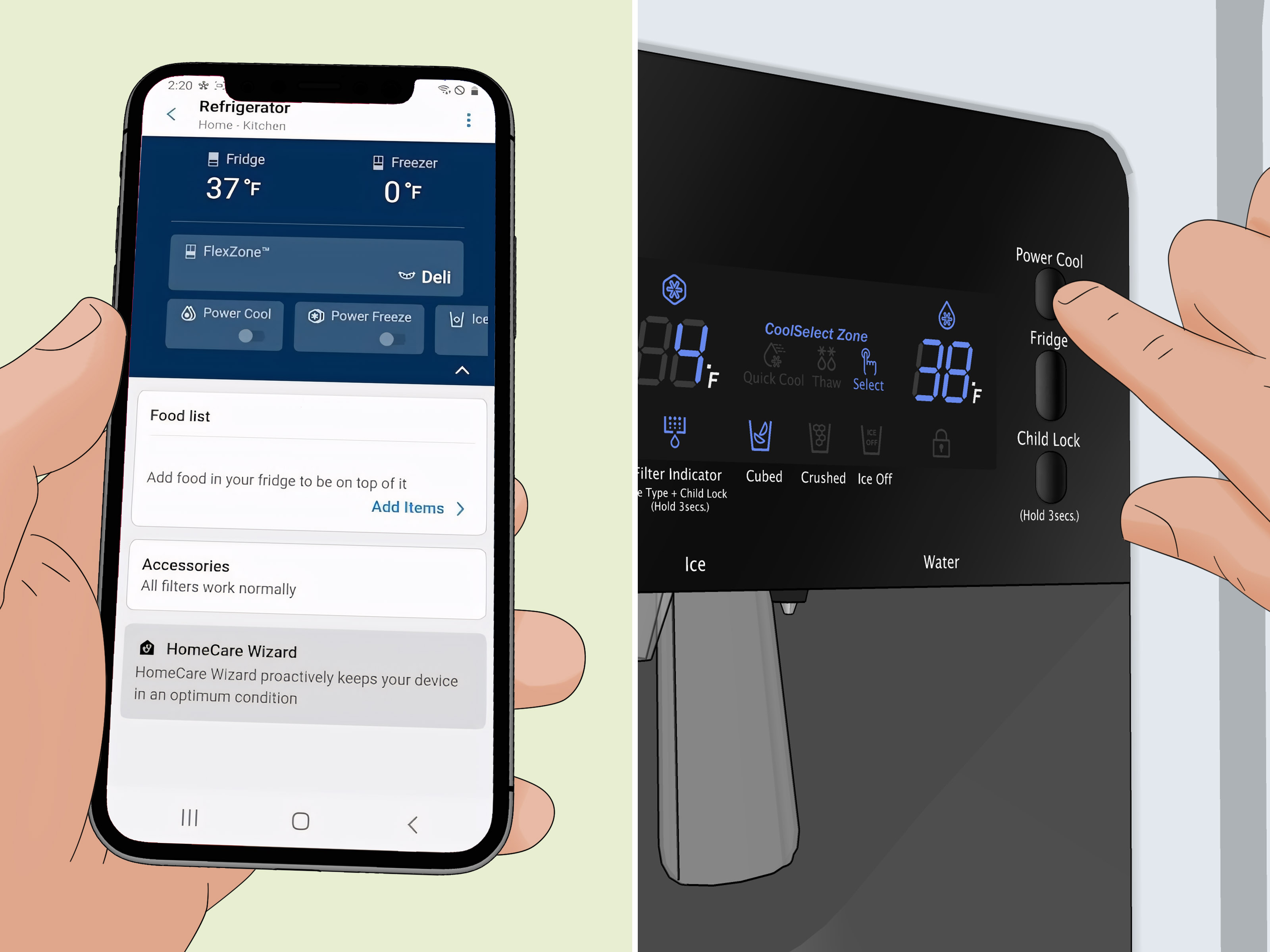
A warm refrigerator is one of those household problems that turns you into a detective faster than you can say, “Why is the milk sweating?” One minute your Samsung fridge is minding its business, and the next your leftovers feel suspiciously room-temp and your ice cream has the emotional stability of soup.
The good news: a Samsung fridge not cooling does not always mean an expensive repair. In many cases, the culprit is something simple like Cooling Off mode, blocked vents, dirty condenser coils, a door that is not sealing, or settings that got bumped by an enthusiastic child, a sleepy adult, or a rogue pizza box. In other cases, the issue points to a failing fan, sensor, defrost component, control board, or compressor.
This guide walks through 11 common issues, what each problem looks like, what you can safely check yourself, and when it is time to stop playing appliance therapist and call a professional.
Start Here: Check the Basics Before You Panic
Before you assume your refrigerator is doomed, verify the temperature. For food safety, the refrigerator should stay at 40°F or below, while the freezer should stay at 0°F or below. Samsung commonly recommends aiming for about 38°F in the fridge and -2°F in the freezer on many models. If you use a standalone appliance thermometer, place it near the center of the compartment and give it time to settle for a reliable reading.
Also remember this important little detail: refrigerator cooling is not instant. If you just changed the settings, loaded in a week’s worth of groceries, or restored power after an outage, your Samsung unit may need several hours to start showing improvement and much longer to fully stabilize. Translation: don’t accuse the fridge of betrayal after twelve minutes.
11 Common Reasons Your Samsung Fridge Is Not Cooling
1. The Refrigerator Is in Cooling Off Mode
This is one of the most Samsung-specific causes, and it catches a lot of people off guard. Cooling Off mode, also called Demo mode or Shop mode, disables cooling. The display may show OF OF, O FF, OFF OFF, or scrolling bars, depending on the model.
If your lights and display are working but the fridge feels warm, check for this first. It often happens after cleaning, moving, installation, or a mystery button press no one in the house wants to confess to.
What to do: Turn off Cooling Off mode using your model-specific control sequence in the manual. Once the mode is disabled, normal cooling should return.
2. The Temperature Settings Are Wrong or Were Just Changed
Sometimes the problem is not a broken fridge. It is a fridge following the wrong instructions. If the temperature is set too warm, food will not stay cold enough. If someone adjusted the panel recently, you may simply need to wait.
On most Samsung models, a practical target is 37°F to 38°F for the refrigerator and 0°F to -2°F for the freezer. If your current settings are higher than that, lower them. If you just changed them, give the appliance time to catch up before deciding the fix failed.
What to do: Reset the target temperature, avoid opening the doors constantly, and recheck the actual temperature later with a thermometer.
3. A Power Issue or Recent Outage Interrupted Cooling
A Samsung fridge can look “on” while still not cooling correctly after a power interruption. A brief outage, surge, brownout, or tripped breaker can interfere with the control board or leave the refrigerator needing a reset.
In some cases, the display may also show voltage or communication errors. If cooling failure happened right after an outage, this becomes one of the most likely explanations.
What to do: Make sure the fridge is firmly plugged in, verify the outlet works, and check the circuit breaker. Then unplug the refrigerator or switch off the breaker for about 5 minutes before restoring power. If the error returns or cooling does not resume, you may need service.
4. The Doors Are Not Sealing Properly
A refrigerator can only stay cold if warm kitchen air stays out. Dirty, warped, cracked, or misaligned door gaskets let cold air escape and warm air enter. The result is poor cooling, frost, condensation, longer run times, and sometimes food spoilage.
Samsung recommends a simple paper or dollar-bill test: close the door on part of the paper and pull. If there is light resistance, the seal is doing its job. If the paper slides out too easily, the seal may be dirty, damaged, or the doors may be misaligned.
What to do: Clean the gaskets with a damp cloth and mild dish soap, wipe them dry, and try the test again. If the gasket is torn or the door alignment is off, repair or replacement may be necessary.
5. Food Is Blocking the Interior Vents
This one is sneaky because the fridge can look full, organized, and perfectly normal while quietly suffocating itself. Samsung refrigerators rely on free airflow through interior vents. If large containers, leftovers, produce bins, or frozen-food towers block those vents, cold air cannot circulate properly.
That can create warm spots in the refrigerator section, especially when the freezer still seems fine. It can also cause frost and uneven cooling.
What to do: Rearrange food so there is about 2 inches of clearance around vents where possible. Avoid pressing items against the back wall. If your fridge is packed like a game of edible Tetris, give it some breathing room.
6. The Fridge Is Overstuffed, Underfilled, or Opened Too Often
Yes, a refrigerator can be too full. But it can also be oddly inefficient when nearly empty. Samsung notes that keeping the fridge reasonably stocked can help it maintain temperature, because the cold contents hold temperature better than air alone. At the same time, overcrowding blocks airflow.
Frequent door opening makes the problem worse. Every time the doors open, cold air escapes and warm air rushes in. If the family treats the fridge like a browsing aisle at a warehouse club, temperature recovery takes longer.
What to do: Keep the unit organized, avoid overpacking shelves, and reduce unnecessary door-opening marathons.
7. The Refrigerator Does Not Have Enough Clearance or Is in a Hot Room
Your fridge removes heat from inside the compartments and releases that heat into the room. If the appliance is jammed too tightly against the wall or installed in a hot area near an oven, direct sunlight, or poor ventilation, cooling performance can drop.
Samsung advises leaving space around the appliance for airflow, and many service sources also warn that tight installation can trap heat and strain the system.
What to do: Pull the refrigerator away from the wall enough to allow ventilation, keep it out of direct heat when possible, and make sure it is level. A slightly unlevel fridge can also interfere with door sealing.
8. The Condenser Coils Are Dirty
Dirty condenser coils are one of the most common causes of a refrigerator not cooling well. Dust, lint, grease, and pet hair collect on the coils and make it harder for the appliance to release heat. That forces the system to work harder and cool less effectively.
If you have pets, this issue moves from “possible” to “honestly, probably.”
What to do: Unplug the fridge. Locate the coils underneath or behind the appliance, depending on the model. Use a coil brush and vacuum to remove buildup. Cleaning them every 6 to 12 months is a smart maintenance habit and can improve both performance and efficiency.
9. Frost Buildup or a Defrost System Problem Is Restricting Airflow
If your freezer is cold but the refrigerator section is warm, one common explanation is a defrost problem. When the defrost system fails, frost can build up on the evaporator coils and block airflow. The freezer may still feel chilly, but not enough cold air makes it into the fresh-food compartment.
This is a classic pattern in refrigerators that seem half-functional: the freezer acts brave, the fridge section quietly gives up.
What to do: Look for excessive frost on vents or rear freezer panels. A full defrost-system diagnosis may involve the defrost heater, thermostat, thermistor, or wiring, which usually means a professional repair is the safer move.
10. The Evaporator Fan, Condenser Fan, or Air Damper Is Failing
Fans and dampers move cold air where it needs to go. If the evaporator fan is weak or stuck, the fridge may not circulate cold air properly. If the condenser fan is not doing its job, the compressor can overheat and cooling drops. If the air damper stays closed, the refrigerator compartment may warm up even when the freezer still works.
Signs include weak airflow, unusual humming, chirping, buzzing, squealing, warm spots, or a freezer-that-works/fridge-that-doesn’t situation.
What to do: Check for obvious ice or debris blocking airflow. Beyond that, fan-motor and damper repairs usually require disassembly and are better left to a technician.
11. The Thermistor, Control Board, Compressor, or Sealed System Has Failed
This is the serious end of the troubleshooting list. If you have already checked settings, seals, vents, power, reset steps, clearance, and condenser coils, but the Samsung fridge still is not cooling, the issue may be a failed temperature sensor, electronic control board, compressor, start relay, evaporator, or even a refrigerant leak in the sealed system.
Possible clues include clicking noises, a hot back panel area, no compressor hum, persistent error codes, hissing or bubbling sounds, repeated warm temperatures after resets, or a fridge that runs constantly without getting cold.
What to do: Stop at basic external troubleshooting and book professional service. Refrigerant and compressor work are not safe or practical DIY jobs.
When You Should Call a Professional Right Away
Some issues are worth a little patience and a vacuum cleaner. Others deserve a trained technician. Call for service if:
- the display shows repeated error codes after a reset,
- the compressor is silent, clicking, or overheating,
- you hear hissing or bubbling that suggests a refrigerant leak,
- the freezer works but the fridge stays warm after you clear vents and reset the unit,
- there is heavy frost behind panels,
- or the refrigerator still does not cool after 24 hours of basic troubleshooting.
If food has been above 40°F for too long, do not focus only on the appliance. Focus on food safety too. A fridge problem is annoying; food poisoning is a much worse hobby.
How to Prevent Cooling Problems from Coming Back
- Set the refrigerator to about 37°F to 38°F and the freezer to 0°F to -2°F.
- Clean condenser coils every 6 to 12 months, more often if you have pets.
- Wipe down door gaskets regularly.
- Do not block vents with food containers.
- Let hot food cool before placing it inside.
- Keep the appliance level and give it room to breathe.
- Use an appliance thermometer if the display seems unreliable.
- After a power outage, reset and monitor temperatures closely.
Final Thoughts
A Samsung fridge not cooling can come from something simple, something fixable, or something expensive. The trick is knowing which is which. Start with the easy checks: Cooling Off mode, temperature settings, power, seals, vents, clearance, and dirty coils. Those are the usual suspects and they are often fixable without a service visit.
If those steps do not solve the issue, the pattern of symptoms matters. A warm fridge with a cold freezer often points to airflow, fan, damper, or defrost trouble. A completely warm unit after a power event may point to a reset or board issue. Strange noises, persistent errors, or no cooling at all after basic troubleshooting usually mean it is time for professional repair.
In other words, do the smart checks first, save the groceries if you can, and do not let a preventable problem turn your refrigerator into a very expensive pantry.
Homeowner Experiences: What This Problem Looks Like in Real Life
One of the most frustrating things about a Samsung refrigerator not cooling is that the problem rarely announces itself in a dramatic, movie-worthy way. Usually, it sneaks in. Someone grabs creamer for coffee and notices it is not exactly cold. A yogurt tastes a little off. The lettuce wilts faster than usual. Then everyone in the house begins doing that suspicious open-close-open routine, as if staring harder at the refrigerator will make it explain itself.
A very common real-world experience happens after a power outage. The lights come back, the display lights up, and everyone assumes life is normal again. Then the next morning, the freezer seems okay, but the fridge section feels oddly warm. In that scenario, people often waste time assuming the unit is “sort of working” when it actually needs a reset or has a control-related issue from the outage. That delay can mean spoiled groceries by the time anyone takes the problem seriously.
Another classic experience is the overloaded family fridge. It usually appears after a big grocery trip, a holiday weekend, or meal prep that got wildly ambitious. The shelves are packed, leftovers are stacked to the ceiling, and something large is parked directly in front of an air vent like it pays rent. The refrigerator technically runs, but airflow gets restricted, and suddenly the milk is warm while the berries in the back are trying to become popsicles. The owner assumes the appliance is broken, when the first fix is really just reorganizing the food like a calmer, less chaotic person.
Then there is the pet-hair situation. People without pets hear “dirty condenser coils” and think, “That sounds manageable.” People with dogs or cats hear it and realize the back of the fridge may be wearing a sweater. In homes with shedding pets, coil buildup can happen surprisingly fast, and many owners notice the refrigerator cooling poorly long before they realize the coils are the issue. A quick cleaning can feel almost magical, which is probably the closest most appliances get to a redemption arc.
Some experiences are more subtle and drag on for weeks. The fridge works most of the time, but temperatures swing. Ice cream softens. Drinks are cool, not cold. Produce spoils too quickly. That kind of inconsistent behavior often makes people second-guess themselves. They wonder if they are imagining it, or if the weather is to blame, or if someone just left the door open once. In reality, those are often the early signs of a sensor issue, weak fan, bad gasket, or developing defrost problem.
And finally, there is the experience everyone hates most: you do all the reasonable DIY steps, and the refrigerator still refuses to cooperate. At that point, there is actually some comfort in knowing you ruled out the obvious causes. It means you are no longer guessing. You have moved from “maybe the fridge is being weird” to “this likely needs a real repair,” which is not fun, but it is clear. And when an appliance problem becomes clear, it usually becomes easier to solve.